
Windows Vista Support

  • Subscribe to our RSS feed.
  • Twitter
  • StumbleUpon
  • Reddit
  • Facebook
  • Digg

Sunday, 18 June 2006

How to remove the WGA reminders

Posted on 18:08 by Unknown


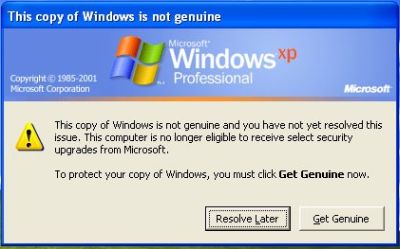
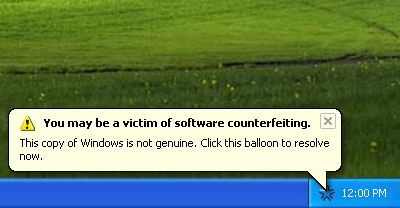
The Problem:-When you use a non-genuine copy of Windows XP, you will find the following notification error message:-

“This copy of Windows is not genuine. You may be a victim of software counterfeiting."

To stop this annoying pop up do the following:-

If you are using XP Home,then open Task Manager and stop wgtray.exe.
If you are using XP Professional then enter into the Safe Mode and stop wgtray.exe.

Now delete the wgtray.exe from the following locations:-
i]C:\Windows\System32
ii]C:\Windows\System32\dllcache

Now do some tweaking in the registry:-
Start>Run>regedit>OK

Now naviagate to the following location:-
HKEY_LOCAL_MACHINE\SOFTWARE\Microsoft\Windows NT\CurrentVersion\Winlogon\Notify and delete the entire folder WgaLogon ,close the registry editor and restart the system.

After restarting scenario:-

After the restart if it again prompts to reinstall those services then:-

Start>run>msconfig>ok
Click Services tab and uncheck from there.Apply and restart.


Frequently Asked Questions on WGA:-

The Windows Genuine Advantage (WGA) program and Office Genuine Advantage (OGA) program are part of Microsoft’s on-going effort to protect its customers and partners from counterfeit software and to increase customer awareness of the value of genuine Microsoft software.

What is genuine Microsoft software?
What are the benefits of genuine Microsoft software?
Validation: How do I know if my Microsoft software is genuine?
What is the Windows Genuine Advantage Notifications program?
Validation Failure: What if my Microsoft software is not genuine?
Get genuine: How can I take advantage of the Microsoft genuine Windows offer?

Genuine Microsoft User Community
To share questions and comments with other WGA users, visit the Windows Genuine Advantage Forum (English only).

Ref:-http://www.microsoft.com/genuine/downloads/faq.aspx

[this is just a tip only ;make sure you are using a legal copy of XP,that's the safest way to enjoy computing legally.]
Email ThisBlogThis!Share to XShare to FacebookShare to Pinterest
Posted in | No comments
Newer Post Older Post Home

0 comments:

Post a Comment

Subscribe to: Post Comments (Atom)

Popular Posts

  • 16 Bit Windows Subsystem Error
    The problem:- 16-bit MS-DOS Subsystem path to the program that you are trying to start or install C:\Windows\System32\config.nt The system ...
  • Only Wallpaper Appears
    The Problem:- My computer starts up okay with the, then the windows XP logo, then the blue "welcome" logo, but then only wallpape...
  • Internet Explorer 7 (IE7) Release Candidate 1 (RC1)
    Internet Explorer 7 (IE7) Release Candidate 1 (RC1) has been designed to make everyday tasks easier, provide dynamic security protection and...
  • Group Policy Control-Information bar XPSP2
    One can control the information bar behaviour through the group policy also. For Active X controls:- Start>Run>Type in: gpedit.msc ...
  • DRM
    What is Windows Media DRM? 'Microsoft Windows Media digital rights management (DRM) is a flexible platform that makes it possible to pro...
  • The Fastest Browser;Google Chrome
    This is something every one wants to know. Well Google Chrome(beta) is the fastest browser I have ever used.It's too light and really bl...
  • Turning Off Automatic Updates
    In Microsoft Public Windows XP General News Group,I was going through a starge request-"Accidentally XP SP2 has been downloaded and...
  • The Secuirty Folder Under the Event Viewer is empty
    The Problem:- In the event viewer I can see all the Application folder full of events and System folder full of events but there is nothing...
  • 'Go' Button missing in Internet Explorer
    The Problem:- The Go button may be missing from the Address bar in Internet Explorer. Cause:- May be the 'Go' button has been disabl...
  • How to register dll files in XP
    Regsvr32 This command-line tool registers .dll files as command components in the registry. Start > Run > Regsvr32 then a space, and ...

Blog Archive

  • ►  2008 (12)
    • ►  October (1)
    • ►  September (4)
    • ►  August (1)
    • ►  April (1)
    • ►  March (4)
    • ►  January (1)
  • ►  2007 (47)
    • ►  December (4)
    • ►  July (1)
    • ►  June (3)
    • ►  April (1)
    • ►  March (15)
    • ►  February (11)
    • ►  January (12)
  • ▼  2006 (212)
    • ►  December (12)
    • ►  November (19)
    • ►  October (24)
    • ►  September (13)
    • ►  August (10)
    • ►  July (31)
    • ▼  June (21)
      • Error 0x8024400A
      • Desktop Sideways
      • Portable Media Center Devices
      • Microsoft: Please Don't Disable UAC
      • Resizing Master Volume Window
      • Another Interim Build -Vista 5456
      • Magic Tune and Vista Beta#2
      • Getting Started with User Account Control on Windo...
      • Thinkpad R51/R52-Are they really vista premium ready?
      • Are you ready for Vista?
      • How to remove the WGA reminders
      • How to disable User Account Control (UAC) in Vista...
      • Vsmon.exe
      • Media Center Guide-No data available
      • Sometimes Software update 898461 fails to install
      • More photos of Singapore Visit
      • A few snaps of Windows Vista Training,Singapore
      • Visual tour of the newest installment of Office
      • Office 2007 Beta#2 Download
      • 'The security center is currently unavailable...' ...
      • Where are mini dumps stored?
    • ►  May (10)
    • ►  April (19)
    • ►  March (12)
    • ►  February (16)
    • ►  January (25)
  • ►  2005 (101)
    • ►  December (15)
    • ►  November (10)
    • ►  October (20)
    • ►  September (11)
    • ►  August (6)
    • ►  July (2)
    • ►  June (11)
    • ►  May (1)
    • ►  April (5)
    • ►  March (5)
    • ►  February (8)
    • ►  January (7)
  • ►  2004 (21)
    • ►  December (3)
    • ►  November (11)
    • ►  October (7)
Powered by Blogger.

About Me

Unknown
View my complete profile