Windows Vista Support

  • Subscribe to our RSS feed.
  • Twitter
  • StumbleUpon
  • Reddit
  • Facebook
  • Digg

Wednesday, 31 January 2007

Top 10 Tweaks, Tips, and Tricks for Windows Vista

Posted on 08:00 by Unknown
Technology Enthusiast, Chris Pirillo, of Lockergnome has sited ten great tweaks for Windows Vista.You can also try on your system.
http://chris.pirillo.com/2007/01/20/top-10-tweaks-tips-and-tricks-for-windows-vista/
Read More
Posted in | No comments

Stardock's Windows Vista Road-Map

Posted on 07:40 by Unknown
Here is a very nice collection.We can do many cool things with this.Check it here:-

http://www.wincustomize.com/articles.aspx?aid=142507&c=1


Read More
Posted in | No comments

Tuesday, 30 January 2007

Vista Launch Lunch

Posted on 17:03 by Unknown
Cool pictures taken during the official release of Windows Vista in New York.

http://www.eweek.com/slideshow/0,1206,a=199812,00.asp
Read More
Posted in | No comments

How To Remove the Update Root Certificates

Posted on 16:12 by Unknown
To Remove the Update Root Certificates Component from an Individual Computer Running Windows XP with SP2:-


Open Control Panel >Double-click Add or Remove Programs.>Click Add/Remove Windows Components.

Scroll down the list of components to Update Root Certificates, and make sure the check box for that component is cleared.

Follow the instructions to complete the Windows Components Wizard.
Read More
Posted in | No comments

Thursday, 25 January 2007

Windows Vista System Performance Reports

Posted on 22:23 by Unknown
Rob Williams tried to analyze in details,check it here:-
http://techgage.com/article/windows_vista_system_performance_reports
Read More
Posted in | No comments

Wednesday, 24 January 2007

AutoRuns for Windows v8.61

Posted on 03:46 by Unknown
Introduction:-

This utility, which has the most comprehensive knowledge of auto-starting locations of any startup monitor, shows you what programs are configured to run during system bootup or login, and shows you the entries in the order Windows processes them. These programs include ones in your startup folder, Run, RunOnce, and other Registry keys. You can configure Autoruns to show other locations, including Explorer shell extensions, toolbars, browser helper objects, Winlogon notifications, auto-start services, and much more. Autoruns goes way beyond the MSConfig utility bundled with Windows Me and XP.

More information here:-
http://www.microsoft.com/technet/sysinternals/utilities/Autoruns.mspx
Read More
Posted in | No comments

Microsoft Photo Info 1.0

Posted on 02:45 by Unknown
Overview:-

Microsoft Photo Info allows photographers to add, change and delete common "metadata" properties for digital photographs from inside Windows Explorer.When installed, a new "Photo Info" item appears on the context menu for files selected in Windows Explorer. To use, simply select one or more image fiiles, right-click and choose "Photo Info" to open the Photo Info properties editor. You can edit metadata for files individually, or all together as a batch. Photo Info reads and writes metadata in IPTC and XMP formats (depending on file type). It also provides enhanced "hover tips" and additional sort properties for digital photographs in Windows Explorer.Microsoft Photo Info runs on 32-bit versions of Windows XP (with Service Pack 2 or later) and the Windows Vista operating systems.

Microsoft Photo Info v1.0
Read More
Posted in | No comments

Wednesday, 17 January 2007

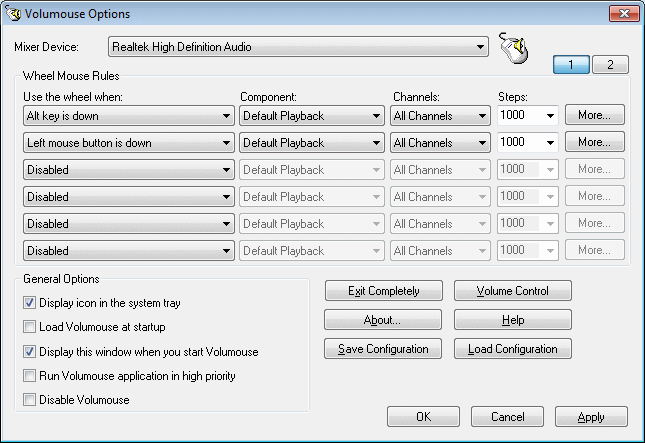
Control Volume while Scrolling Mouse

Posted on 05:43 by Unknown

Yes,just scroll the mouse to contol the volume of your computer. Volumouse provides you a quick and easy way to control the sound volume on your system - simply by rolling the wheel of your wheel mouse.

http://www.nirsoft.net/utils/volumouse.html
Read More
Posted in | No comments

Tuesday, 16 January 2007

A day in the life...with MSN Direct and SPOT

Posted on 20:11 by Unknown
Check out how MSN Direct and SPOT can keep you connected to important information morning, noon and night.

Check it here:-
http://microsoftatces.com/archive/2007/01/16/a-day-in-the-life-with-msn-direct-and-spot.aspx
Read More
Posted in | No comments

HP TouchSmart PC

Posted on 20:07 by Unknown


The HP TouchSmart PC, a Windows Vista-inspired PC that introduces the convenient touch-screen experience to desktop computing, serves as a fast and easy-to-access information, communication and entertainment hub designed to fit wherever life happens: in the kitchen, family room or living room.
http://microsoftatces.com/photos/photosatces/picture535.aspx
Read More
Posted in | No comments

Saturday, 13 January 2007

Vista Start menu Emulator

Posted on 02:50 by Unknown

This project has been started to all of you who’d still like to use Windows XP SP2 but also want to see the Start menu of Windows Vista.

http://vseproject.extra.hu/

Read More
Posted in | No comments

Thursday, 11 January 2007

Yahoo! Messenger for Windows Vista

Posted on 04:31 by Unknown


Built from the ground up specifically for Microsoft Windows Vista, this all-new version combines the reliable and easy-to-use features you've always loved from Yahoo! Messenger with the cutting-edge experience of this new operating system.

*Instant message, voice, webcam video, and more
*Use the integrated Yahoo! Messenger Sidebar gadget to keep up with the friends that matter most
*Also add Windows Live™ Messenger friends to your contact list to see when they're online and IM them
*Keep conversations organized by dragging and dropping them into one tabbed window
*Brand new emoticons, program icons and alert sounds
*Instantly change the look and feel of your Yahoo! Messenger interface
*Automatic groups are created in your contact list based on your Yahoo! interests (i.e. Yahoo! Sports Fantasy Football league)
http://messenger.yahoo.com/windowsvista.php;_ylt=AnixGrx3zUDVrpXc__iv3ntwMMIF
Read More
Posted in | No comments
Newer Posts Older Posts Home
Subscribe to: Comments (Atom)

Popular Posts

  • 16 Bit Windows Subsystem Error
    The problem:- 16-bit MS-DOS Subsystem path to the program that you are trying to start or install C:\Windows\System32\config.nt The system ...
  • Only Wallpaper Appears
    The Problem:- My computer starts up okay with the, then the windows XP logo, then the blue "welcome" logo, but then only wallpape...
  • Internet Explorer 7 (IE7) Release Candidate 1 (RC1)
    Internet Explorer 7 (IE7) Release Candidate 1 (RC1) has been designed to make everyday tasks easier, provide dynamic security protection and...
  • Group Policy Control-Information bar XPSP2
    One can control the information bar behaviour through the group policy also. For Active X controls:- Start>Run>Type in: gpedit.msc ...
  • DRM
    What is Windows Media DRM? 'Microsoft Windows Media digital rights management (DRM) is a flexible platform that makes it possible to pro...
  • The Fastest Browser;Google Chrome
    This is something every one wants to know. Well Google Chrome(beta) is the fastest browser I have ever used.It's too light and really bl...
  • Turning Off Automatic Updates
    In Microsoft Public Windows XP General News Group,I was going through a starge request-"Accidentally XP SP2 has been downloaded and...
  • The Secuirty Folder Under the Event Viewer is empty
    The Problem:- In the event viewer I can see all the Application folder full of events and System folder full of events but there is nothing...
  • 'Go' Button missing in Internet Explorer
    The Problem:- The Go button may be missing from the Address bar in Internet Explorer. Cause:- May be the 'Go' button has been disabl...
  • How to register dll files in XP
    Regsvr32 This command-line tool registers .dll files as command components in the registry. Start > Run > Regsvr32 then a space, and ...

Blog Archive

  • ►  2008 (12)
    • ►  October (1)
    • ►  September (4)
    • ►  August (1)
    • ►  April (1)
    • ►  March (4)
    • ►  January (1)
  • ▼  2007 (47)
    • ►  December (4)
    • ►  July (1)
    • ►  June (3)
    • ►  April (1)
    • ►  March (15)
    • ►  February (11)
    • ▼  January (12)
      • Top 10 Tweaks, Tips, and Tricks for Windows Vista
      • Stardock's Windows Vista Road-Map
      • Vista Launch Lunch
      • How To Remove the Update Root Certificates
      • Windows Vista System Performance Reports
      • AutoRuns for Windows v8.61
      • Microsoft Photo Info 1.0
      • Control Volume while Scrolling Mouse
      • A day in the life...with MSN Direct and SPOT
      • HP TouchSmart PC
      • Vista Start menu Emulator
      • Yahoo! Messenger for Windows Vista
  • ►  2006 (212)
    • ►  December (12)
    • ►  November (19)
    • ►  October (24)
    • ►  September (13)
    • ►  August (10)
    • ►  July (31)
    • ►  June (21)
    • ►  May (10)
    • ►  April (19)
    • ►  March (12)
    • ►  February (16)
    • ►  January (25)
  • ►  2005 (101)
    • ►  December (15)
    • ►  November (10)
    • ►  October (20)
    • ►  September (11)
    • ►  August (6)
    • ►  July (2)
    • ►  June (11)
    • ►  May (1)
    • ►  April (5)
    • ►  March (5)
    • ►  February (8)
    • ►  January (7)
  • ►  2004 (21)
    • ►  December (3)
    • ►  November (11)
    • ►  October (7)
Powered by Blogger.

About Me

Unknown
View my complete profile