Windows Vista Support

  • Subscribe to our RSS feed.
  • Twitter
  • StumbleUpon
  • Reddit
  • Facebook
  • Digg

Thursday, 30 November 2006

Microsoft's Big Day is Here!

Posted on 07:16 by Unknown
In a historic product launch, Microsoft India today announced business availability of the much awaited Windows Vista operating system, the 2007 Microsoft Office system, and Exchange Server 2007. Beginning today, Windows Vista and 2007 Microsoft Office will be available to volume licensing customers. While the 'New Windows' and 2007 Microsoft Office will be released to consumers and organizations that are sans volume license agreements on Jan 30, 2007; Exchange Server 2007 is on track for release to organizations with volume license agreements by December second week.
http://www.techtree.com/India/News/Microsofts_Big_Day_is_Here/551-77544-580.html
Read More
Posted in | No comments

Indian Skype Users Get Wi-Fi Phone

Posted on 07:11 by Unknown

Netgear has launched a new Wi- Fi phone for VoIP software, Skype. The phone, SPH101, will be available to Indian Skype users for Rs 16,900 (MRP) at the 48 Rashi branches across India.

The phone has an intuitive on-screen menu which shows saved Skype contacts and their online availability. Other features include the ability to use the phone in any, Wi-Fi enabled office, public hotspot, or municipal wireless access point that does not require browser-based authentication. The phone will enable users to call mobile or landline networks users across the globe, without having to use a PC. The calls will be absolutely free if made to other Skype accounts, but users will be charged per minute if they make calls to mobile or landline networks, with SkypeOut .Software updates are received wirelessly, without the use of a USB cable and wireless security is ensured Wireless security through WEP and WPA-PSK. However, the Wi-Fi phone will not function during a power failure or broadband Internet outage.Read more here.
http://www.tech2.com/india/news/internet/indian-skype-users-get-wifi-phone/3067/0
Read More
Posted in | No comments

Wednesday, 29 November 2006

VISTA vs. XP – a brief yet more detailed look

Posted on 23:49 by Unknown
Want to know the differences between Vista and it's biggest competitor, Windows XP? An online article in the US has some basic information, but we thought it needed a bit more detail. So here's a much better rundown on the differences to expect!

Check it here:-
http://www.itwire.com.au/content/view/7586/52/1/0/
Read More
Posted in | No comments

Windows Vista Product Guide

Posted on 17:37 by Unknown
Overview
A comprehensive feature-by-feature guide to Windows Vista. With contributions from people who actually worked on the product, this is the definitive resource to learn about Windows Vista. The Windows Vista Product Guide is available in the new Microsoft Word 2007 or the new XPS format.

http://www.microsoft.com/downloads/details.aspx?FamilyID=bbc16ebf-4823-4a12-afe1-5b40b2ad3725&DisplayLang=en
Read More
Posted in | No comments

How to add Run Command in Vista

Posted on 05:04 by Unknown
There is no presence of "Run" Command as such in the Start menu of Windows Vista.If we want to launch the Run command we press the Win logo+R keys together.But we can permanently put the Run command in the Start menu.To do so:-

1]Right Click on the taskbar.
2]Select Properties.
3]Click Start menu tab present in Taskbar Start Menu Properties.
4]Now click the Customize tab.
5]Scroll down to Run command and put a check mark in the box present adjacent to it.
6]Click OK.
7]Again Click OK/Apply.
Read More
Posted in | No comments

Saturday, 25 November 2006

Windows Vista Countdown Gadget

Posted on 05:57 by Unknown

http://microsoft.blognewschannel.com/archives/2006/11/21/windows-vista-countdown-gadget/
More gadgets here:-
http://www.windowsxlive.net/?p=289
Read More
Posted in | No comments

Monday, 20 November 2006

Nero 7.5.7.0 And Windows Vista

Posted on 19:14 by Unknown
Nero 7.5.7.0 works perfectly in Windows Vista.

Download link:-
http://www.nero.com/nero7/eng/nero7-up.php
Read More
Posted in | No comments

Wednesday, 15 November 2006

Windows Vista Security Guide

Posted on 20:52 by Unknown
The Windows Vista Security Guide provides guidance and tools to further protect Windows Vista against real-live threats such as malware and information theft. This solution accelerator recommends the Enterprise Client (EC) configuration for organizations of all types. Only in extreme security situations does the guide recommend the Specialized Security – Limited Functionality (SSLF) configuration, which considerably limits client computer functionality. The Solution Accelerator includes recommendations about how to use new and enhanced security technologies in Windows Vista to better defend the client computers in your organization against malware. The guide also provides recommendations and best practices on how to use encryption and access control technologies in Windows Vista to protect corporate data. Application compatibility testing recommendations are included. This Solution Accelerator includes several files, such as the Windows Vista Security Guide.doc, the detailed Appendix A of the Windows Vista Security Guide.doc, the Windows Vista Security Guide Settings.xls, and the GPOAccelerator tool to help you easily implement the guidance.

http://www.microsoft.com/downloads/details.aspx?familyid=a3d1bbed-7f35-4e72-bfb5-b84a526c1565&displaylang=en
Read More
Posted in | No comments

A new version of the Windows Update offline scan file is available

Posted on 20:41 by Unknown
A new version of the Microsoft Windows Update (WU) offline scan file has been released. This new offline scan file is available in addition to the existing WU offline scan file, Wsusscan.cab. The new offline scan file, Wsusscn2.cab, has a new format.You must update any scanning solution that uses the existing offline scan file by March 2007 so that it uses the new CAB file. Microsoft solutions that use the existing offline scan file include Microsoft Systems Management Server Inventory Tool for Microsoft Updates (SMS ITMU), the Microsoft Baseline Security Analyzer (MBSA), and the Windows Update Agent (WUA).

http://support.microsoft.com/kb/926464
Read More
Posted in | No comments

Thursday, 9 November 2006

Photosynth is on Live

Posted on 17:33 by Unknown


http://labs.live.com/photosynth/


Read More
Posted in | No comments

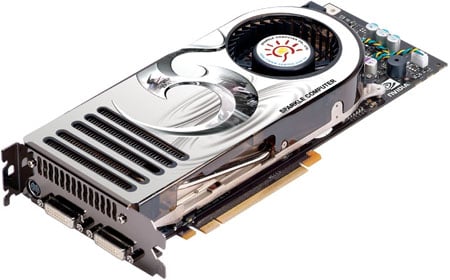
Nvidia GeForce 8800 GTX graphics card for Windows Vista

Posted on 17:20 by Unknown


Are you ready for DirectX 10 gaming under Windows Vista? Nvidia finally unveiled its new DX10-capable graphics chip, the GeForce 8800 - aka 'G80'.Here is a great review on this latest GPU:-

http://www.reghardware.co.uk/2006/11/08/review_nvidia_geforce_8800_gtx/

Read More
Posted in | No comments

Wednesday, 8 November 2006

Windows Vista releases to manufacturing

Posted on 16:44 by Unknown
After 5 years of development, Vista is finally finished.

Windows Vista releases to manufacturing

http://windowsvistablog.com/
Read More
Posted in | No comments

Tuesday, 7 November 2006

Can't change Wallpaper

Posted on 17:33 by Unknown
The Problem:-This is a situation when one can't change the wallpaper.

Resolution:-

Start>Run>Regedit>OK
Now navigate to the following :-
HKEY_CURRENT_USER\Software\Microsoft\Windows\CurrentVersion\Policies\Active­­Desktop DWord Value: NoChangingWallPaper

Settings: 1 = Can't change Wallpaper
0= Can change Wallpaper
Read More
Posted in | No comments

Screensaver Issues

Posted on 17:25 by Unknown
Many users face various problems with the Screensavers in Windows XP.Here are some references which will be handy:-

Screen Saver May Not Start in Windows XP
http://support.microsoft.com/default.aspx?scid=kb;en-us;326719

The screen saver does not work when you use a Wireless Optical Desktop mouse on a Windows XP SP2-based computer
http://support.microsoft.com/?scid=kb;en-us;911895

Troubleshooting Screen Saver Issues in XP
http://www.kellys-korner-xp.com/xp_s.htm#ss
Read More
Posted in | No comments

Sunday, 5 November 2006

MSConfig Cleanup

Posted on 06:35 by Unknown
MSConfig is a powerful tool that allows you to enable/disable the programs that start when Windows boots up.
MSConfig would be a perfect startup manager, if it allowed you not only to disable items, but to delete them forever. Unfortunately it does not do that. This is where MSConfig Cleanup comes in! It scans the startup configurations and allows you to remove any item that has been previously disabled via MSConfig.

Try it. It's Free!
Download MSConfig Cleanup 1.2

http://www.get-in-control.com/msconfig-cleanup/
Read More
Posted in | No comments

Intel's quad-core Core 2 Extreme QX6700 processor

Posted on 06:27 by Unknown
Intel's quad-core offerings will not likely live up to the performance gains seen in the Core 2 Duo rollout.The review on quadcore has a mixed report and not a good one as far as gamers are concerned.However, video editors and graphics designers should appreciate the "25 percent" increase in Photoshop CS2 processing, "78 percent" boost in Pinnacle rendering speed, and the "60 percent" jump in 3D Studio Max.
http://www.engadget.com/2006/11/02/intels-quad-core-core-2-extreme-qx6700-processor-reviewed/
Read More
Posted in | No comments

How to create a Clipboard shortcut

Posted on 03:34 by Unknown
1]Right click on a blank area of your Desktop
2]Select New>Shortcut
3] In the shortcut blank window type in CLIPBRD.EXE and click Next.
4] In the next window, type in: Clipboard , and click "Finish"
5] A Clipboard shortcut icon will appear on your Desktop.
Read More
Posted in | No comments

Saturday, 4 November 2006

Fastest Monitor

Posted on 04:51 by Unknown
BenQ has come out with world's fastest wide screen monitors.The available models are:-92W, 222W, and 241W.The BenQ FP92W comes with a 5 milliseconds response time.Its high contrast ratio (700:1) and high brightness (300 cd/m2) together offer distortion free images, and make for a brilliant visual experience, making it, as BenQ says, the best option for both business and home entertainment. And prices start from just Rs.13,999. onwards.
Read More
Posted in | No comments

Friday, 3 November 2006

Indimix06

Posted on 03:42 by Unknown

Watch Steve Ballmer in action in India.He will be live on Nov 9th 2006; in Mumbai.
http://www.msnspecials.in/indimix/index.asp
Read More
Posted in | No comments
Newer Posts Older Posts Home
Subscribe to: Comments (Atom)

Popular Posts

  • 16 Bit Windows Subsystem Error
    The problem:- 16-bit MS-DOS Subsystem path to the program that you are trying to start or install C:\Windows\System32\config.nt The system ...
  • Only Wallpaper Appears
    The Problem:- My computer starts up okay with the, then the windows XP logo, then the blue "welcome" logo, but then only wallpape...
  • Internet Explorer 7 (IE7) Release Candidate 1 (RC1)
    Internet Explorer 7 (IE7) Release Candidate 1 (RC1) has been designed to make everyday tasks easier, provide dynamic security protection and...
  • Group Policy Control-Information bar XPSP2
    One can control the information bar behaviour through the group policy also. For Active X controls:- Start>Run>Type in: gpedit.msc ...
  • DRM
    What is Windows Media DRM? 'Microsoft Windows Media digital rights management (DRM) is a flexible platform that makes it possible to pro...
  • The Fastest Browser;Google Chrome
    This is something every one wants to know. Well Google Chrome(beta) is the fastest browser I have ever used.It's too light and really bl...
  • Turning Off Automatic Updates
    In Microsoft Public Windows XP General News Group,I was going through a starge request-"Accidentally XP SP2 has been downloaded and...
  • The Secuirty Folder Under the Event Viewer is empty
    The Problem:- In the event viewer I can see all the Application folder full of events and System folder full of events but there is nothing...
  • 'Go' Button missing in Internet Explorer
    The Problem:- The Go button may be missing from the Address bar in Internet Explorer. Cause:- May be the 'Go' button has been disabl...
  • How to register dll files in XP
    Regsvr32 This command-line tool registers .dll files as command components in the registry. Start > Run > Regsvr32 then a space, and ...

Blog Archive

  • ►  2008 (12)
    • ►  October (1)
    • ►  September (4)
    • ►  August (1)
    • ►  April (1)
    • ►  March (4)
    • ►  January (1)
  • ►  2007 (47)
    • ►  December (4)
    • ►  July (1)
    • ►  June (3)
    • ►  April (1)
    • ►  March (15)
    • ►  February (11)
    • ►  January (12)
  • ▼  2006 (212)
    • ►  December (12)
    • ▼  November (19)
      • Microsoft's Big Day is Here!
      • Indian Skype Users Get Wi-Fi Phone
      • VISTA vs. XP – a brief yet more detailed look
      • Windows Vista Product Guide
      • How to add Run Command in Vista
      • Windows Vista Countdown Gadget
      • Nero 7.5.7.0 And Windows Vista
      • Windows Vista Security Guide
      • A new version of the Windows Update offline scan f...
      • Photosynth is on Live
      • Nvidia GeForce 8800 GTX graphics card for Windows ...
      • Windows Vista releases to manufacturing
      • Can't change Wallpaper
      • Screensaver Issues
      • MSConfig Cleanup
      • Intel's quad-core Core 2 Extreme QX6700 processor
      • How to create a Clipboard shortcut
      • Fastest Monitor
      • Indimix06
    • ►  October (24)
    • ►  September (13)
    • ►  August (10)
    • ►  July (31)
    • ►  June (21)
    • ►  May (10)
    • ►  April (19)
    • ►  March (12)
    • ►  February (16)
    • ►  January (25)
  • ►  2005 (101)
    • ►  December (15)
    • ►  November (10)
    • ►  October (20)
    • ►  September (11)
    • ►  August (6)
    • ►  July (2)
    • ►  June (11)
    • ►  May (1)
    • ►  April (5)
    • ►  March (5)
    • ►  February (8)
    • ►  January (7)
  • ►  2004 (21)
    • ►  December (3)
    • ►  November (11)
    • ►  October (7)
Powered by Blogger.

About Me

Unknown
View my complete profile