Windows Vista Support

  • Subscribe to our RSS feed.
  • Twitter
  • StumbleUpon
  • Reddit
  • Facebook
  • Digg

Friday, 30 June 2006

Error 0x8024400A

Posted on 03:46 by Unknown
The Problem:-
I am trying to use Microsoft Update to update my computer & get error message 0x8024400A.

Resolution:-

1]Disable antivirus.
2]Start>Run>Type in: regsvr32 MSXML3.DLL>OK
3]Reboot.
4]Retry Windows/Microsoft update.
Read More
Posted in | No comments

Desktop Sideways

Posted on 03:28 by Unknown
The problem:-
I don't know how I managed this one, but all the desktop is on it's side. What is supposed to be on top is on the side. As I write this, the message appears vertical. I have to physically turn my laptop so that I can read anything on it. Since I have no clue how I did this; I have no clue on how to correct it.

Resolution:-
Open Control Panel>Display>Settings tab>advanced, navigate through the tabs to find a rotate display option.This option has come due to the graphic card you have installed. The option should allow you to rotate the display back to its original orientation.

If you have Nvidia software installed,then look for NVRotate;with NVRotate, you can rotate any display 90, 180 or 270 degrees.
http://www.nvidia.com/object/feature_nvrotate.html

You may also try Ctrl + Alt + Up/Down arrow. [hot keys]
Read More
Posted in | No comments

Thursday, 29 June 2006

Portable Media Center Devices

Posted on 21:05 by Unknown


Toshiba gigabeat S Series Portable Media Center is now Available! The Toshiba gigabeat S Series Portable Media Center offers a vivid 2.4" color display and an extended storage capacity, so you can take your favorite digital media with you. Download recorded TV shows from TiVo Series2 or feature-length movies from movie studio Web sites, and then watch them on your Portable Media Center or a TV. Listen to music and download album art from online music providers. Tune into your favorite FM radio station with the unique FM tuner feature. Create impressive photo shows set to music, or enjoy interactive gaming with integrated audio for Microsoft Xbox 360™.Features
Compact dimensions with up to 60 gigabytes (GB) of storage space
FM radio tuner
Extended battery life (12 hours of audio and up to 2.5 hours of video)
Familiar Windows Mobile software navigation
Compatible with popular media file formats, including .wma, .wmv, .wav, JPEG, and MP3
Media download from Media Center PCs
Recorded TV download from TiVo Series2
Audio integration with Xbox 360
Available in Piano Black and Piano White
Accessories
Earphones
Power adapter
USB cable for PC synchronization
A/V cable and output
Carrying case
Specifications
Display: 2.4" QVGA (320 x 240) LCD screen
Storage: 30 GB or 60 GB hard drive
Battery hours: 12 of audio/2.5 of video
MPU: Freescale i.MX
System requirements: Microsoft Windows Media Player 10
For more information or to buy the Toshiba gigabeat S Series Portable Media Center, visit http://gigabeat.com/.

Tatung V620 Portable Media Center
Just announced! The Tatung V620 Portable Media Center offers a sizable 3.5” color display and a large storage capacity, so you can take your favorite digital media with you. Download recorded TV shows from TiVo Series2 or feature-length movies from movie studio Web sites, and then watch them on your Portable Media Center or a TV. Or use the video record feature to make your own movies. Listen to your favorite music and download album art from online music providers. Create impressive photo shows set to music, or enjoy interactive gaming with integrated audio for Microsoft Xbox 360™. Available Spring 2006. Features
3.5” wide screen, ideal for easier viewing
20 gigabytes (GB) of storage space
Compatible with popular media file formats, including .wma, .wmv, .wav, JPEG, and MP3
Familiar Windows Mobile software navigation
Media download from Media Center PCs
Recorded TV download from TiVo Series2
Audio integration with Xbox 360
Video recording
Accessories
Earphones
Power adapter
USB cable for PC synchronization
A/V cable and output
Carrying case
Specifications
Display: 3.5” QVGA (320 x 240) LCD screen
Storage: 20 GB hard drive
Battery hours: 20 of audio/5 of video
MPU: Texas Instruments DM320
System requirements: Microsoft Windows Media Player 10
For more information about the Tatung V620 Portable Media Center, visit http://www.tatung.com/
Read More
Posted in | No comments

Tuesday, 27 June 2006

Microsoft: Please Don't Disable UAC

Posted on 22:52 by Unknown
At Windows Vista lab in Redmond before the release of Beta 2, Microsoft developers showed off the new OS to a room full of MVPs and enthusiasts. But even the company's most loyal fan base turned ugly when User Account Control took the stage. Now, Microsoft is begging users not to disable the controversial feature.

http://www.betanews.com/article/Microsoft_Please_Dont_Disable_UAC/1151441160
Read More
Posted in | No comments

Monday, 26 June 2006

Resizing Master Volume Window

Posted on 21:53 by Unknown
If we double click on the volume icon present in the taskbar we get a Master Volume window.Now if we press Ctrl+S it will minimize the window.If we press those two keys again the original size will be restored.
Read More
Posted in | No comments

Another Interim Build -Vista 5456

Posted on 03:17 by Unknown
New features:-

1]This package contains Ultimate, Home Basic, Home Premium, and Business binariesWindows Vista Beta 2 English builds for x86 and x64

2] A revamped Aero/DWM subsystem- including the new Aero themed mouse pointers.

3] UAP feature totally overhauled-it's now more user friendly.

4]Time zone bug has been fixed.

5]A new Network and Sharing Center -Network Map, a Sharing and Discovery Panel, it's now very easy to configure and diagnose network connections.

6] Presence of Explorer List View, and the taskbar Window Switcher

But still driver problem continues.I have also noticed some anomalies in performance ratings.
Read More
Posted in | No comments

Saturday, 24 June 2006

Magic Tune and Vista Beta#2

Posted on 00:49 by Unknown

Magic Tune is a software developed by Samsung which allows a user to control brightness,contrast,resolution,colour depth and image size of Samsung's monitors.In nutshell it's a very handy tool which helps to configure a monitor as per requirement of the user.
Very recently I have bought a 17"LCD monitor and tried to install Magic tune on Vista Beta#2.It installed but couldn't recognize the OS.
So I had to adjust my monitor manually.

To know more on Magic Tune:-
http://www.samsung.com/Products/Monitors/magictune/magictune_01s.htm
Read More
Posted in | No comments

Friday, 23 June 2006

Getting Started with User Account Control on Windows Vista Beta 2

Posted on 06:47 by Unknown

'This Getting Started guide is intended for Microsoft® Windows VistaTM Beta 2 and UAC deployments in lab environments. This guide provides user experience and configuration data for both managed and unmanaged environments as well as information about UAC updates included in Windows Vista Beta 2.This Getting Started guide is intended for Microsoft® Windows VistaTM Beta 2 and UAC deployments in lab environments. This guide provides user experience and configuration data for both managed and unmanaged environments as well as information about UAC updates included in Windows Vista Beta 2.'
http://www.microsoft.com/technet/WindowsVista/library/f72d606c-ad66-403b-be70-3d59e4e5c10f.mspx
Read More
Posted in | No comments

Thursday, 22 June 2006

Thinkpad R51/R52-Are they really vista premium ready?

Posted on 04:11 by Unknown
Lenovo has published a list of their laptops which are vista capable as well as vista premium ready.But that list is really confusing.Check it here:-
http://www.pc.ibm.com/au/microsoft/vista/recommended.html
For example, how can Thinkpad R51/52 are listed as vista premium ready?At best they can satisfy the vista core experience.Intel 915gm graphic card does not support WDDM driver which is essential for getting the Aero experience.And you can confirm this fact by running the Windows Vista Upgrade Advisor beta.
I am not sure which R51 or,R52 models are vista premium ready.I am really curious to know.
Read More
Posted in | No comments

Tuesday, 20 June 2006

Are you ready for Vista?

Posted on 04:17 by Unknown
Windows Vista is coming.Before it finally arrives be sure that your system is ready or capable for Vista.
Microsoft has released a very cool tool-Windows Vista Upgrade Advisor beta.It's a small beta application when you run on a current Windows XP-based computer ,it scans and tells whether it's ready for an upgrade to Windows Vista.

Ref:-http://www.microsoft.com/windowsvista/getready/upgradeadvisor/default.mspx
Read More
Posted in | No comments

Sunday, 18 June 2006

How to remove the WGA reminders

Posted on 18:08 by Unknown


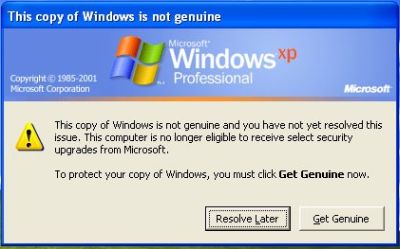
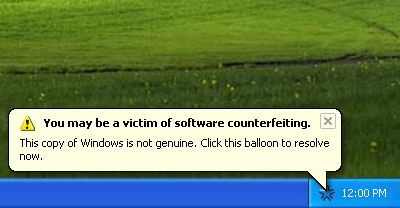
The Problem:-When you use a non-genuine copy of Windows XP, you will find the following notification error message:-

“This copy of Windows is not genuine. You may be a victim of software counterfeiting."

To stop this annoying pop up do the following:-

If you are using XP Home,then open Task Manager and stop wgtray.exe.
If you are using XP Professional then enter into the Safe Mode and stop wgtray.exe.

Now delete the wgtray.exe from the following locations:-
i]C:\Windows\System32
ii]C:\Windows\System32\dllcache

Now do some tweaking in the registry:-
Start>Run>regedit>OK

Now naviagate to the following location:-
HKEY_LOCAL_MACHINE\SOFTWARE\Microsoft\Windows NT\CurrentVersion\Winlogon\Notify and delete the entire folder WgaLogon ,close the registry editor and restart the system.

After restarting scenario:-

After the restart if it again prompts to reinstall those services then:-

Start>run>msconfig>ok
Click Services tab and uncheck from there.Apply and restart.


Frequently Asked Questions on WGA:-

The Windows Genuine Advantage (WGA) program and Office Genuine Advantage (OGA) program are part of Microsoft’s on-going effort to protect its customers and partners from counterfeit software and to increase customer awareness of the value of genuine Microsoft software.

What is genuine Microsoft software?
What are the benefits of genuine Microsoft software?
Validation: How do I know if my Microsoft software is genuine?
What is the Windows Genuine Advantage Notifications program?
Validation Failure: What if my Microsoft software is not genuine?
Get genuine: How can I take advantage of the Microsoft genuine Windows offer?

Genuine Microsoft User Community
To share questions and comments with other WGA users, visit the Windows Genuine Advantage Forum (English only).

Ref:-http://www.microsoft.com/genuine/downloads/faq.aspx

[this is just a tip only ;make sure you are using a legal copy of XP,that's the safest way to enjoy computing legally.]
Read More
Posted in | No comments

Sunday, 11 June 2006

How to disable User Account Control (UAC) in Vista Beta 2; Build 5384.4

Posted on 01:27 by Unknown
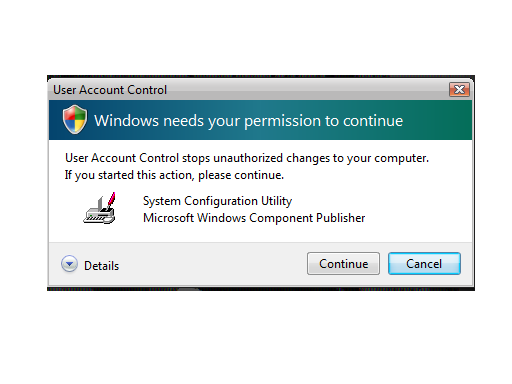
User Account Control (UAC) is a feature in Windows Vista which prevents unauthorized changes to the system. When UAC is on and you are using an administrative account or,the account which has admin. rights Windows will ask you for permission when you try to do something that requires administrative rights.

So to prevent that pop up do the following:-

1]Press Win Key+R to open the Run Menu.
2]In the Run,type Msconfig and click OK.
3]Now click Tools in tthe System Configuration window.
4]Scroll down to Disable Usr Account Protection (UAP).Highlight/select that.
5]Click Launch tab.Click OK.
6]Reboot.


Read More
Posted in | No comments

Thursday, 8 June 2006

Vsmon.exe

Posted on 04:47 by Unknown
The Problem:-I have found in the task manager that vsmon.exe is using lots of memories.

Resolution:-Vsmon.exe is associated with Zone Alarm firewall,which monitors internet traffic and generates alerts to the users.So if you have Zone Alarm you have to live with vsmon.exe.
Read More
Posted in | No comments

Tuesday, 6 June 2006

Media Center Guide-No data available

Posted on 20:17 by Unknown

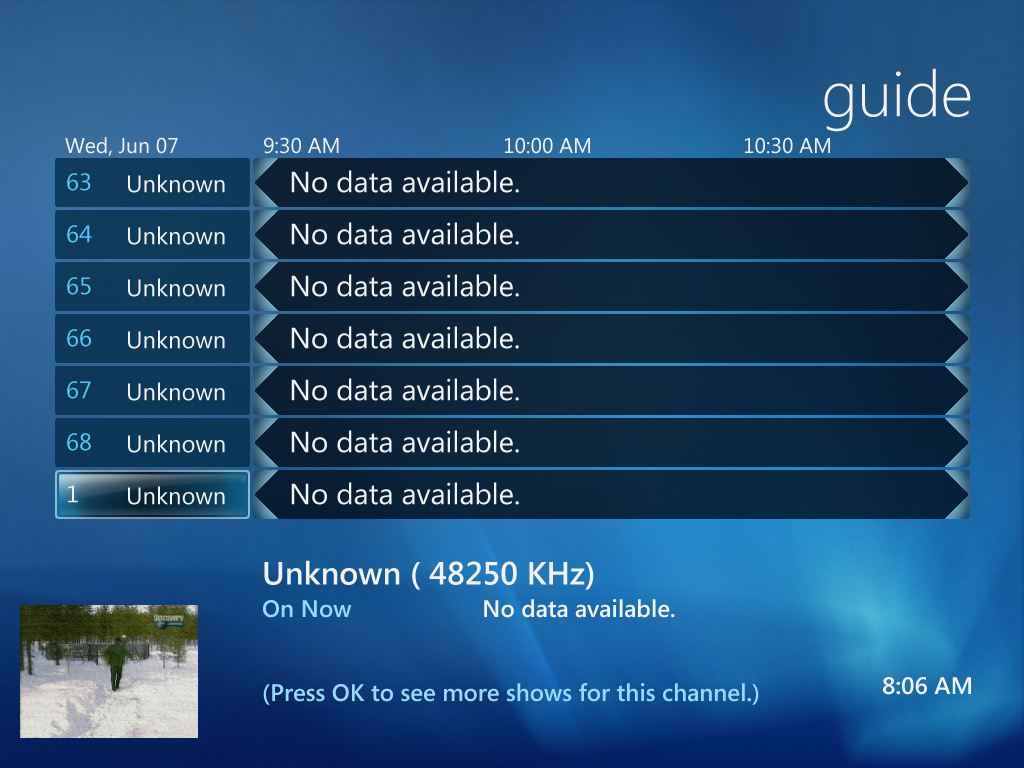
I expected that I will be able to view the electronic Media guide,as it has been recently launched in India,but when I tried to configure it in Windows Vista Beta#2 ,it started to scan and finally I got 'No data available' message.
Read More
Posted in | No comments

Sunday, 4 June 2006

Sometimes Software update 898461 fails to install

Posted on 22:02 by Unknown

The Problem:-When one tries to install Software update 898461it fails to install.


The related KB which fails to install:-http://support.microsoft.com/?kbid=898461


Why does it happen:-It happens if %SystemRoot%\System32\Spupdsvc.exe is corrupted.


Resolution:-Rename Spudsvc.exe to Spudsvc.old and retry.


Read More
Posted in | No comments

More photos of Singapore Visit

Posted on 03:39 by Unknown
I have added more photos of my Singapore visit.
http://www.flickr.com/photos/ssengupta
Read More
Posted in | No comments

Saturday, 3 June 2006

A few snaps of Windows Vista Training,Singapore

Posted on 18:57 by Unknown


Powered by Qumana

Read More
Posted in | No comments

Visual tour of the newest installment of Office

Posted on 18:19 by Unknown

Computerworld has a review and visual tour of the newest installment of Office


Powered by Qumana

Read More
Posted in | No comments

Office 2007 Beta#2 Download

Posted on 18:05 by Unknown

Evaluate the next release of Microsoft Office products for testing and planning purposes with 2007 Microsoft Office system Beta 2. The beta release contains all the functionality of the regular release, but is not the final product.


http://www.microsoft.com/office/preview/beta/getthebeta.mspx


Powered by Qumana

Read More
Posted in | No comments

Friday, 2 June 2006

'The security center is currently unavailable...' error

Posted on 20:36 by Unknown
The Problem:-
When you try to open Security Center,present under the Control Panel,you receive the following error:-

The security center is currently unavailable because the security center service has not started or was stopped. Please close this window and restart the computer (or start the security center service) and then open the security center again.

Why does it happen?

It happens,if:-
1]the Security Service is disabled.
2]if the specific service has stopped.

Resolution:-

To restore Security Center's functioning do the following.

Start>Run>type in:services.msc>OK

Now scroll down to Security Center.Right click on it to select Properties.Change the Startup type to Automatic from the drop down box.Also click the Start button to start the service.Click OK/Apply.
Read More
Posted in | No comments

Thursday, 1 June 2006

Where are mini dumps stored?

Posted on 20:21 by Unknown
Small Memory Dump records the smallest amount of information that will help identify the crash problemIt is a file containing the most important parts of a crashed application.A history of these files is stored in the directory listed under Small Dump Directory.

How to view:-
Open Control Panel>System>Advanced>Settings under Startup and Recovery.There you will find small dump directory location (%SystemRoot%\Minidump).

Related KB Article:-
How to read the small memory dump files that Windows creates for debugging
http://support.microsoft.com/?kbid=315263
Read More
Posted in | No comments
Newer Posts Older Posts Home
Subscribe to: Comments (Atom)

Popular Posts

  • 16 Bit Windows Subsystem Error
    The problem:- 16-bit MS-DOS Subsystem path to the program that you are trying to start or install C:\Windows\System32\config.nt The system ...
  • Only Wallpaper Appears
    The Problem:- My computer starts up okay with the, then the windows XP logo, then the blue "welcome" logo, but then only wallpape...
  • Internet Explorer 7 (IE7) Release Candidate 1 (RC1)
    Internet Explorer 7 (IE7) Release Candidate 1 (RC1) has been designed to make everyday tasks easier, provide dynamic security protection and...
  • Group Policy Control-Information bar XPSP2
    One can control the information bar behaviour through the group policy also. For Active X controls:- Start>Run>Type in: gpedit.msc ...
  • DRM
    What is Windows Media DRM? 'Microsoft Windows Media digital rights management (DRM) is a flexible platform that makes it possible to pro...
  • The Fastest Browser;Google Chrome
    This is something every one wants to know. Well Google Chrome(beta) is the fastest browser I have ever used.It's too light and really bl...
  • Turning Off Automatic Updates
    In Microsoft Public Windows XP General News Group,I was going through a starge request-"Accidentally XP SP2 has been downloaded and...
  • The Secuirty Folder Under the Event Viewer is empty
    The Problem:- In the event viewer I can see all the Application folder full of events and System folder full of events but there is nothing...
  • 'Go' Button missing in Internet Explorer
    The Problem:- The Go button may be missing from the Address bar in Internet Explorer. Cause:- May be the 'Go' button has been disabl...
  • How to register dll files in XP
    Regsvr32 This command-line tool registers .dll files as command components in the registry. Start > Run > Regsvr32 then a space, and ...

Blog Archive

  • ►  2008 (12)
    • ►  October (1)
    • ►  September (4)
    • ►  August (1)
    • ►  April (1)
    • ►  March (4)
    • ►  January (1)
  • ►  2007 (47)
    • ►  December (4)
    • ►  July (1)
    • ►  June (3)
    • ►  April (1)
    • ►  March (15)
    • ►  February (11)
    • ►  January (12)
  • ▼  2006 (212)
    • ►  December (12)
    • ►  November (19)
    • ►  October (24)
    • ►  September (13)
    • ►  August (10)
    • ►  July (31)
    • ▼  June (21)
      • Error 0x8024400A
      • Desktop Sideways
      • Portable Media Center Devices
      • Microsoft: Please Don't Disable UAC
      • Resizing Master Volume Window
      • Another Interim Build -Vista 5456
      • Magic Tune and Vista Beta#2
      • Getting Started with User Account Control on Windo...
      • Thinkpad R51/R52-Are they really vista premium ready?
      • Are you ready for Vista?
      • How to remove the WGA reminders
      • How to disable User Account Control (UAC) in Vista...
      • Vsmon.exe
      • Media Center Guide-No data available
      • Sometimes Software update 898461 fails to install
      • More photos of Singapore Visit
      • A few snaps of Windows Vista Training,Singapore
      • Visual tour of the newest installment of Office
      • Office 2007 Beta#2 Download
      • 'The security center is currently unavailable...' ...
      • Where are mini dumps stored?
    • ►  May (10)
    • ►  April (19)
    • ►  March (12)
    • ►  February (16)
    • ►  January (25)
  • ►  2005 (101)
    • ►  December (15)
    • ►  November (10)
    • ►  October (20)
    • ►  September (11)
    • ►  August (6)
    • ►  July (2)
    • ►  June (11)
    • ►  May (1)
    • ►  April (5)
    • ►  March (5)
    • ►  February (8)
    • ►  January (7)
  • ►  2004 (21)
    • ►  December (3)
    • ►  November (11)
    • ►  October (7)
Powered by Blogger.

About Me

Unknown
View my complete profile