Windows Vista Support

  • Subscribe to our RSS feed.
  • Twitter
  • StumbleUpon
  • Reddit
  • Facebook
  • Digg

Friday, 30 September 2005

How To Create A Briefcase

Posted on 16:57 by Unknown
Start>Run>Type in the following command:-

rundll32 syncui.dll,Briefcase_Create and press the Enter Key or;OK button.It will create a Briefcase folder on the Desktop.

More information on Briefcase here:-
How To Use the Briefcase Feature in Windows XP
http://support.microsoft.com/default.aspx?scid=kb;en-us;307885&sd=tech
Read More
Posted in | No comments

Thursday, 29 September 2005

Background Image Files

Posted on 19:35 by Unknown
In XP image files are located in the following locations:-
BMP, JPG, GIF, JPE, DIB, PNG, HTM files from the following locations:-
Start>Run>Type in:-
%Systemroot% [Open the Windows Folder to find the respective file]
%Systemroot%\Web\Wallpaper
%USERPROFILE%\My Documents\My Pictures
%AppData%\Microsoft\Internet Explorer
%Programfiles%\Plus!\Themes


In each case don't forget to click the Enter Key or,OK button.

If you want to delete a file clear that from the any above location (as required)
Read More
Posted in | No comments

Windows cannot load your profile because it may be corrupted.

Posted on 18:08 by Unknown
The Problem:-When you try to log on to , you receive the following error message:
Windows cannot load your profile because it may be corrupted. You may be logged in using a temporary User Profile.

Why does it happen?
It happens if the user profile is corrupted.

Resolution:-
1.Log on as Administrator.
2.Open Control Panel,click User Accounts and Create a new Account.
3.Restart the machine.
4.Now log on with another User Account (other than what you have just created).
5.Open Windows Explorer, click Tools>Folder Options>View tab>Show hidden files and folders>click to clear the Hide protected operating system files check box, and then click OK.
6.Locate the C:\Documents and Settings\Old_Username folder.
7.Copy all the files except:-Ntuser.dat;Ntuser.dat.log;Ntuser.ini
8.Now locate the newly created user account,which is located at C:\Documents and Settings\New_Username folder.
9.Paste the files here which you have copied earlier from the Old User Account.
10.You must import your e-mail messages and addresses to the new user profile before you delete the old profile.

References:-
'"Windows cannot load your profile because it may be corrupted" error message when you try to log on to Windows XP'
http://support.microsoft.com/default.aspx?scid=kb;en-us;Q318011

'How to copy data from a corrupted user profile to a new profile' http://support.microsoft.com/default.aspx?kbid=811151

OLEXP: How to back up the Outlook Express address book and mail folders
http://support.microsoft.com/kb/188854/
Read More
Posted in | No comments

Display rotated 90 Degrees

Posted on 09:16 by Unknown
The Problem:-Display screen has rotated to 90 degrees clockwise.

The Resolution:-Open Control Panel>Display>Settings tab>advanced, navigate through the tabs to find a rotate display option.This option has come due to the graphic card you have installed. The option should allow you to rotate the display back to its original orientation.
Read More
Posted in | No comments

Windows Explorer starts in Search mode

Posted on 09:08 by Unknown
The Problem:-Windows Explorer always starts showing the Search pane first.

The Resolution:-

Start>Run and type in the following command:-
regsvr32 /i shell32.dll>ok
Read More
Posted in | No comments

"Make all my picturs smaller" dialogue box doesn't appear

Posted on 08:59 by Unknown
The Problem:-When you click on "email this picture", the dialogue box that allows you to make the picture(s) smaller no longer appears.

The Resolution:-
Start>Run>Type in the following commands:-
regsvr32 /i shell32
regsvr32 shimgvw
regsvr32 sendmail

Don't forget to press the Enter key or,OK after each command.
Read More
Posted in | No comments

Tuesday, 20 September 2005

Drag and drop won't work

Posted on 21:54 by Unknown
The problem:-For some inexplicable reason drag and drop has stopped working.

The Resolution:-If some one faces the above problem in Windows XP then I shall suggest him to do the followings:-
1]Sometimes just a system reboot solves the issue.So try that first.


2]Check whether Drag and Drop is enabled or not.Right click on Start button>Properties>Start Menu>Customize>Advanced>Under the start menu items make sure the box against Enable dragging and dropping is checked.

3]If the above fails then try a System Restore.

4]If nothing helps,then type the following commands from the Run menu.:-

i>Start>Run>type in-"regsvr32 ole32.dll "(without the quotes)>press the Enter Key or OK.
ii>Start>Run>type in-"regsvr32 /i shell32.dll "(without quotes)>press the Enter
Key,or,OK.

5]Restart the computer.
Read More
Posted in | No comments

Sunday, 4 September 2005

Losing the Quick Launch Toolbar upon shut down

Posted on 21:08 by Unknown
The Problem:-losing the Quick Launch Toolbar upon shut down,or,the Quick Launch settings are not saved.

The Resolution:-
Sometimes this is caused by malware BlazeFind. [Scan your system with latest versions of spybot,search and destroy,CWShredder as well as with adaware.Run all of them in safe mode]

Check the registry settings:-
Start>Run>Regedit>Ok Now,navigate to the following key:- HKEY LOCAL MACHINE\SOFTWARE\Microsoft\Win­­dowsNT\CurrentVersion\Winlogo­n
Highlight Winlogon and in the right pane check the value of Userinit.It should be-"C:\WINDOWS\system32\userin­it.­exe," [Note:-copy and paste exactly what is written within the qotes,including the comma but exclude the quotes. Close the registry editor.Reboot.

Related topics:-

Taskbar Repair Tool Plus!
http://www.kellys-korner-xp.com/taskbarplus!.htm

Quick Launch settings are not saved; Search Assistant Toolbar in Taskbar http://www.winxptutor.com/wsaremove.htm

"Cannot create Toolbar" error when you enable Quick Launch http://windowsxp.mvps.org/QLError.htm
Read More
Posted in | No comments

D:\ is not accessible

Posted on 20:59 by Unknown
The Problem:-
When you click on the CD-ROM drive icon under My Computer you get the following error:-
'D:\ is not accessible'.

The Resolution:-
Right-click on the drive>Properties>Recording page and see if Enable CD Recording on this drive is checked. Start>Run>services.msc>ok scroll down to IMAPI CD Burning.. and see if it is Started. If not, double click it, set the Startup type to Automatic, click Apply and click the Start button.
Read More
Posted in | No comments

Desktop Icons missing

Posted on 20:56 by Unknown
The problem:-
The system is perfectly alright except there is no icon on the desktop.

Resolution:-Right click on desktopArrange Icons ByShow Desktop Icons
Read More
Posted in | No comments

Start Menu Properties restricted In XP Professional

Posted on 20:34 by Unknown
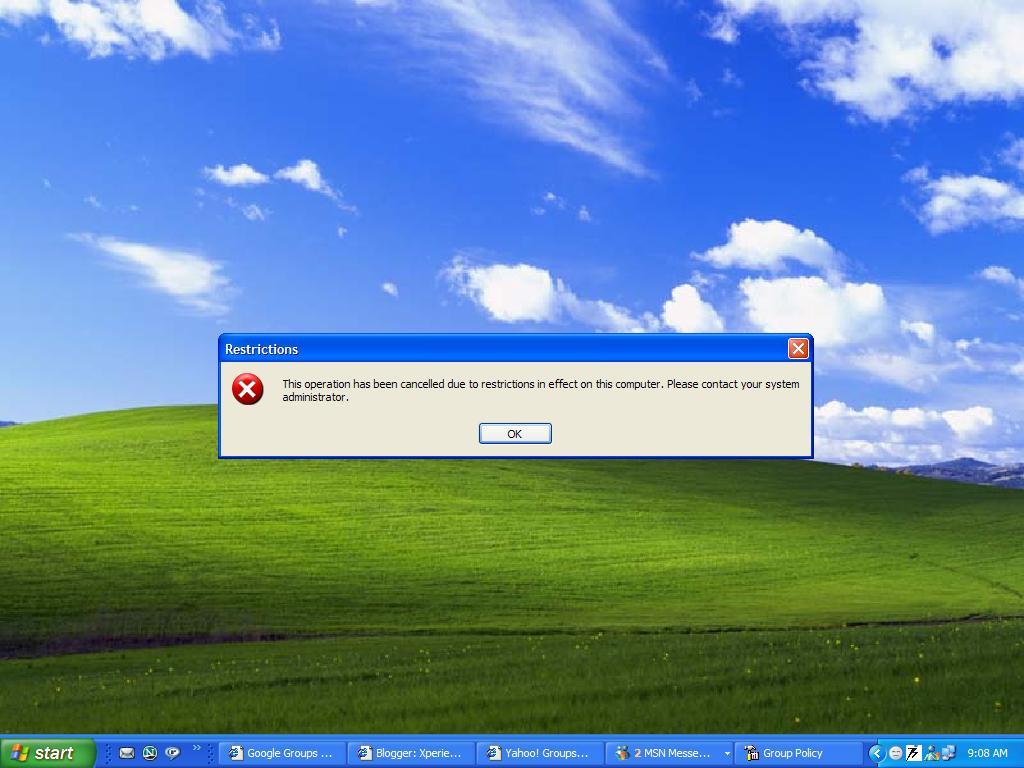
The Problem:-When you right click on the Start button and select left click on Properties you get the following error message:-


The same thing happens when you right click on taskbar properties.

The Resolution:-
Start>Run>type in:gpedit.msc>Ok

Now expand Administrative Templates under User Configuration and select Start Menu and Taskbar.From the list highlight Prevent Changes to Taskbar and Start Menu Settings and double click on it.If it is Enabled under the settings then change it to either Disabled or,Not configured.Apply/Ok.
Read More
Posted in | No comments
Newer Posts Older Posts Home
Subscribe to: Comments (Atom)

Popular Posts

  • 16 Bit Windows Subsystem Error
    The problem:- 16-bit MS-DOS Subsystem path to the program that you are trying to start or install C:\Windows\System32\config.nt The system ...
  • Only Wallpaper Appears
    The Problem:- My computer starts up okay with the, then the windows XP logo, then the blue "welcome" logo, but then only wallpape...
  • Internet Explorer 7 (IE7) Release Candidate 1 (RC1)
    Internet Explorer 7 (IE7) Release Candidate 1 (RC1) has been designed to make everyday tasks easier, provide dynamic security protection and...
  • Group Policy Control-Information bar XPSP2
    One can control the information bar behaviour through the group policy also. For Active X controls:- Start>Run>Type in: gpedit.msc ...
  • DRM
    What is Windows Media DRM? 'Microsoft Windows Media digital rights management (DRM) is a flexible platform that makes it possible to pro...
  • The Fastest Browser;Google Chrome
    This is something every one wants to know. Well Google Chrome(beta) is the fastest browser I have ever used.It's too light and really bl...
  • Turning Off Automatic Updates
    In Microsoft Public Windows XP General News Group,I was going through a starge request-"Accidentally XP SP2 has been downloaded and...
  • The Secuirty Folder Under the Event Viewer is empty
    The Problem:- In the event viewer I can see all the Application folder full of events and System folder full of events but there is nothing...
  • 'Go' Button missing in Internet Explorer
    The Problem:- The Go button may be missing from the Address bar in Internet Explorer. Cause:- May be the 'Go' button has been disabl...
  • How to register dll files in XP
    Regsvr32 This command-line tool registers .dll files as command components in the registry. Start > Run > Regsvr32 then a space, and ...

Blog Archive

  • ►  2008 (12)
    • ►  October (1)
    • ►  September (4)
    • ►  August (1)
    • ►  April (1)
    • ►  March (4)
    • ►  January (1)
  • ►  2007 (47)
    • ►  December (4)
    • ►  July (1)
    • ►  June (3)
    • ►  April (1)
    • ►  March (15)
    • ►  February (11)
    • ►  January (12)
  • ►  2006 (212)
    • ►  December (12)
    • ►  November (19)
    • ►  October (24)
    • ►  September (13)
    • ►  August (10)
    • ►  July (31)
    • ►  June (21)
    • ►  May (10)
    • ►  April (19)
    • ►  March (12)
    • ►  February (16)
    • ►  January (25)
  • ▼  2005 (101)
    • ►  December (15)
    • ►  November (10)
    • ►  October (20)
    • ▼  September (11)
      • How To Create A Briefcase
      • Background Image Files
      • Windows cannot load your profile because it may be...
      • Display rotated 90 Degrees
      • Windows Explorer starts in Search mode
      • "Make all my picturs smaller" dialogue box doesn't...
      • Drag and drop won't work
      • Losing the Quick Launch Toolbar upon shut down
      • D:\ is not accessible
      • Desktop Icons missing
      • Start Menu Properties restricted In XP Professional
    • ►  August (6)
    • ►  July (2)
    • ►  June (11)
    • ►  May (1)
    • ►  April (5)
    • ►  March (5)
    • ►  February (8)
    • ►  January (7)
  • ►  2004 (21)
    • ►  December (3)
    • ►  November (11)
    • ►  October (7)
Powered by Blogger.

About Me

Unknown
View my complete profile