Windows Vista Support

  • Subscribe to our RSS feed.
  • Twitter
  • StumbleUpon
  • Reddit
  • Facebook
  • Digg

Thursday, 20 December 2007

“Internet Explorer has experienced a problem and needs to close”

Posted on 16:10 by Unknown
After downloading the Internet Explorer Cumulative Security Update for December 2007, some customers using IE6 on Windows XP Service Pack 2 have experienced an unexpected crash or hang upon launching Internet Explorer.

This might occur while navigating to a website hosting considerable media content (for example: http://msn.com) resulting in Internet Explorer displaying a dialog that states “Internet Explorer has experienced a problem and needs to close”. If you experience this issue, implement the applicable workaround provided in the following knowledge base article:
Microsoft Knowledge Base article 946627

For your security, we strongly recommend that you deploy the Internet Explorer Cumulative Security Update for December 2007.

Terry McCoy Program Manager Internet Explorer Security.

IE Blog
Read More
Posted in | No comments

Internet Explorer 8 and Acid2: A Milestone

Posted on 16:06 by Unknown

As a team, we’ve spent the last year heads down working hard on IE8. Last week, we achieved an important milestone that should interest web developers. IE8 now renders the “Acid2 Face” correctly in IE8 standards mode.
IEBlog
Read More
Posted in | No comments

D-Link Router Firmwares Updates

Posted on 15:54 by Unknown
If you wish to upgrade your exsisting D-Link roter's firmware then here is the link.I personally use DI-724P+;my firmware version was 1.03,I upgraded to the latest version 1.04.

http://tsd.dlink.com.tw/Download.asp
Read More
Posted in | No comments

Thursday, 13 December 2007

Windows XP Service Pack 3

Posted on 00:01 by Unknown
Is there anything sensational in this latest service pack?

Well,'no' is the answer. XP SP3 includes all previously released Windows XP updates, including security updates and hotfixes, and select out-of-band releases.It does not include Internet Explorer 7, but you will get all the necessary updates for Internet Explorer 6 as well as of Internet Explorer 7.

But it does include Network Access Protection (NAP).According to Microsoft-
NAP is a policy enforcement platform built into Windows Vista, Windows Server 2008, and Windows XP SP3 with which you can better protect network assets by enforcing compliance with system health requirements.

For more information about NAP, see Network Access Protection: Frequently Asked Questions.
http://www.microsoft.com/technet/network/nap/napfaq.mspx

And there is also black hole router detection which is turning it on by default.

Remember XP SP3 is for x86 editions of XP only. The x64 editions of Windows XP were serviced by Windows Server 2003 SP2.And you can deploy this latest service pack over
XP SP1 or SP2.

Download: Windows XP Service Pack 3 Build 3264 RC1
Read More
Posted in | No comments

Sunday, 1 July 2007

EasyBCD 1.6

Posted on 18:36 by Unknown
EasyBCD is NeoSmart Technologies' multiple award-winning answer to tweaking the new Windows Vista bootloader. With EasyBCD, almost anything is possible. Setting up and configuring Windows boot entries is simple, and there is no easier way to quickly boot right into Linux, Mac OS X, or BSD straight from the Windows Vista bootloader - on the fly, no expert knowledge needed.

http://neosmart.net/dl.php?id=1
Read More
Posted in | No comments

Friday, 29 June 2007

Improve the quality of your images

Posted on 16:37 by Unknown
As everyone knows, JPEG (.jpg) image compression doesn't save all the information in an image. It compresses images so consume only a small amount of disk space (e.g. compared with .bmp), but also damages them with a "blotchy look" and "JPEG artifacts". Most graphics editors have JPEG as a default format. And almost all digital photo cameras save images in JPEG format.

Jpeg Enhancer is a simple and extremely powerful program that lets you restore the images damaged by low-quality JPEG compression.

It uses a unique technique that allows even novices to remove the so-called "JPEG artifacts" and the "blotchy look" from their images easily, quickly and effectively.

Unlike all other tools, our science-intensive technology doesn't damage your photos simply by blurring them, but restores them, so your images will look as they did before being damaged by JPEG compression!

Jpeg Enhancer is the only product on the market able to restore compressed JPEG images smartly.

Jpeg Enhancer is useful for everyone who works with JPEG images. It's a must for design studios and publishers as well.

http://www.vicman.net/jpegenhancer/index.htm
Read More
Posted in | No comments

How To Make Windows look like Ubuntu Linux

Posted on 16:28 by Unknown
This is really cool one.I was going through the blog article here:-
http://www.theindietribune.com/2007/06/how-to-make-windows-look-like-ubuntu.html
Read More
Posted in | No comments

Thursday, 28 June 2007

Ultimate Boot CD for Windows Version 3.05

Posted on 04:37 by Unknown

Ultimate Boot CD for Windows Version 3.05 was released on 23rd June,2007.UBCD4Win is a bootable CD which contains software that allows you to repair, restore, or diagnose almost any computer problem. Our goal is to be the ultimate free hardware and software diagnostic tool.


Here is the download link:-

Ultimate Boot CD for Windows v3.05

Read More
Posted in | No comments

Sunday, 15 April 2007

Pulling Back XP to Push Vista?

Posted on 09:34 by Unknown
Microsoft has asked PC manufacturers to discontinue selling PCs loaded with Windows XP, starting January 2008, according to reports. This looks like a major step by the software giant to try and make Windows Vista the default operating system, despite the latter facing huge compatibility and performance issues.

More here:-
http://www.techtree.com/India/News/Pulling_Back_XP_to_Push_Vista/551-80490-580.html
Read More
Posted in | No comments

Friday, 30 March 2007

Client Services for NetWare has disabled the Welcome screen and Fast User Switching

Posted on 18:24 by Unknown
The Problem:-

After installing XP and it does not give me the option to select from either one of these two options. When I try, I receive the error: "Client Services for NetWare has disabled the Welcome screen and Fast User Switching. To restore these features you must uninstall Client Services for NetWare. How do I do this?

Resolution:-

There are two ways by which you can reolve the problem.

First Method:-

1]Open control panal.
2.]Open 'NETWORK CONNECTIONS'
3.]Right click on LAN and select 'Properties'
4.]Then where it says 'connection uses the following' click on'Client Services for Netware'
5.]Then press uninstall

Second Method:-

Start>Run>Regedit>OK.

Now navigate to the following key:-
HKEY_LOCAL_MACHINE\SOFTWARE\Microsoft\Windows NT\CurrentVersion\Winlogon

and delete GinaDLL key.
Read More
Posted in | No comments

Friday, 23 March 2007

i’m Making A Difference

Posted on 19:34 by Unknown
What is i’m
i’m is a new initiative from Windows Live™ Messenger. Every time you start a conversation using i’m, Microsoft shares a portion of the program's advertising revenue with some of the world's most effective organizations dedicated to social causes. We've set no cap on the amount we'll donate to each organization. The sky's the limit.
Live Messenger home page
Read More
Posted in | No comments

Yod'm 3D Desktop Manager

Posted on 19:27 by Unknown

Yod'm 3D is a virtual desktop manager with the fashionable effect : the cube

Source: chsalmon.club.fr
Download
Read More
Posted in | No comments

Wednesday, 21 March 2007

User Agent String Utility version 2

Posted on 19:05 by Unknown
A utility that opens an Internet Explorer 7.0 window that is configured to report its identity to websites as being Internet Explorer 6.0.

Check it here:-
Download details: User Agent String Utility 2
Read More
Posted in | No comments

If I have Windows Vista Enterprise, what can I downgrade to?

Posted on 18:48 by Unknown
The Problem:-
If I have Windows Vista Enterprise, what can I downgrade to?


Resolution:-

According to Microsoft:-Windows Vista Enterprise is a new type of product and does not have a prior version. However, customers licensed for use of Windows Vista Enterprise are licensed for Windows Vista Business, and it can be downgraded to the Windows XP Professional, Windows 2000 Professional, Windows NT® 4.0, Windows NT 3.51, Windows 98, or Windows 95 operating system. You would not, however, be able to downgrade to Windows Vista Home Basic or Windows Vista Home Premium, Microsoft Windows XP Home Edition, or Microsoft Windows Millennium as those are different products and not considered previous versions of Windows Vista Business.
Read More
Posted in | No comments

Can I downgrade my OEM version of Windows Vista Business to Windows XP Professional?

Posted on 18:44 by Unknown
The Problem:-
Can I downgrade my OEM version of Windows Vista Business to Windows XP Professional?

Resolution:-

Yes,you can.According to Microsoft:-OEM downgrade rights for desktop PC operating systems apply to Windows Vista Business and Windows Vista Ultimate as stated in the License Terms. Please note, OEM downgrade versions of Windows Vista Business and Windows Vista Ultimate are limited to Windows XP Professional (including Windows XP Tablet PC Edition and Windows XP x64 Edition).
Read More
Posted in | No comments

Friday, 16 March 2007

Create Favicon

Posted on 01:20 by Unknown
RealWorld Graphics Online Icon Maker helps to create cool icons
Check it out here: http://www.rw-designer.com/online_icon_maker.php
Read More
Posted in | No comments

Monday, 12 March 2007

System Process consuming high CPU Percentage

Posted on 06:01 by Unknown
The Problem:-

There is a process in my task manager called "system" and it takes up most of the CPU on my machine.What to do?

Resolution:-

There are lots of sub processes present under the System Process,so you have to find out what specific sub process is consuming maximum CPU%.To do this you have to expand System Process and identify the sub process causing the problem. Download and install -"Process Explorer": http://www.sysinternals.com/Utilities/ProcessExplorer.html This tool will help you to identify the curlprit.
Read More
Posted in | No comments

Sunday, 11 March 2007

Bill Gates MVP Summit 2007 Keynote Live Video

Posted on 08:33 by Unknown
Now you can listen to listen to the Bill Gates keynote at the Summit on Tuesday through a live video stream.

William (Bill) H. Gates, chairman of Microsoft Corporation, will share his insights, thoughts and vision for technology during the 2007 MVP Global Summit in a keynote address. The keynote will be available via live video stream on Tuesday, March 13, from 09:00 – 09:45 Pacific Daylight Time or March 12 22:30 – 23:15 hrs (Indian Time).

Access the live video stream by visiting http://mvpsummit.origindigital.net/ .
To get the passcode for the stream, go to the MVP Members site at https://mvp.support.microsoft.com/default.aspx.

courtesy Abhishek kant,MVP Lead-India,Microsoft.
Read More
Posted in | No comments

Wednesday, 7 March 2007

The Google Desktop 5 Beta is available

Posted on 16:53 by Unknown
Google Desktop 5 has been "Vista-fied," it has a nice "preview" feature which allows users to view without opening that fully.Security things are also been enhanced.There is a cool sidebar which reminds me of Vista.the sidebar samples the background color of the user's desktop.

Google Desktop 5 Beta is available for download
Read More
Posted in | No comments

How to Turn off Digital Driver Signing Check in Vista

Posted on 08:39 by Unknown
Log on as the Administrator and do the following:-

Start>Run>cmd.exe>Ok

Now in the Command Prompt window type in the following command:-

Bcdedit.exe /set nointegritychecks ON

Reboot and install the unsigned driver without any hiccup.

If you want to turn on driver signing check then use the following command.

Bcdedit.exe /set nointegritychecks Off

Restart the system.

Read More
Posted in | No comments

Rediffmail, now with unlimited space

Posted on 08:32 by Unknown
The word 'unlimited' conjures up two images in your mind - that of the sea and sky.
Therefore, one could not have asked for a better place to announce the launch of unlimited storage space on rediffmail than a catamaran in the middle of the Arabian Sea, off Gateway of India.
Full story here:-
Rediffmail, now with unlimited space
Read More
Posted in | No comments

Saturday, 3 March 2007

HOWTO: Install Windows Vista from a high speed USB 2.0 Flash Drive

Posted on 18:13 by Unknown
I've been thinking about writing a post about "How to install Windows Vista from a USB Flash Drive" for a while but just never got around to doing it. What got me thinking about it was a post on Josh's board (windowsconnected.com) about running WinPE from a bootable USB Flash drive and it seems to me like there's be a lot of folks that would want to install Windows Vista entirely from a USB Flash drive as well.

Check it here:-
Kurt Shintaku's Blog
Read More
Posted in | No comments

Lenovo Recalls 205,000 Batteries

Posted on 09:44 by Unknown
Lenovo has recalled nearly 205,000 ThinkPad batteries made by Sanyo Electric, as they could overheat and catch fire.
http://www.techtree.com/India/News/Lenovo_Recalls_205000_Batteries/551-79531-615.html
Read More
Posted in | No comments

Thursday, 1 March 2007

NZ Bliss Desktop Backgrounds for Windows

Posted on 22:49 by Unknown
NZ Bliss Desktop Backgrounds for Windows is now ready for downloading.Microsoft New Zealand is making available some free desktop backgrounds for use on your computer. Thanks to the team here at Microsoft New Zealand who have kindly donated their images. The wallpapers will be updated from time to time.

Before downloading,check the previews here:-
http://www.microsoft.com/nz/windows/bliss/default.mspx

Download:-
NZ Bliss Desktop Backgrounds for Windows
Read More
Posted in | No comments

Wednesday, 21 February 2007

Virtual PC 2007 is now available

Posted on 16:32 by Unknown

Whether Microsoft virtualization technology is an important component of your existing infrastructure or you're just a Virtual PC enthusiast, you can now download Virtual PC 2007 absolutely free.

Download now
More information
http://www.microsoft.com/windows/products/winfamily/virtualpc/default.mspx
Read More
Posted in | No comments

Recover accidentally deleted files

Posted on 09:17 by Unknown
Recuva (pronounced "recover") is a freeware Windows utility to restore files that have been accidentally deleted from your computer. This includes files emptied from the Recycle bin as well as images and other files that have been deleted by user error from digital camera memory cards or MP3 players. It will even bring back files that have been deleted by bugs, crashes and viruses!

Download beta version
View Screenshots
Home
Read More
Posted in | No comments

Sunday, 18 February 2007

Thinkpad Notebook Fan Controller

Posted on 07:06 by Unknown


If you own a Thinkpad Notebook you probably aware of the cooling fan noise annoyances, if you suffer from the noise and want to have a quiet life and gain control of the fan speed take a look at the Thinkpad Fan Controller.
The Thinkpad Fan Controller allows the user to control fan activity based on the system temperature (or manual of course...)
This Visual C++ project controls the fan via port IO to the embedded controller.
p.s. though it was build for the T4x series... its working great on my T60p.

http://blogs.microsoft.co.il/blogs/ohad/archive/2007/02/17/Thinkpad-Notebook-Fan-Controller.aspx

Read More
Posted in | No comments

Saturday, 17 February 2007

HP smartphone features VoWiFi, Windows Mobile 6

Posted on 06:25 by Unknown

Hewlett-Packard announced its first smartphone running the new platform. The quad-band GSM/GPRS/EDGE iPAQ 500 series Voice Messenger features hands-free operation with more than 20 voice commands, according to the company.
Here is the full story:-
http://windowsfordevices.com/news/NS2475752024.html
Read More
Posted in | No comments

Upcoming release of Office:"Office 14"

Posted on 06:11 by Unknown
Check it here:-
http://www.aeroxp.org/index.php?categoryid=10&p2_articleid=42
Read More
Posted in | No comments

Friday, 16 February 2007

Steel RunAs 1.0

Posted on 07:06 by Unknown
Steel Run-As helps you in executing audit commands or any kind of application which runs properly when run only with administrator privileges without having to give the user full rights to his machine. Steel Run-As lets you give access to the user to run that application with administrator credentials without making him into a administrator equivalent account.If you are managing Win2000/XP/ computers, you know that administrator privileges are required to install applications and to make configuration changes on your user's computers.As an administrator of computers you would need to install many applications in your users computers.This task would need you to personally visit the client workstation and launch the setup.Now that if you wish not to go till there and start the setup you would want your co-workers to install the application without the need for you to enter the password.Steel Run-As lets you to achieve this task easily. All you have to do is create a self running ( executable ) exe which contains all the required parameters like the administrator or equivalent user name and the password associated with that and the program to launch with that privileges.

http://www.softpedia.com/get/Network-Tools/Network-Tools-Suites/Steel-RunAs.shtml
Read More
Posted in | No comments

Windows Easy Transfer Companion (Beta)

Posted on 06:57 by Unknown
Windows Easy Transfer Companion enables you to automatically transfer your most important programs from your Windows XP-based PC to your new Windows Vista-based PC. The software will move more than 100 of the most popular programs, as well as many others that you may have installed. You have complete control over selecting which programs to transfer, so only the programs you care about will move. The software will alert you if some programs may not be able to transfer, or may not transfer with high confidence. Most security software is not able to transfer due to technical reasons.
Easy Transfer Companion is designed to be used in addition to Windows Easy Transfer - which is part of Windows Vista and automatically transfers your data and settings. Connecting your two computers can be done with either an Easy Transfer Cable (available online, from retailers, and from PC manufacturers), or a home or small business network. If using an Easy Transfer Cable, you must first install Windows Easy Transfer on your Windows XP-based PC. By using Easy Transfer and Easy Transfer Companion you will be able to quickly and easily setup your new PC with all the data, settings, and programs that matter to you, so you can be productive on your new PC right away.
Easy Transfer Companion only transfers programs from a Windows XP-based PC to a Windows Vista-based PC. Easy Transfer Companion is currently in Beta, and only available for the US market.

Source: www.microsoft.com
Read More
Posted in | No comments

Wednesday, 7 February 2007

Nvidia nForce Version 15.00 for Vista

Posted on 08:23 by Unknown
nForce 430/410/405/400 with Integrated Graphics Version 15.00WHQL driver package for nForce 430/410/405/400 with Integrated Graphics motherboards nForce 570 SLI/570/550 AMD and nForce 680i SLI Version 15.00WHQL driver package for nForce 570 SLI AMD motherboards and nForce 680i SLI motherboards.

Download for NF4: Vista 32-bit Vista 64-bit
Download for NF5: Vista 32-bit Vista 64-bit
Read More
Posted in | No comments

Monday, 5 February 2007

Windows Vista Support Tools

Posted on 16:52 by Unknown
There are no support tool for Windows Vista.

But one can install Windows Server 2003 Support Tools, these tools run on Windows Vista. On the Windows Server 2003 CD,they are located in the Support\Tools folder.

Windows Server 2003 Service Pack 1 Support Tools
Read More
Posted in | No comments

Bluetooth Diagnostic Tool

Posted on 16:03 by Unknown

Medieval Bluetooth Diagnostic Tool is a Bluetooth network diagnostic tool for Windows XP SP2. It's only 66 Kb and completely free! You need Micorosoft .NET Framework version.

http://www.medieval.it/
Read More
Posted in | No comments

Sunday, 4 February 2007

Vista Sidebar Experience in XP

Posted on 00:22 by Unknown

This is really cool,you can also enjoy the Vista sidebar in your Windows XP.

http://www.thoosje.com/index.html
Read More
Posted in | No comments

Wednesday, 31 January 2007

Top 10 Tweaks, Tips, and Tricks for Windows Vista

Posted on 08:00 by Unknown
Technology Enthusiast, Chris Pirillo, of Lockergnome has sited ten great tweaks for Windows Vista.You can also try on your system.
http://chris.pirillo.com/2007/01/20/top-10-tweaks-tips-and-tricks-for-windows-vista/
Read More
Posted in | No comments

Stardock's Windows Vista Road-Map

Posted on 07:40 by Unknown
Here is a very nice collection.We can do many cool things with this.Check it here:-

http://www.wincustomize.com/articles.aspx?aid=142507&c=1


Read More
Posted in | No comments

Tuesday, 30 January 2007

Vista Launch Lunch

Posted on 17:03 by Unknown
Cool pictures taken during the official release of Windows Vista in New York.

http://www.eweek.com/slideshow/0,1206,a=199812,00.asp
Read More
Posted in | No comments

How To Remove the Update Root Certificates

Posted on 16:12 by Unknown
To Remove the Update Root Certificates Component from an Individual Computer Running Windows XP with SP2:-


Open Control Panel >Double-click Add or Remove Programs.>Click Add/Remove Windows Components.

Scroll down the list of components to Update Root Certificates, and make sure the check box for that component is cleared.

Follow the instructions to complete the Windows Components Wizard.
Read More
Posted in | No comments

Thursday, 25 January 2007

Windows Vista System Performance Reports

Posted on 22:23 by Unknown
Rob Williams tried to analyze in details,check it here:-
http://techgage.com/article/windows_vista_system_performance_reports
Read More
Posted in | No comments

Wednesday, 24 January 2007

AutoRuns for Windows v8.61

Posted on 03:46 by Unknown
Introduction:-

This utility, which has the most comprehensive knowledge of auto-starting locations of any startup monitor, shows you what programs are configured to run during system bootup or login, and shows you the entries in the order Windows processes them. These programs include ones in your startup folder, Run, RunOnce, and other Registry keys. You can configure Autoruns to show other locations, including Explorer shell extensions, toolbars, browser helper objects, Winlogon notifications, auto-start services, and much more. Autoruns goes way beyond the MSConfig utility bundled with Windows Me and XP.

More information here:-
http://www.microsoft.com/technet/sysinternals/utilities/Autoruns.mspx
Read More
Posted in | No comments

Microsoft Photo Info 1.0

Posted on 02:45 by Unknown
Overview:-

Microsoft Photo Info allows photographers to add, change and delete common "metadata" properties for digital photographs from inside Windows Explorer.When installed, a new "Photo Info" item appears on the context menu for files selected in Windows Explorer. To use, simply select one or more image fiiles, right-click and choose "Photo Info" to open the Photo Info properties editor. You can edit metadata for files individually, or all together as a batch. Photo Info reads and writes metadata in IPTC and XMP formats (depending on file type). It also provides enhanced "hover tips" and additional sort properties for digital photographs in Windows Explorer.Microsoft Photo Info runs on 32-bit versions of Windows XP (with Service Pack 2 or later) and the Windows Vista operating systems.

Microsoft Photo Info v1.0
Read More
Posted in | No comments

Wednesday, 17 January 2007

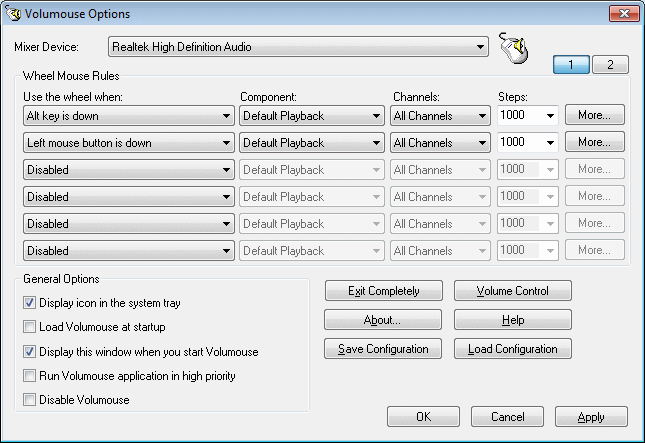
Control Volume while Scrolling Mouse

Posted on 05:43 by Unknown

Yes,just scroll the mouse to contol the volume of your computer. Volumouse provides you a quick and easy way to control the sound volume on your system - simply by rolling the wheel of your wheel mouse.

http://www.nirsoft.net/utils/volumouse.html
Read More
Posted in | No comments

Tuesday, 16 January 2007

A day in the life...with MSN Direct and SPOT

Posted on 20:11 by Unknown
Check out how MSN Direct and SPOT can keep you connected to important information morning, noon and night.

Check it here:-
http://microsoftatces.com/archive/2007/01/16/a-day-in-the-life-with-msn-direct-and-spot.aspx
Read More
Posted in | No comments

HP TouchSmart PC

Posted on 20:07 by Unknown


The HP TouchSmart PC, a Windows Vista-inspired PC that introduces the convenient touch-screen experience to desktop computing, serves as a fast and easy-to-access information, communication and entertainment hub designed to fit wherever life happens: in the kitchen, family room or living room.
http://microsoftatces.com/photos/photosatces/picture535.aspx
Read More
Posted in | No comments

Saturday, 13 January 2007

Vista Start menu Emulator

Posted on 02:50 by Unknown

This project has been started to all of you who’d still like to use Windows XP SP2 but also want to see the Start menu of Windows Vista.

http://vseproject.extra.hu/

Read More
Posted in | No comments

Thursday, 11 January 2007

Yahoo! Messenger for Windows Vista

Posted on 04:31 by Unknown


Built from the ground up specifically for Microsoft Windows Vista, this all-new version combines the reliable and easy-to-use features you've always loved from Yahoo! Messenger with the cutting-edge experience of this new operating system.

*Instant message, voice, webcam video, and more
*Use the integrated Yahoo! Messenger Sidebar gadget to keep up with the friends that matter most
*Also add Windows Live™ Messenger friends to your contact list to see when they're online and IM them
*Keep conversations organized by dragging and dropping them into one tabbed window
*Brand new emoticons, program icons and alert sounds
*Instantly change the look and feel of your Yahoo! Messenger interface
*Automatic groups are created in your contact list based on your Yahoo! interests (i.e. Yahoo! Sports Fantasy Football league)
http://messenger.yahoo.com/windowsvista.php;_ylt=AnixGrx3zUDVrpXc__iv3ntwMMIF
Read More
Posted in | No comments
Newer Posts Older Posts Home
Subscribe to: Comments (Atom)

Popular Posts

  • 16 Bit Windows Subsystem Error
    The problem:- 16-bit MS-DOS Subsystem path to the program that you are trying to start or install C:\Windows\System32\config.nt The system ...
  • Only Wallpaper Appears
    The Problem:- My computer starts up okay with the, then the windows XP logo, then the blue "welcome" logo, but then only wallpape...
  • Internet Explorer 7 (IE7) Release Candidate 1 (RC1)
    Internet Explorer 7 (IE7) Release Candidate 1 (RC1) has been designed to make everyday tasks easier, provide dynamic security protection and...
  • Group Policy Control-Information bar XPSP2
    One can control the information bar behaviour through the group policy also. For Active X controls:- Start>Run>Type in: gpedit.msc ...
  • DRM
    What is Windows Media DRM? 'Microsoft Windows Media digital rights management (DRM) is a flexible platform that makes it possible to pro...
  • The Fastest Browser;Google Chrome
    This is something every one wants to know. Well Google Chrome(beta) is the fastest browser I have ever used.It's too light and really bl...
  • Turning Off Automatic Updates
    In Microsoft Public Windows XP General News Group,I was going through a starge request-"Accidentally XP SP2 has been downloaded and...
  • The Secuirty Folder Under the Event Viewer is empty
    The Problem:- In the event viewer I can see all the Application folder full of events and System folder full of events but there is nothing...
  • 'Go' Button missing in Internet Explorer
    The Problem:- The Go button may be missing from the Address bar in Internet Explorer. Cause:- May be the 'Go' button has been disabl...
  • How to register dll files in XP
    Regsvr32 This command-line tool registers .dll files as command components in the registry. Start > Run > Regsvr32 then a space, and ...

Blog Archive

  • ►  2008 (12)
    • ►  October (1)
    • ►  September (4)
    • ►  August (1)
    • ►  April (1)
    • ►  March (4)
    • ►  January (1)
  • ▼  2007 (47)
    • ▼  December (4)
      • “Internet Explorer has experienced a problem and n...
      • Internet Explorer 8 and Acid2: A Milestone
      • D-Link Router Firmwares Updates
      • Windows XP Service Pack 3
    • ►  July (1)
      • EasyBCD 1.6
    • ►  June (3)
      • Improve the quality of your images
      • How To Make Windows look like Ubuntu Linux
      • Ultimate Boot CD for Windows Version 3.05
    • ►  April (1)
      • Pulling Back XP to Push Vista?
    • ►  March (15)
      • Client Services for NetWare has disabled the Welco...
      • i’m Making A Difference
      • Yod'm 3D Desktop Manager
      • User Agent String Utility version 2
      • If I have Windows Vista Enterprise, what can I dow...
      • Can I downgrade my OEM version of Windows Vista Bu...
      • Create Favicon
      • System Process consuming high CPU Percentage
      • Bill Gates MVP Summit 2007 Keynote Live Video
      • The Google Desktop 5 Beta is available
      • How to Turn off Digital Driver Signing Check in Vista
      • Rediffmail, now with unlimited space
      • HOWTO: Install Windows Vista from a high speed USB...
      • Lenovo Recalls 205,000 Batteries
      • NZ Bliss Desktop Backgrounds for Windows
    • ►  February (11)
      • Virtual PC 2007 is now available
      • Recover accidentally deleted files
      • Thinkpad Notebook Fan Controller
      • HP smartphone features VoWiFi, Windows Mobile 6
      • Upcoming release of Office:"Office 14"
      • Steel RunAs 1.0
      • Windows Easy Transfer Companion (Beta)
      • Nvidia nForce Version 15.00 for Vista
      • Windows Vista Support Tools
      • Bluetooth Diagnostic Tool
      • Vista Sidebar Experience in XP
    • ►  January (12)
      • Top 10 Tweaks, Tips, and Tricks for Windows Vista
      • Stardock's Windows Vista Road-Map
      • Vista Launch Lunch
      • How To Remove the Update Root Certificates
      • Windows Vista System Performance Reports
      • AutoRuns for Windows v8.61
      • Microsoft Photo Info 1.0
      • Control Volume while Scrolling Mouse
      • A day in the life...with MSN Direct and SPOT
      • HP TouchSmart PC
      • Vista Start menu Emulator
      • Yahoo! Messenger for Windows Vista
  • ►  2006 (212)
    • ►  December (12)
    • ►  November (19)
    • ►  October (24)
    • ►  September (13)
    • ►  August (10)
    • ►  July (31)
    • ►  June (21)
    • ►  May (10)
    • ►  April (19)
    • ►  March (12)
    • ►  February (16)
    • ►  January (25)
  • ►  2005 (101)
    • ►  December (15)
    • ►  November (10)
    • ►  October (20)
    • ►  September (11)
    • ►  August (6)
    • ►  July (2)
    • ►  June (11)
    • ►  May (1)
    • ►  April (5)
    • ►  March (5)
    • ►  February (8)
    • ►  January (7)
  • ►  2004 (21)
    • ►  December (3)
    • ►  November (11)
    • ►  October (7)
Powered by Blogger.

About Me

Unknown
View my complete profile