Windows Vista Support

  • Subscribe to our RSS feed.
  • Twitter
  • StumbleUpon
  • Reddit
  • Facebook
  • Digg

Saturday, 28 January 2006

configure Outlook Express to use a Hotmail account

Posted on 23:19 by Unknown
Follow the following steps to configure Outlook Express to use a Hotmail account:-

1]Open Outlook Express.

2]Click Tools >Accounts>Add>Mail.

3]In the Display name box, type your name, and then click Next

4]In the E-mail address box, type your Hotmail address, and then click Next

5]Select HTTP in the My incoming mail server drop down box

6]Select Hotmail from the drp down box beside Incoming mail(POP3,IMAP or HTTP) Server: and click Next.

7]In the Account name type your account (eg.xyz@hotmail/msn.com).Put your Password in the box below.Tick the box against Remember Password.Click Next.

8]Click Close. At the prompt to download folders from the mail server that you added, click Yes.

Further References:-
How to configure Outlook Express to use a Hotmail account
http://support.microsoft.com/?kbid=220852

Related KB Article:-

You receive an error message when you use Outlook Express to access your Hotmail account
http://support.microsoft.com/?kbid=878462
Read More
Posted in | No comments

Tuesday, 24 January 2006

Microsoft Shared Computer Toolkit for Windows XP

Posted on 21:09 by Unknown
Shared computers are commonly found in schools, libraries, Internet and gaming cafés, community centers, and other locations. Often, non-technical personnel are asked to manage shared computers in addition to their primary responsibilities. Managing shared computers can be difficult, time-consuming, and expensive. Without restrictions, users can change the desktop appearance, reconfigure system settings, and introduce spyware, viruses, and other harmful programs. Repairing damaged shared computers costs significant time and effort. User privacy is also an issue. Shared computers often use shared accounts that make Internet history, saved documents, and cached Web pages available to subsequent users. The Microsoft Shared Computer Toolkit for Windows XP provides a simple and effective way to defend shared computers from untrusted users and malicious software, safeguard system resources, and enhance and simplify the user experience. The Toolkit runs on genuine copies of Windows XP Professional, Windows XP Home Edition, and Windows XP Tablet PC Edition.

http://www.microsoft.com/downloads/details.aspx?familyid=7256D456-E3DA-42EA-857D-92B716077A84&displaylang=en
Read More
Posted in | No comments

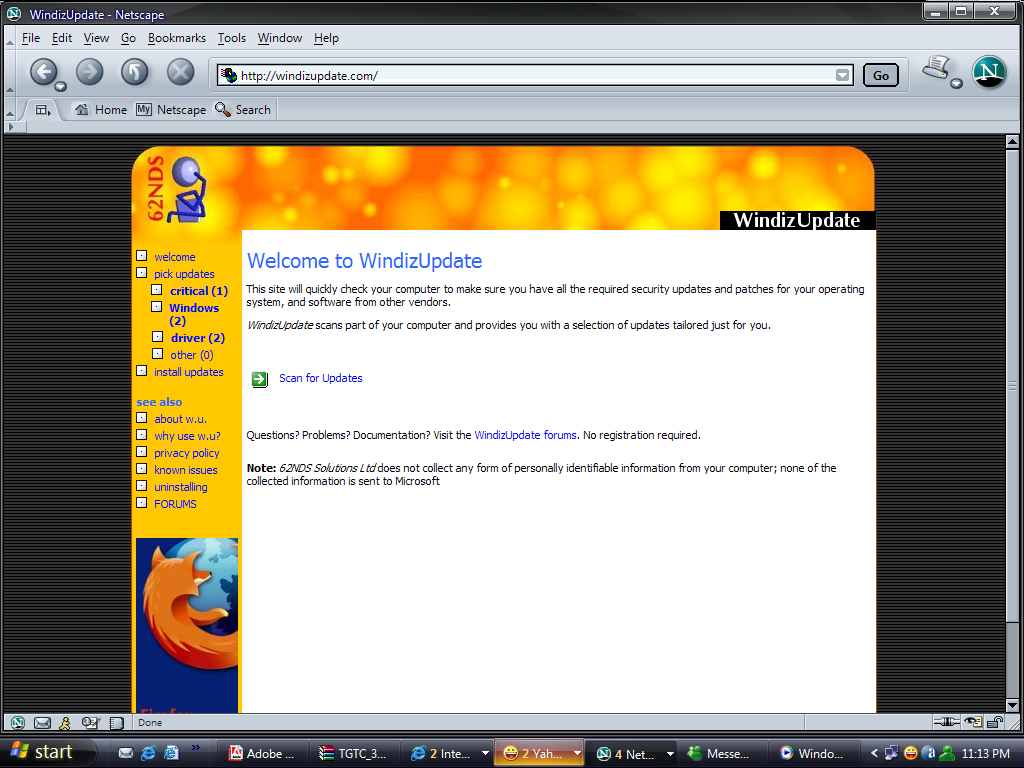
Windows Update with other browsers other than IE

Posted on 09:41 by Unknown

Except Internet Explorer,other browsers can not access Windows Update normally.If you want to do Windows Update through the browsers other than Internet Explorer then here is a cool solution:-
http://windizupdate.com/
Read More
Posted in | No comments

Saturday, 21 January 2006

Transparent Texts under icons vanished

Posted on 22:37 by Unknown
The problem:- My desktop icons all had transparent text under them, all of a sudden, they have that nasty grey box around them now, can someone tell me how to fix this.

Resolution:- Control Panel>System>Advanced tab, click on performance settings. On the Visual Effects tab, enable the line to "use drop shadows for icon labels on the desktop".

Also make sure that there is no web content on the desktop, if it's present then transparency won't work.

Check it under Display Properties > Desktop tab > Customize Desktop button > Web tab >make sure 'My Current Home Page' box is unchecked.
Read More
Posted in | No comments

Friday, 20 January 2006

Windows XP Service Pack 3 Release date

Posted on 03:02 by Unknown
"When XP SP3 is going to be released?"
This is one of the hottest topics in microsoft.public.windowsxp.general news group.

So here goes the reply straight from the horse's mouth:-

SP3 for Windows XP Home Edition is currently planned for 2H 2007. This date is preliminary.

SP3 for Windows XP Professional is currently planned for 2H 2007. This date is preliminary.

Ref:-Windows Service Pack Road Map
http://www.microsoft.com/windows/lifecycle/servicepacks.mspx
Read More
Posted in | No comments

'View as a slide show' feature not working

Posted on 02:46 by Unknown
The Problem:-Under Picture Tasks, when you click View as a slide show.It doesn't work.

Resolution:- To use slideshow, you must have folder options set to show common tasks in folders
Read More
Posted in | No comments

How to show Windows Messenger in Add or Remove Programs

Posted on 02:27 by Unknown
Windows Messenger is not listed in Add/Remove programs,but you can easily make it appear there and if you wish can remove from the Add/Remove list too.

To do this:-

Start>Run>type:C:\WINDOWS\inf>ok

Now open sysoc.inf and locate:- msmsgs=msgrocm.dll,OcEntry,msmsgs.inf,hide,7 change this

to:- msmsgs=msgrocm.dll,OcEntry,msmsgs.inf,7

Windows Messenger will appear in Add or Remove Programs.
Read More
Posted in | No comments

Wednesday, 18 January 2006

Using WindowsXP to Make RAID 5 Happen

Posted on 01:41 by Unknown
RAID is a way of combining multiple disk drives into a single entity to improve performance and/or reliability.

Software RAID operates on a partition-by-partition basis, where a number of individual disk partitions are ganged together to create a RAID partition. This is in contrast to most hardware RAID, which gang together entire disk drives into an array. There are many things which act as major factors.Operating system is one of them as far as RAID is concerned.

Many motherboards have already built in RAID controllers, but not all of these are suitable for fileserver applications. Most of them only support the simple modes 0 and 1.

If high capacity is first priority, the common option is a RAID 5, which distributes data to all array members and adds rotating parity information, too.

So, why not use the RAID 5 software option? RAID 5 that Windows Server offers can include all existing drives, rendering a RAID 5 controller unnecessary. However, if you only need file services, not even the expensive Windows Sever license is needed, since WindowsXP is capable of sophisticated RAID functions after only a few modifications.

http://www.tomshardware.com/2004/11/19/using_windowsxp_to_make_raid_5_happen/index.html
Read More
Posted in | No comments

Monday, 16 January 2006

How Can I make Internet Explorer As My Default Browser?

Posted on 20:42 by Unknown
Goto Control Panel,double click on Internet Options ,click to the "Programs" tab.
Check the "Internet Explorer should check to see whether it is the default browser" option.
Click "OK".

Close all Explorer windows and restart the system. Once the system comes back up, restart Explorer.

When the "Would you like to make [Internet Explorer] your default browser?" prompt appears, click "Yes" to make Explorer the default browser.
Read More
Posted in | No comments

WMP 10 only shows on taskbar

Posted on 08:54 by Unknown
The Problem:-Windows Media Player 10;only shows on taskbar or as toolbar but will not maximize or restore to a window.

Resolution:-Try right-clicking on the taskbar icon for WMP and choosing "Move". Then use the left and up keyboard arrow buttons repeatedly until WMP shows up.
Read More
Posted in | No comments

How to turn on and turn off mini Player mode in Windows Media Player 10

Posted on 03:28 by Unknown

How To Turn On mini Player mode :-

1Start Windows Media Player.

2.Right-click on a blank area of the taskbar and then point to Toolbars and put a check mark next to the Windows Media Player command indicates that mini Player mode is turned on.

3.In the Player, click the Minimize button;now you will find the mini player on taskbar.

How To Turn Off mini player mode:-

Right-click an open area of the Windows taskbar, point to Toolbars, and then click Windows Media Player.
This removes the check mark beside Windows Media Player and turns off mini Player mode.

Otherwise,click the Restore button in the lower-right corner of the mini Player toolbar or press the keyboard shortcut combination ALT+SHIFT+P.
Read More
Posted in | No comments

The Helpsvc.exe process uses more than 90% of the CPU resources

Posted on 03:15 by Unknown
The Problem:- The Helpsvc.exe process uses m0re than 90% of the CPU resources.

Resolution:-

This problem has been discussed in the following KB Article:-
'Help and Support causes Windows XP to stop responding'

http://support.microsoft.com/kb/839017/en-us

And here is a detailed discussion on this specific problem.

HelpSvc.exe has gone insane!!

http://blogs.msdn.com/cyrusn/archive/2004/05/31/145044.aspx
Read More
Posted in | No comments

wininet.dll missing

Posted on 03:08 by Unknown
What does this dll do?

This dll contains Internet-related functions used by Windows applications.

How To Restore it:-

Use the Recovery Console from your XP CD and then use the EXPAND command to copy a replacement for wininet.dll to \Windows\System32Boot from the Windows XP installation CD-ROM (make sure your primary boot device is the CD-ROM drive;change in the BIOS to do that),then use the EXPAND command: expand d:\i386\wininet.dl_ c:\windows\system32\wininet.dll (where d:=your CD-ROM) Then type EXIT and restart the machine.

Reference:-

Description of the Windows XP Recovery Console
http://support.microsoft.com/default.aspx?scid=kb;en-us;314058
Read More
Posted in | No comments

Sunday, 15 January 2006

Can not uninstall the Norton Antivirus 2006 using Add/Remove Programs

Posted on 05:50 by Unknown
The Problem:-When you try to remove Norton Antivirus 2006 from Add/Remove prgrams,you get error and can not uninstall the application.

Resolution:-You can use SymNRT to remove the so called undeletable files.

Download :-SymNRT.exe

Reference:-
http://tinyurl.com/6tzrv
Read More
Posted in | No comments

Error Message: "A File That Is Required to Run Search Companion Cannot Be Found"

Posted on 02:54 by Unknown
The Problem:-When I try to search for a file, I get receive the following error message:
A file that is required to run search companion cannot be found. You may need to run setup.

CAUSE:-This may happen if Search Companion files may be damaged.

RESOLUTION:-
Log on to the computer by using an account with administrator permissions.

Start>Run>%SystemRoot%\Inf>ok.

Locate the srchasst.inf file.

Right click it and select Install. You'll need your XP CD or, if you have Service pack installed then extract the files from the Windows\ServicePackFiles\i386 folder.

Remember Windows\Inf folder is a hidden folder,so enable Windows Explorer options to show hidden files and folders before proceeding.

Reference:-
Error Message: "A File That Is Required to Run Search Companion Cannot Be Found"
http://support.microsoft.com/default.aspx?scid=kb;en-us;Q319949

Read More
Posted in | No comments

Friday, 13 January 2006

DRM

Posted on 07:28 by Unknown
What is Windows Media DRM?

'Microsoft Windows Media digital rights management (DRM) is a flexible platform that makes it possible to protect and securely deliver content by subscription or individual request for playback on a computer, portable device, or network device.'

See:-Windows Media DRM FAQ
http://www.microsoft.com/windows/windowsmedia/drm/faq.aspx#drmfaq_1_1

I can't find DRM Folder;what to do?

DRM Folder is present under:-drive:\Documents and Settings\All Users\DRM

But to view it you have to turn on the Show hidden files and folders option in Windows.

Further Ref:-
"Licenses for your media files are corrupted" or "License is either corrupted or not valid" error message when you try to play licensed media files
http://support.microsoft.com/KB/810422
Read More
Posted in | No comments

Wednesday, 11 January 2006

To disconnect persistent LPTx connections

Posted on 17:33 by Unknown
The Problem:- I redirected LPT2 to a network printer using NET USE LPT2
\\server\printername but now I want to cancel the assginment.
When I try NET USE LPT2 \\server\printername /DELETE I get "Local device
is already in use".

Resolution:-To disconnect persistent LPTx connections, use the following syntax:
net use lpt2/delete
Read More
Posted in | No comments

Screenshot that includes the cursor

Posted on 05:25 by Unknown
Introduction:-Pressing Alt and the PrtScn will take a Screenshot of the active window but it doesn't iclude the cursor.How can I get the screenshot that includes the cursor?

Resolution:-Download and install Gadwin Print Screen Utility.It can take screenshots that include cursors.It will save screenshots directly to the hard disk rather than on the clipboard.

Download freeware Gadwin PrintScreen now
Read More
Posted in | No comments

Tuesday, 10 January 2006

Recyclers

Posted on 03:42 by Unknown
The Problem:- I was just wondering what is the "RECYCLERS" folders for? Can I delete some of the files in this folder?

Resolution:- The recycler bin is just a per-user version of the drive's recycle bin. The Recycler folder is used only on NTFS partitions.

Differences Between the Recycle Bin and the Recycler Folder
http://support.microsoft.com/?kbid=171694
Read More
Posted in | No comments

Sunday, 8 January 2006

Security center warning about Norton Anti Virus not started

Posted on 04:03 by Unknown
The Problem:-When I boot my system I find the security center bubble telling me that my NAV is not started but within 20 secs. after NAV has loaded the bubble disappears.Why is it so?

Resolution:-

That is normal. The Security Center is monitoring before your antivirus is completely running, thus the bubble disappears once it is running.

Still if you don't want to see that warning bubble then:-Open Control Panel,Click Security Center and click on "Change the way Security Alerts me" at the left side of the window and then uncheck "Virus Protection". Warning though... you will not be alerted if your virus protection actually doesn't start.

Further Reference:-

Manage Your Computer's Security Settings in One Place
http://www.microsoft.com/windowsxp/using/security/internet/sp2_wscintro.mspx
Read More
Posted in | No comments

Friday, 6 January 2006

How to register dll files in XP

Posted on 01:34 by Unknown
Regsvr32
This command-line tool registers .dll files as command components in the registry.

Start>Run> Regsvr32 then a space, and the DLL file name and press the Enter key,or click OK.

For example:-regsvr32 schmmgmt.dll

To get all parameters open Command Propmt and type in: regsvr32/? and press the Enter Key.

Further Reference:-
http://www.microsoft.com/resources/documentation/windows/xp/all/proddocs/en-us/regsvr32.mspx


Read More
Posted in | No comments

Thursday, 5 January 2006

If you forget Administrator's password

Posted on 16:51 by Unknown
If you forget Administrator's password and have been locked out of a Windows system then there is a boot disk you can download at: http://home.eunet.no/~pnordahl/ntpasswd/ .You can also have a bootable CD image you can download.

Just follow all the default settings which are for the admin account.
Read More
Posted in | No comments

Blue bar with additional options missing in My Computer or Control Panel

Posted on 16:20 by Unknown

The Problem:-When you open a window from My Computer or the Control Panel, and you don't see the blue bar with additional options.

Cause:-This happens if Common Tasks are in turned off.


Resolution:-Open My Computer or,Control Panel,go to Tools then Folder Options,Check Show common tasks in folders.Click OK/Apply.
Read More
Posted in | No comments

Tuesday, 3 January 2006

How to delete a particular item from the History list

Posted on 09:52 by Unknown
The Problem:- How can I delete a particular item from the Internet History list if I don't want to clear the entire list?

Resolution:- IEHistoryView allows to delete the selective URL while keeping the rest of the URLs intact.

Download Link:-http://www.nirsoft.net/utils/iehv.html

To manually clear the History entries:-

How to clear the History entries in Internet Explorer
http://support.microsoft.com/?kbid=157729
Read More
Posted in | No comments

Sunday, 1 January 2006

How to turn off image toolbar

Posted on 05:33 by Unknown
The Image Toolbar feature in Internet Explorer 6 lets you quickly e-mail, print or save images from Web pages. The Image Toolbar feature is turned on by default.But if you wish you can easily turn it off.

How to turn off image toolbar:-

In Internet Explorer, on the Tools menu, click Internet Options.
On the Advanced tab, under Multimedia, clear the Enable Image Toolbar check box.Click Apply/OK.
Restart the machine.

Note:-
The image toolbar does not display for all images. The image must be at least 200 x 200 pixels to use the image toolbar.
Read More
Posted in | No comments
Newer Posts Older Posts Home
Subscribe to: Comments (Atom)

Popular Posts

  • 16 Bit Windows Subsystem Error
    The problem:- 16-bit MS-DOS Subsystem path to the program that you are trying to start or install C:\Windows\System32\config.nt The system ...
  • Only Wallpaper Appears
    The Problem:- My computer starts up okay with the, then the windows XP logo, then the blue "welcome" logo, but then only wallpape...
  • Internet Explorer 7 (IE7) Release Candidate 1 (RC1)
    Internet Explorer 7 (IE7) Release Candidate 1 (RC1) has been designed to make everyday tasks easier, provide dynamic security protection and...
  • Group Policy Control-Information bar XPSP2
    One can control the information bar behaviour through the group policy also. For Active X controls:- Start>Run>Type in: gpedit.msc ...
  • DRM
    What is Windows Media DRM? 'Microsoft Windows Media digital rights management (DRM) is a flexible platform that makes it possible to pro...
  • The Fastest Browser;Google Chrome
    This is something every one wants to know. Well Google Chrome(beta) is the fastest browser I have ever used.It's too light and really bl...
  • Turning Off Automatic Updates
    In Microsoft Public Windows XP General News Group,I was going through a starge request-"Accidentally XP SP2 has been downloaded and...
  • The Secuirty Folder Under the Event Viewer is empty
    The Problem:- In the event viewer I can see all the Application folder full of events and System folder full of events but there is nothing...
  • 'Go' Button missing in Internet Explorer
    The Problem:- The Go button may be missing from the Address bar in Internet Explorer. Cause:- May be the 'Go' button has been disabl...
  • How to register dll files in XP
    Regsvr32 This command-line tool registers .dll files as command components in the registry. Start > Run > Regsvr32 then a space, and ...

Blog Archive

  • ►  2008 (12)
    • ►  October (1)
    • ►  September (4)
    • ►  August (1)
    • ►  April (1)
    • ►  March (4)
    • ►  January (1)
  • ►  2007 (47)
    • ►  December (4)
    • ►  July (1)
    • ►  June (3)
    • ►  April (1)
    • ►  March (15)
    • ►  February (11)
    • ►  January (12)
  • ▼  2006 (212)
    • ►  December (12)
    • ►  November (19)
    • ►  October (24)
    • ►  September (13)
    • ►  August (10)
    • ►  July (31)
    • ►  June (21)
    • ►  May (10)
    • ►  April (19)
    • ►  March (12)
    • ►  February (16)
    • ▼  January (25)
      • configure Outlook Express to use a Hotmail account
      • Microsoft Shared Computer Toolkit for Windows XP
      • Windows Update with other browsers other than IE
      • Transparent Texts under icons vanished
      • Windows XP Service Pack 3 Release date
      • 'View as a slide show' feature not working
      • How to show Windows Messenger in Add or Remove P...
      • Using WindowsXP to Make RAID 5 Happen
      • How Can I make Internet Explorer As My Default Bro...
      • WMP 10 only shows on taskbar
      • How to turn on and turn off mini Player mode in Wi...
      • The Helpsvc.exe process uses more than 90% of the ...
      • wininet.dll missing
      • Can not uninstall the Norton Antivirus 2006 using ...
      • Error Message: "A File That Is Required to Run Sea...
      • DRM
      • To disconnect persistent LPTx connections
      • Screenshot that includes the cursor
      • Recyclers
      • Security center warning about Norton Anti Virus no...
      • How to register dll files in XP
      • If you forget Administrator's password
      • Blue bar with additional options missing in My Com...
      • How to delete a particular item from the History list
      • How to turn off image toolbar
  • ►  2005 (101)
    • ►  December (15)
    • ►  November (10)
    • ►  October (20)
    • ►  September (11)
    • ►  August (6)
    • ►  July (2)
    • ►  June (11)
    • ►  May (1)
    • ►  April (5)
    • ►  March (5)
    • ►  February (8)
    • ►  January (7)
  • ►  2004 (21)
    • ►  December (3)
    • ►  November (11)
    • ►  October (7)
Powered by Blogger.

About Me

Unknown
View my complete profile