Windows Vista Support

  • Subscribe to our RSS feed.
  • Twitter
  • StumbleUpon
  • Reddit
  • Facebook
  • Digg

Sunday, 27 November 2005

Can't get into Add/Remove Programs

Posted on 03:06 by Unknown
The Problem:-I can't get into add/remove programs, when I click on the icon, nothing happens.

Cause:-This problem may happen if Appwiz.cpl is no longer registered.

Resolution:-To resolve the problem one has to re-register Appwiz.cpl

Start>Run>regsvr32 appwiz.cpl>ok

This will bring a pop up "DllRegisterserver in appwiz.cpl succeeded" , click Ok.
Read More
Posted in | No comments

Wednesday, 23 November 2005

Annoying empty "Custom" folder on Desktop

Posted on 19:18 by Unknown
The Problem:- When booting my XP pro pc, I boot to a desktop that contains an empty and inactive "Custom" folder. I can close it and proceed, but it is agrivating.

Cause:- This can be caused by leftovers from cleaning up spyware.

Resolution:-

Open Control Panel>Folder Options> View tab, uncheck the line "restore
previous folder windows at logon". Click apply/ok.

Start>Tun>msconfig>ok. On the general tab select the diagnostic mode. Click
apply/ok and reboot at prompted.


The folder should not show up now. Rerun msconfig, put the
system back in
normal mode. Click apply/ok and reboot once more.


To remove the entires from the registry,see:-
'How to remove Startup items from the Source'
http://hive.net/Member/forums/9283/ShowPost.aspx


Read More
Posted in | No comments

Monday, 21 November 2005

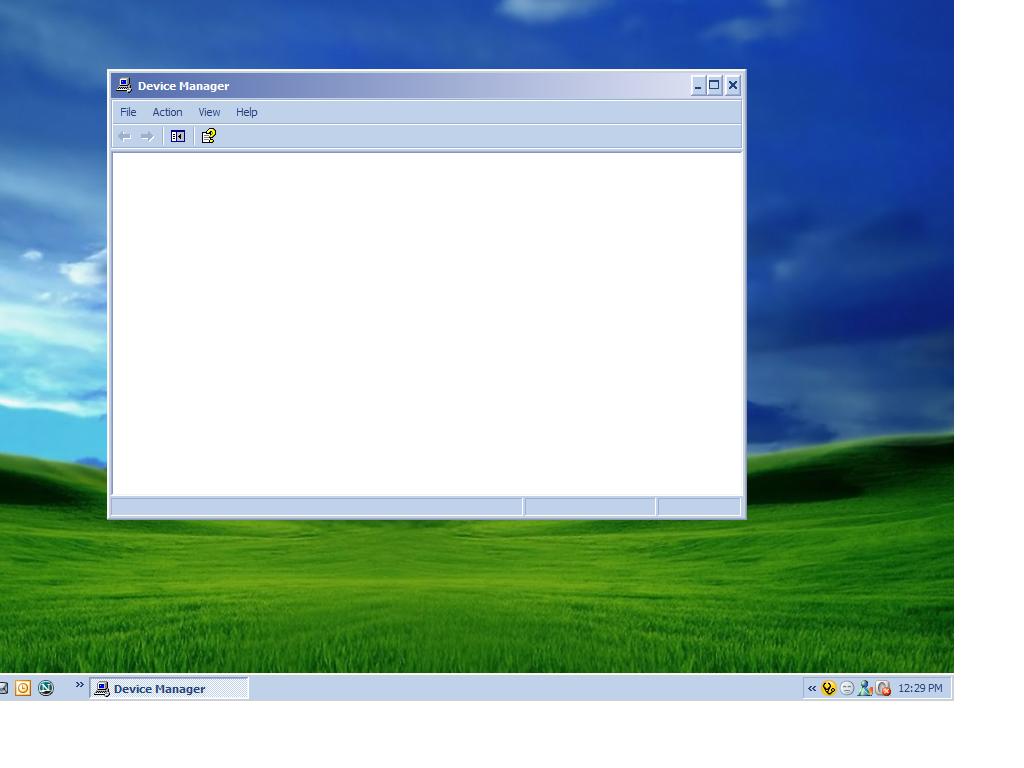
Blank Device Manager

Posted on 22:43 by Unknown

The Problem:-When you open device manager,you get nothing.It's totally blank.

Cause:-If Plug and Play service is either off or disabled then it may happen.Plug and Play Service enables a computer to recognize and adapt to hardware changes with little or no user input. Stopping or disabling this service will result in system instability.

Resolution:-
Start>Run>Services.msc>ok
Scroll down to Plug and Play service>Double Click on it>Make the StartUp type -Automatic>Click Ok/Apply.>Now reboot the system.

Further Reference:-
No Items Appear in the Device Manager List When You Open It
http://support.microsoft.com/default.aspx?scid=kb;en-us;311504

Read More
Posted in | No comments

Drop down box styled Shutdown option appears.

Posted on 17:17 by Unknown
The problem:-

When I press the red 'shutdown' button in the start
menu a new box opens up. It has a drop down box which I need to click which
now includes the options of hibernate and stand by.How do I restore the original look of my shutdown options?


Cause:-

This Win2K style shutdown option appears if the user doesn't use the Welcome Screen and Fast User Switching options.

Resolution:-

1.Open User Accounts in Control Panel.
2.Click Change the way users log on or off.
3.Use Welcome Screen and Use Fast User Switching.
4.Apply options.

Further Reference:-
http://www.microsoft.com/resources/documentation/windows/xp/all/proddocs/en-us/ua_logon_at_welcome_page_w.mspx
Read More
Posted in | No comments

Sunday, 20 November 2005

How to clear entries from "Open with" menu

Posted on 06:20 by Unknown
When you right click on a file you get an Open With menu option,which provides a list of programs for you to open the file with.This list changes along with the type of file you're clicking. This list can get long,and there may be those programs which are not applicable to open with those at all.

Resolution:-To clear those unwanted entries do the following:-
Start>Run>Regedit>Ok

Now navigate to the following location:-
HKEY_CURRENT_USER\Software\Microsoft\Windows\CurrentVersion\Explorer\FileExts. Look for the file extension whose Open With list you want to edit and find its OpenWithList subkey-HKEY_CURRENT_USER\Software\Microsoft\Windows\CurrentVersion\Explorer\FileExts\.x\OpenWithList
[.x=any .file extn;eg.bmp]
The subkey will have an alphabetical list of String values.Delete the entry which you don't want.
Read More
Posted in | No comments

How To Chkdsk an external USB drive

Posted on 05:30 by Unknown
Open Command Prompt and there you type:-

chkdsk X: and press the Enter Key.
[where X=your external USB Drive letter]
Read More
Posted in | No comments

Monday, 14 November 2005

BCUpdate2.exe

Posted on 19:42 by Unknown
This is a great tool which helps to resolve the fault that occurs when the MFT (master file table) on a NTFS partition becomes fragmented. It updates the boot code of the NTFS boot sector.

When to use:-When messages like- "Cannot locate NTLDR" or "Cannot load NTLDR into memory" or,"NTLDR missing" keeps comming up.

How to use:-
1]Download the utility.
2]Create a boot floppy disk.See:-
http://support.microsoft.com/kb/305595/#XSLTH3131121122120121120120
http://support.microsoft.com/kb/310994/EN-US/
3]Boot from the disk and then run the utility from the command line against the affected drive:-
a:\bcupdate.exe c:

Download:-

bcupdate.exe

Click here to get bcupdate2.exe


References:-
http://support.microsoft.com/?kbid=228734
http://www.protostorm.com/bcupdate2.html


Read More
Posted in | No comments

Friday, 11 November 2005

How To Confirm Whether I have USB 2.0 Installed In My Machine

Posted on 07:13 by Unknown
All the following methods will confirm whether you have USB 2.0 installed in your machine or not.
First method:-

Start>Run>type Devmgmt.Msc>ok
In the Device Manager expand the Universal Serial Bus section. There should be an "Enhanced" USB host controller present.


Second method:-

Start>Run>Regedit>ok
Now navigate to the following key:-
HKLM\SYSTEM\CurrentControlSet\Enum\USB\ROOT_HUB20
The presence of the above registry key seems to indicate USB 2.0


Third method:-

Run this direct edit:- Test for USB 2 (Line 330, right column)http://www.kellys-korner-xp.com/xp_tweaks.htm
Read More
Posted in | No comments

Sunday, 6 November 2005

Restore missing shortcuts under the System Tools

Posted on 00:50 by Unknown
If we open System Tools present under the All Programs>Accessories>System Tools we find there are several system tools like - Backup,Character Map, Disk Cleanup,Disk Defragmenter - Files and Setting Transfer Wizard Security Center, System Information, Schedule tasks,System Restore,Acivate Windows.

The problem:-The above shortcuts are missing under the system tools.

Resolution:-To recreate those missing shortcuts do the following:-

Right click on desktop>New>Shortcut.
In the blank box type the following :-

%SystemRoot%\system32\ntbackup.exe then click Next and give a name to the shortcut-Backup and click Finish.

Like wise create shortcuts for the followings:-

Character Map - %SystemRoot%\system32\charmap.exe
Disk Cleanup - %SystemRoot%\system32\cleanmgr.exe
Disk Defragmenter - %SystemRoot%\system32\dfrg.msc
Files and Setting Transfer Wizard - %SYSTEMROOT%\system32\usmt\migwiz.exe
Security Center - %SystemRoot%\system32\wscui.cpl
System Information - C:\PROGRAM FILES\Common Files\Microsoft Shared\MSInfo\msinfo32.exe
Scheduled Tasks-%SystemRoot%\explorer.exe ::{20D04FE0-3AEA-1069-A2D8-08002B30309D}\::{21EC2020-3AEA-1069-A2DD-08002B30309D}\::{D6277990-4C6A-11CF-8D87-00AA0060F5BF}
System Restore - %SystemRoot%\system32\restore\rstrui.exe
Activate Windows-%SYSTEMROOT%\system32\oobe\msoobe.exe /A

Now open Windows Explorer>Expand My Computer>Expand 'C' Drive>Documents and settings>Local User Name>Start Menu>Programs>Accessories>Click on System Tools.

Now copy and paste the above created shortcuts in the System Tools folder.

Read More
Posted in | No comments

Wednesday, 2 November 2005

How To Remove stored .NET Entries

Posted on 04:28 by Unknown
A .NET Passport uses your e-mail address to provide you with personalized access to Passport-enabled services and Web sites.
To remove the stored user names and passwords:-

Method#1

Start>Run>Control Userpasswords2 >ok
Now Click the Advanced tab of User Accounts window.
Click Manage passwords tab under Advanced option.
Highlight the .NET entry you want to remove and click Remove tab.Close and Click Ok.

Method#2

Start>Run>Control keymgr.dll>ok
Remove the .NET entry.Click Close.
Read More
Posted in | No comments
Newer Posts Older Posts Home
Subscribe to: Comments (Atom)

Popular Posts

  • 16 Bit Windows Subsystem Error
    The problem:- 16-bit MS-DOS Subsystem path to the program that you are trying to start or install C:\Windows\System32\config.nt The system ...
  • Only Wallpaper Appears
    The Problem:- My computer starts up okay with the, then the windows XP logo, then the blue "welcome" logo, but then only wallpape...
  • Internet Explorer 7 (IE7) Release Candidate 1 (RC1)
    Internet Explorer 7 (IE7) Release Candidate 1 (RC1) has been designed to make everyday tasks easier, provide dynamic security protection and...
  • Group Policy Control-Information bar XPSP2
    One can control the information bar behaviour through the group policy also. For Active X controls:- Start>Run>Type in: gpedit.msc ...
  • DRM
    What is Windows Media DRM? 'Microsoft Windows Media digital rights management (DRM) is a flexible platform that makes it possible to pro...
  • The Fastest Browser;Google Chrome
    This is something every one wants to know. Well Google Chrome(beta) is the fastest browser I have ever used.It's too light and really bl...
  • Turning Off Automatic Updates
    In Microsoft Public Windows XP General News Group,I was going through a starge request-"Accidentally XP SP2 has been downloaded and...
  • The Secuirty Folder Under the Event Viewer is empty
    The Problem:- In the event viewer I can see all the Application folder full of events and System folder full of events but there is nothing...
  • 'Go' Button missing in Internet Explorer
    The Problem:- The Go button may be missing from the Address bar in Internet Explorer. Cause:- May be the 'Go' button has been disabl...
  • How to register dll files in XP
    Regsvr32 This command-line tool registers .dll files as command components in the registry. Start > Run > Regsvr32 then a space, and ...

Blog Archive

  • ►  2008 (12)
    • ►  October (1)
    • ►  September (4)
    • ►  August (1)
    • ►  April (1)
    • ►  March (4)
    • ►  January (1)
  • ►  2007 (47)
    • ►  December (4)
    • ►  July (1)
    • ►  June (3)
    • ►  April (1)
    • ►  March (15)
    • ►  February (11)
    • ►  January (12)
  • ►  2006 (212)
    • ►  December (12)
    • ►  November (19)
    • ►  October (24)
    • ►  September (13)
    • ►  August (10)
    • ►  July (31)
    • ►  June (21)
    • ►  May (10)
    • ►  April (19)
    • ►  March (12)
    • ►  February (16)
    • ►  January (25)
  • ▼  2005 (101)
    • ►  December (15)
    • ▼  November (10)
      • Can't get into Add/Remove Programs
      • Annoying empty "Custom" folder on Desktop
      • Blank Device Manager
      • Drop down box styled Shutdown option appears.
      • How to clear entries from "Open with" menu
      • How To Chkdsk an external USB drive
      • BCUpdate2.exe
      • How To Confirm Whether I have USB 2.0 Installed In...
      • Restore missing shortcuts under the System Tools
      • How To Remove stored .NET Entries
    • ►  October (20)
    • ►  September (11)
    • ►  August (6)
    • ►  July (2)
    • ►  June (11)
    • ►  May (1)
    • ►  April (5)
    • ►  March (5)
    • ►  February (8)
    • ►  January (7)
  • ►  2004 (21)
    • ►  December (3)
    • ►  November (11)
    • ►  October (7)
Powered by Blogger.

About Me

Unknown
View my complete profile