Windows Vista Support

  • Subscribe to our RSS feed.
  • Twitter
  • StumbleUpon
  • Reddit
  • Facebook
  • Digg

Saturday, 30 December 2006

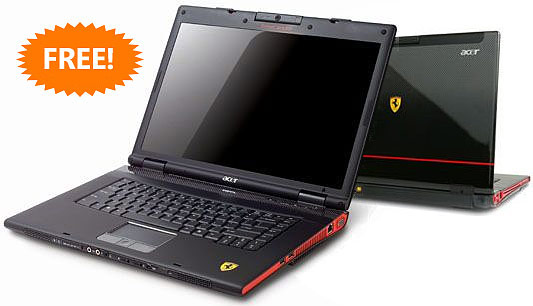
Microsoft Sent Free Ferrari Acer Laptops to bloggers

Posted on 04:52 by Unknown


Microsoft together with AMD gave out some timely Christmas presents (which are officially review PCs) to a bunch of bloggers this year. Brandon LeBlanc got one, Scott Beale got one, Mauricio Freitas got one, Mitch Denny got one, Zen.Heavengames got one, Barb Bowman got a media center, plus many other bloggers who has yet to receive it during the Christmas rush. They seem to have covered everyone from A-list to Z-list, a first in the industry with such a valuable gift, kudos for thinking about the little guys.
Some people got Ferrari 1000s, others got 5000s (Some got Media Centers even). The following specs are from the Ferrari 5000.
Full story here:-
http://www.istartedsomething.com/20061227/microsoft-free-ferrari/
Read More
Posted in | No comments

Friday, 22 December 2006

Vista Compatibility Check

Posted on 07:15 by Unknown
The following softwares have now compatibility with Windows Vista.

Visual Studio 2005 Service Pack 1 Update for Windows Vista Beta

Zune Marketplace.

A third for future compatibility: Kernel Patch Protection Criteria Evaluation Document.


http://www.microsoft-watch.com/content/vista/windows_vista_compatibility_check.html?kc=MWRSS02129TX1K0000535
Read More
Posted in | No comments

Thursday, 21 December 2006

Blank Settings under the Advanced tab in IE7

Posted on 18:14 by Unknown
The Problem:-

Open IE7>Tools>Internet Options>Advanced-under it you will find setting options are blank.

Resolution:-

Start>Run>cmd>OK

In the Command Prompt window type in the following command and hit the Enter key.

regsvr32 /n /i /s inetcpl.cpl
Read More
Posted in | No comments

Thursday, 14 December 2006

Chat With Santa on Windows Live Messenger

Posted on 04:46 by Unknown
'This year families can avoid the lines to see Santa at the mall and spend time at home together chatting with Santa Claus through Windows Live Messenger.'

http://santaonspaces.spaces.live.com/
Read More
Posted in | No comments

Life Cycle of various versions of Windows Vista

Posted on 01:46 by Unknown
According to Microsoft various versions of Windows Vista will retire as follows:-


Windows Vista Business
Windows Vista Business 64-bit edition
Windows Vista Business N
Windows Vista Business N 64-bit Edition
Windows Vista Ultimate
Windows Vista Ultimate 64-bit edition

The Mainstream Support of the above products will expire on 10th April,2012 and the Extended Support will be retired on 11th April,2017.


The Mainstream Support of the following products will expire on 10th April,2012 and the Extended Support will not be applicable.


Windows Vista Home Premium
Windows Vista Home Premium 64-bit edition
Windows Vista Home Basic N
Windows Vista Home Basic N 64-bit Edition
Windows Vista Home Premium
Windows Vista Home Premium 64-bit edition
Read More
Posted in | No comments

Monday, 11 December 2006

An error occurs while installing the Windows Installer Cleanup Utility

Posted on 18:26 by Unknown
When you attempt to install the Windows Installer Cleanup Utility you may face problems.Here is a cool resolution:-
http://www.winhelponline.com/articles/81/1/
Read More
Posted in | No comments

Saturday, 9 December 2006

First Windows Mobile 5.0 Pocket PC

Posted on 04:40 by Unknown
I saw this news in the techtree that Reliance Communications and UTStarcom have announced the launch of India's first CDMA Windows Mobile 5.0 Pocket PC.

Check it here:-

First Windows Mobile 5.0 Pocket PC
Read More
Posted in | No comments

Chitti aayi hai : Outlook 2007

Posted on 04:34 by Unknown
Enjoy!

http://chitthi.webchutney.net/
Read More
Posted in | No comments

Thursday, 7 December 2006

Microsoft’s hack for running IE6 & 7 on the same machine.

Posted on 16:45 by Unknown
This is a great tip :-
Microsoft’s hack for running IE6 & 7 on the same machine.
Read More
Posted in | No comments

Sysinternals Tools Updated

Posted on 05:41 by Unknown
The following Sysinternals utilities and files have been updated:

PsTools v.2.42 All PsTools now support the switch '-accepteula' on the command-line in order to avoid breaking non-interactive scenarios (e.g. scripts and other automation)

PsExec v1.73 Supports the ability to run processes in the Local System account on the interactive desktop with the -s and -I switches.

PsGetSid v1.43 Fixes a bug where it wouldn’t correctly process multiple computers PsService v2.21 Adds support for reporting Windows Vista delayed autostart and pre-shutdown notification services

SysinternalsSuite Removed the BlueScreen Screen Saver from the Sysinternals Suite since some anti-virus packages were blocking access to the suite due to the screen saver's new malware status. The BlueScreen Screen Saver is still available as a download from its dedicated page here.

More here.

http://www.thincomputing.net/
Read More
Posted in | No comments

Tuesday, 5 December 2006

Microsoft Hardware Vista Support

Posted on 09:20 by Unknown
Mouse (IntelliPoint) and keyboard (IntelliType) Hardware beta device software for Windows Vista is now available.
Webcam (LifeCam) software to work with Windows Vista will be available in January.
Fingerprint Reader software posted here is final, not beta, software.

Final software for keyboards and mice will be available by end of December 2006.

The following links provide up-to-date installation notes, known issues, and beta software to download and install:

» Keyboard software: IntelliType Pro

» Mouse software: IntelliPoint

» Fingerprint Reader software

http://www.microsoft.com/hardware/vista/vistasupport.mspx
Read More
Posted in | No comments

Monday, 4 December 2006

Vista's image-based install is great for hackers

Posted on 06:18 by Unknown
USERS HOPING for pirated copies of Vole's latest operating system Vista might find themselves downloading some heavy duty malware.

More here:-
http://www.theinquirer.net/default.aspx?article=36134
Read More
Posted in | No comments

Thursday, 30 November 2006

Microsoft's Big Day is Here!

Posted on 07:16 by Unknown
In a historic product launch, Microsoft India today announced business availability of the much awaited Windows Vista operating system, the 2007 Microsoft Office system, and Exchange Server 2007. Beginning today, Windows Vista and 2007 Microsoft Office will be available to volume licensing customers. While the 'New Windows' and 2007 Microsoft Office will be released to consumers and organizations that are sans volume license agreements on Jan 30, 2007; Exchange Server 2007 is on track for release to organizations with volume license agreements by December second week.
http://www.techtree.com/India/News/Microsofts_Big_Day_is_Here/551-77544-580.html
Read More
Posted in | No comments

Indian Skype Users Get Wi-Fi Phone

Posted on 07:11 by Unknown

Netgear has launched a new Wi- Fi phone for VoIP software, Skype. The phone, SPH101, will be available to Indian Skype users for Rs 16,900 (MRP) at the 48 Rashi branches across India.

The phone has an intuitive on-screen menu which shows saved Skype contacts and their online availability. Other features include the ability to use the phone in any, Wi-Fi enabled office, public hotspot, or municipal wireless access point that does not require browser-based authentication. The phone will enable users to call mobile or landline networks users across the globe, without having to use a PC. The calls will be absolutely free if made to other Skype accounts, but users will be charged per minute if they make calls to mobile or landline networks, with SkypeOut .Software updates are received wirelessly, without the use of a USB cable and wireless security is ensured Wireless security through WEP and WPA-PSK. However, the Wi-Fi phone will not function during a power failure or broadband Internet outage.Read more here.
http://www.tech2.com/india/news/internet/indian-skype-users-get-wifi-phone/3067/0
Read More
Posted in | No comments

Wednesday, 29 November 2006

VISTA vs. XP – a brief yet more detailed look

Posted on 23:49 by Unknown
Want to know the differences between Vista and it's biggest competitor, Windows XP? An online article in the US has some basic information, but we thought it needed a bit more detail. So here's a much better rundown on the differences to expect!

Check it here:-
http://www.itwire.com.au/content/view/7586/52/1/0/
Read More
Posted in | No comments

Windows Vista Product Guide

Posted on 17:37 by Unknown
Overview
A comprehensive feature-by-feature guide to Windows Vista. With contributions from people who actually worked on the product, this is the definitive resource to learn about Windows Vista. The Windows Vista Product Guide is available in the new Microsoft Word 2007 or the new XPS format.

http://www.microsoft.com/downloads/details.aspx?FamilyID=bbc16ebf-4823-4a12-afe1-5b40b2ad3725&DisplayLang=en
Read More
Posted in | No comments

How to add Run Command in Vista

Posted on 05:04 by Unknown
There is no presence of "Run" Command as such in the Start menu of Windows Vista.If we want to launch the Run command we press the Win logo+R keys together.But we can permanently put the Run command in the Start menu.To do so:-

1]Right Click on the taskbar.
2]Select Properties.
3]Click Start menu tab present in Taskbar Start Menu Properties.
4]Now click the Customize tab.
5]Scroll down to Run command and put a check mark in the box present adjacent to it.
6]Click OK.
7]Again Click OK/Apply.
Read More
Posted in | No comments

Saturday, 25 November 2006

Windows Vista Countdown Gadget

Posted on 05:57 by Unknown

http://microsoft.blognewschannel.com/archives/2006/11/21/windows-vista-countdown-gadget/
More gadgets here:-
http://www.windowsxlive.net/?p=289
Read More
Posted in | No comments

Monday, 20 November 2006

Nero 7.5.7.0 And Windows Vista

Posted on 19:14 by Unknown
Nero 7.5.7.0 works perfectly in Windows Vista.

Download link:-
http://www.nero.com/nero7/eng/nero7-up.php
Read More
Posted in | No comments

Wednesday, 15 November 2006

Windows Vista Security Guide

Posted on 20:52 by Unknown
The Windows Vista Security Guide provides guidance and tools to further protect Windows Vista against real-live threats such as malware and information theft. This solution accelerator recommends the Enterprise Client (EC) configuration for organizations of all types. Only in extreme security situations does the guide recommend the Specialized Security – Limited Functionality (SSLF) configuration, which considerably limits client computer functionality. The Solution Accelerator includes recommendations about how to use new and enhanced security technologies in Windows Vista to better defend the client computers in your organization against malware. The guide also provides recommendations and best practices on how to use encryption and access control technologies in Windows Vista to protect corporate data. Application compatibility testing recommendations are included. This Solution Accelerator includes several files, such as the Windows Vista Security Guide.doc, the detailed Appendix A of the Windows Vista Security Guide.doc, the Windows Vista Security Guide Settings.xls, and the GPOAccelerator tool to help you easily implement the guidance.

http://www.microsoft.com/downloads/details.aspx?familyid=a3d1bbed-7f35-4e72-bfb5-b84a526c1565&displaylang=en
Read More
Posted in | No comments

A new version of the Windows Update offline scan file is available

Posted on 20:41 by Unknown
A new version of the Microsoft Windows Update (WU) offline scan file has been released. This new offline scan file is available in addition to the existing WU offline scan file, Wsusscan.cab. The new offline scan file, Wsusscn2.cab, has a new format.You must update any scanning solution that uses the existing offline scan file by March 2007 so that it uses the new CAB file. Microsoft solutions that use the existing offline scan file include Microsoft Systems Management Server Inventory Tool for Microsoft Updates (SMS ITMU), the Microsoft Baseline Security Analyzer (MBSA), and the Windows Update Agent (WUA).

http://support.microsoft.com/kb/926464
Read More
Posted in | No comments

Thursday, 9 November 2006

Photosynth is on Live

Posted on 17:33 by Unknown


http://labs.live.com/photosynth/


Read More
Posted in | No comments

Nvidia GeForce 8800 GTX graphics card for Windows Vista

Posted on 17:20 by Unknown


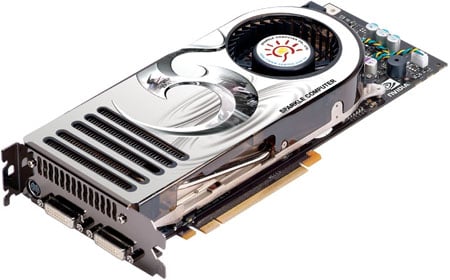
Are you ready for DirectX 10 gaming under Windows Vista? Nvidia finally unveiled its new DX10-capable graphics chip, the GeForce 8800 - aka 'G80'.Here is a great review on this latest GPU:-

http://www.reghardware.co.uk/2006/11/08/review_nvidia_geforce_8800_gtx/

Read More
Posted in | No comments

Wednesday, 8 November 2006

Windows Vista releases to manufacturing

Posted on 16:44 by Unknown
After 5 years of development, Vista is finally finished.

Windows Vista releases to manufacturing

http://windowsvistablog.com/
Read More
Posted in | No comments

Tuesday, 7 November 2006

Can't change Wallpaper

Posted on 17:33 by Unknown
The Problem:-This is a situation when one can't change the wallpaper.

Resolution:-

Start>Run>Regedit>OK
Now navigate to the following :-
HKEY_CURRENT_USER\Software\Microsoft\Windows\CurrentVersion\Policies\Active­­Desktop DWord Value: NoChangingWallPaper

Settings: 1 = Can't change Wallpaper
0= Can change Wallpaper
Read More
Posted in | No comments

Screensaver Issues

Posted on 17:25 by Unknown
Many users face various problems with the Screensavers in Windows XP.Here are some references which will be handy:-

Screen Saver May Not Start in Windows XP
http://support.microsoft.com/default.aspx?scid=kb;en-us;326719

The screen saver does not work when you use a Wireless Optical Desktop mouse on a Windows XP SP2-based computer
http://support.microsoft.com/?scid=kb;en-us;911895

Troubleshooting Screen Saver Issues in XP
http://www.kellys-korner-xp.com/xp_s.htm#ss
Read More
Posted in | No comments

Sunday, 5 November 2006

MSConfig Cleanup

Posted on 06:35 by Unknown
MSConfig is a powerful tool that allows you to enable/disable the programs that start when Windows boots up.
MSConfig would be a perfect startup manager, if it allowed you not only to disable items, but to delete them forever. Unfortunately it does not do that. This is where MSConfig Cleanup comes in! It scans the startup configurations and allows you to remove any item that has been previously disabled via MSConfig.

Try it. It's Free!
Download MSConfig Cleanup 1.2

http://www.get-in-control.com/msconfig-cleanup/
Read More
Posted in | No comments

Intel's quad-core Core 2 Extreme QX6700 processor

Posted on 06:27 by Unknown
Intel's quad-core offerings will not likely live up to the performance gains seen in the Core 2 Duo rollout.The review on quadcore has a mixed report and not a good one as far as gamers are concerned.However, video editors and graphics designers should appreciate the "25 percent" increase in Photoshop CS2 processing, "78 percent" boost in Pinnacle rendering speed, and the "60 percent" jump in 3D Studio Max.
http://www.engadget.com/2006/11/02/intels-quad-core-core-2-extreme-qx6700-processor-reviewed/
Read More
Posted in | No comments

How to create a Clipboard shortcut

Posted on 03:34 by Unknown
1]Right click on a blank area of your Desktop
2]Select New>Shortcut
3] In the shortcut blank window type in CLIPBRD.EXE and click Next.
4] In the next window, type in: Clipboard , and click "Finish"
5] A Clipboard shortcut icon will appear on your Desktop.
Read More
Posted in | No comments

Saturday, 4 November 2006

Fastest Monitor

Posted on 04:51 by Unknown
BenQ has come out with world's fastest wide screen monitors.The available models are:-92W, 222W, and 241W.The BenQ FP92W comes with a 5 milliseconds response time.Its high contrast ratio (700:1) and high brightness (300 cd/m2) together offer distortion free images, and make for a brilliant visual experience, making it, as BenQ says, the best option for both business and home entertainment. And prices start from just Rs.13,999. onwards.
Read More
Posted in | No comments

Friday, 3 November 2006

Indimix06

Posted on 03:42 by Unknown

Watch Steve Ballmer in action in India.He will be live on Nov 9th 2006; in Mumbai.
http://www.msnspecials.in/indimix/index.asp
Read More
Posted in | No comments

Tuesday, 31 October 2006

Product Boxshots: Windows Vista and 2007 Office

Posted on 05:48 by Unknown
Just found these exciting pacakaging screenshots of Windows Vista and Office 2007 at Microsoft PressPass image gallery.

http://www.microsoft.com/presspass/default.mspx


Read More
Posted in | No comments

Monday, 30 October 2006

Stay away from Office if you don't have a genuine copy

Posted on 06:41 by Unknown
If you want to enjoy the extra features of Office then your Office copy must be a genuine one otherwise good bye.Office Online templates would require the validation, and the ability to download updates would also require verification beginning in January.
http://www.betanews.com/article/MS_Office_Validation_Now_Mandatory/1161976219
Read More
Posted in | No comments

Sunday, 29 October 2006

Latest Vista-ready ATI Radeon graphic processors.

Posted on 05:39 by Unknown
ATI Radeon X1950 XTX, X1950 PRO, and X1650 XT will deliver the best performance, and the most stable Vista experience.

AMD Intros ATI Vista Ready Chips
Read More
Posted in | No comments

Saturday, 28 October 2006

Internet Explorer 7 Quick Reference Sheet

Posted on 04:47 by Unknown
IE 7 is the latest browser.And here is an excellent Quick Reference Sheet of it.Here you will find all the General shortcuts,Tab shortcuts and Common tasks.
http://blogs.msdn.com/ie/attachment/715071.ashx
Read More
Posted in | No comments

Thursday, 26 October 2006

Windows Vista™ Tips & Tricks

Posted on 07:49 by Unknown
Check out these great downloadable guides that give you easy access to helpful tips & tricks for Windows Vista.
Windows Vista Tip Sheet
Windows Vista Top 10 Tips & Tricks

http://www.windowsvistatnt.com/
Read More
Posted in | No comments

Microsoft Webcast: Be One of the First to See Tips and Tricks for Windows Vista

Posted on 07:44 by Unknown
Event Overview
In this webcast, we explore the powerful new features in the Windows Vista operating system, including security enhancements, the new user interface, search, and organizational tools. We also provide useful tips on using Windows Internet Explorer 7 and illustrate practical desktop techniques that help you to be more productive right away. Join us for this informative session to see how Windows Vista represents a breakthrough in user experience.Presenter: Andy Reed, Senior Training Specialist, Total Project ManagementSince joining Microsoft as a systems engineer in 1988, Andy Reed has trained customers worldwide to understand and implement Microsoft strategies, technologies, and products. In his roles as a marketing manager, trainer, and training program manager, Andy has developed and delivered training classes for Microsoft staff and partners on varied topics. As a consultant and senior training specialist, Andy approaches Microsoft products from a customer's point of view.

Duration: 60 Minutes Start Date:
Monday, October 30, 2006 1:00 PM Pacific Time (US & Canada)


Be One of the First to See Tips & Tricks for Windows Vista
Read More
Posted in | No comments

Vista Screensavers for Windows XP

Posted on 07:39 by Unknown
If you are using Windows XP and still want to enjoy Vista Screensavers then you can download it from here:-
http://www.softpedia.com//progDownload/Vista-Screensaver-Ported-to-XP-Download-44716.html
Read More
Posted in | No comments

Sunday, 22 October 2006

Brand New Browser-Fresh tension

Posted on 22:37 by Unknown


Two things happened.First one is a great news that it's now available for Windows XP.One can easily download and intall from Microsoft's site-Internet Explorer 7: Home
Now the second one-it doesn't sound well,because-it has already failed a security test.
Read More
Posted in | No comments

Windows Vista build 5808

Posted on 00:01 by Unknown
There are confirmed reports that Windows Vista build 5808 has been released to TAP (Technology Adoption Program) customers, it has also been suggested that testers will not get this build on Connect and it's unclear if this is a pre-RTM build shipped as such. Interesting to note is that 57xx was designated the RTM branch, there is no further information on a 5744 to 58xx jump, or what it implies.Jim Allchin cleared up conflicting reports to eWeek by saying that Windows Vista would not make RTM this week, adding that there was still work to do "We won't RTM (release to manufacturing) in a week," Allchin told MJ Foley on October 18. "We are in pretty good shape. And there are still months before (the January 2007) launch."

Neowin.net
Read More
Posted in | No comments

Saturday, 21 October 2006

Windows Automated Installation Kit (WAIK) User's Guide for Windows Vista

Posted on 23:42 by Unknown
The Windows Automated Installation Kit (Windows AIK) is designed to help Original Equipment Manufacturers (OEMs), system builders, and corporate IT professionals deploy Windows onto new hardware. The Windows AIK is a new set of deployment tools supporting the latest release of Windows. This guide describes the current methods, tools, and requirements for deploying Windows.Supported Operating Systems: Longhorn (Windows Code Name) ; Windows Vista; Windows Vista Business; Windows Vista Business 64-bit edition; Windows Vista Business N; Windows Vista Enterprise; Windows Vista Enterprise 64-bit edition; Windows Vista Home Basic; Windows Vista Home Basic 64-bit edition; Windows Vista Home Basic N; Windows Vista Home Premium; Windows Vista Home Premium 64-bit edition; Windows Vista Starter; Windows Vista Starter N; Windows Vista Ultimate; Windows Vista Ultimate 64-bit edition, Windows XP.

Download: Windows Automated Installation Kit (WAIK) User's Guide for Windows Vista
Read More
Posted in | No comments

XP Service Pack 3 Delayed

Posted on 23:37 by Unknown
SP3 for Windows XP is currently planned for 1H CY2008.

http://www.microsoft.com/windows/lifecycle/servicepacks.mspx
Read More
Posted in | No comments

Tuesday, 17 October 2006

Virtual PC 2007 Beta now available!

Posted on 06:28 by Unknown
You can sign up for it here: https://connect.microsoft.com/programdetails.aspx?ProgramDetailsID=874.

Major changes include:
Support for hardware virtualization (Intel and AMD)
Support for Windows Vista as a host operating system
Support for Windows Vista as a guest operating system
Note: No support for Aero Glass though - just Aero Basic
Support for 64-bit host operating systems
Note: Virtual machines are 32-bit only
Improved performance.

http://blogs.msdn.com/virtual_pc_guy/archive/2006/10/11/virtual-pc-2007-beta-now-available.aspx
Read More
Posted in | No comments

Monday, 16 October 2006

Notepad tips and tricks

Posted on 08:48 by Unknown
Like most people, I use notepad when I need to put together a script. I never actually looked at the help file for notepad (well, why would you?!?) until I hit the F1 key by accident recently. As a result I found quite a few tricks that notepad provides that I never knew existed. They are turning out to be pretty helpful so I thought I'd share them below:

When editing a file, press the F5 key to insert the system date and time
Change or add headers & footers by selecting file page setup
Press ctrl-G and enter a line number to go to (VERY useful when debugging VBScript errors)
Select view status bar to display the line/character number as you navigate the file (another beneficial debugging aid)

Another tip I found was the ability to maintain a log file with timestamps. This is useful when troubleshooting a problem where you need to record what is happening at specific times:

open notepad
set the first line to be (without the quotes and in uppercase) ".LOG"
press enter and save/close the file
every time you open the file, notepad will automatically insert the system date/time at the end of the file and add a new line where you can begin typing

Source: blogs.technet.com
Read More
Posted in | No comments

Sunday, 15 October 2006

How to play a DVD movie in Windows XP

Posted on 00:01 by Unknown
To play DVDs using the WMP, you must have a DVD-ROM drive and a software or hardware DVD decoder installed on your computer. By default, Windows does not include a DVD decoder.
Check here for Windows XP–compatible DVD decoders:-http://www.microsoft.com/windows/windowsmedia/player/plugins.aspx

And the following utility will be handy to determine whether any decoder is installed or not;or whether that's one compatible with WMP or not:-
Windows XP Video Decoder Checkup Utility
http://www.microsoft.com/downloads/details.aspx?FamilyId=DE1491AC-0AB6-4990-943D-627E6ADE9FCB&displaylang=en
Read More
Posted in | No comments

Thursday, 12 October 2006

After an unsuccessful attempt to install Nero 7.0 in Vista RC2

Posted on 08:55 by Unknown
I tried to install Nero 7.0 in a compatible mode(xp sp2) but unfortunately it failed to install.I tried again but the result was very much the same.But after this unsucessful attempt I found the unwanted entry of Nero under the Uninstall or Change a program.I tried to remove this annoying entry through the registry:-
HKEY_LOCAL_MACHINE\ SOFTWARE\ Microsoft\ Windows\ CurrentVersion\ Uninstall and removed the unwanted Nero key under "Uninstall."
I restarted Vista but it still remained as it was.
Now I tried Windows Installer CleanUp Utility and it successfully removed the annoying entry.

http://support.microsoft.com/kb/290301

[Windows Installer CleanUp utility is now availabe for Windows Vista]
Read More
Posted in | No comments

Error 0x80072EE4

Posted on 07:49 by Unknown
The Problem:-When you visit windows update site and try to download a update the windows update site stops responding and you get the following error:-

Checking for latest version of Windows Update software. A red X appears next to the update, and you receive a 0x80072EE4 error.

Why does it happen?
It happens if SSL settings are incorrect or Winsock registry got corrupted.

Resolution:-

Start>Run>type in cmd>ok

in the command prompt window type the following command:-
netsh winsock reset now press the Enter key.


Read More
Posted in | No comments

Desi Search Engine Launched

Posted on 07:18 by Unknown
India's first local Internet search engine was launched named, guruji.com


www.guruji.com
Read More
Posted in | No comments

Monday, 9 October 2006

All Keyboards Are Not Born Equal

Posted on 00:42 by Unknown
Do you like to have a keyboard which is like playing a piano, since there in Das Keyboard there are no keys to look at when typing, your brain will quickly adapt and memorize the key positions. Within a few short weeks users increase their typing accuracy and find themselves typing up to 100% faster.
It's a USB keyboard which works with Windows,Linux and MacOSX.

Learn more about the technical specifications
http://www.daskeyboard.com/


Read More
Posted in | No comments

Office 2007 to Go 'Gold' This Month

Posted on 00:32 by Unknown

According to betanews-Microsoft is winding down the beta program for Office 2007 as it prepares for a release to manufacturing before the end of the month. On October 25, Microsoft will close its Office Preview site and stop allowing downloads of the beta.

http://www.betanews.com/article/Office_2007_to_Go_Gold_This_Month/1160155486

Read More
Posted in | No comments

Sunday, 8 October 2006

Not a good news for Vista Gamers

Posted on 04:15 by Unknown
MICROSOFT is telling its selected gaming industry chaps that gaming under Vista will be ten to fifteen per cent slower than XP. It is because you have to load the 3D desktop all the time. It is ironic, as the same company tells the developers that the same API can do certain things up to four times faster.
http://www.theinquirer.net/default.aspx?article=34915
Read More
Posted in | No comments

IE7 Is Coming This Month...Are you Ready?

Posted on 04:04 by Unknown
The final release of IE7 is fast approaching … and I mean really fast … and will be delivered to customers via Automatic Updates a few weeks after it’s available for download. We want to ensure that you are ready and the information below will help get you there.
IE 7 is "coming later this month."
Read More
Posted in | No comments

Vista Build 5744/RC2 is now ready for public download

Posted on 03:57 by Unknown
The latest build of Vista is 5744 it's also the RC2 release.It's now ready for public download.
http://download.windowsvista.com/preview/rc2/en/download.htm
Read More
Posted in | No comments

Wednesday, 4 October 2006

Windows Vista RC2 Coming This Friday

Posted on 03:40 by Unknown
According to Windows IT Pro, the final interim release of Windows Vista before release to manufacturing (RTM) will come this Friday
Read More
Posted in | No comments

Sunday, 1 October 2006

Intel GPUs that would support WDDM

Posted on 04:23 by Unknown
When a customer buys an intel based PC he/she would check that the graphic card that comes with the intel motherboard is supporting Windows Vista.

The Intel® Graphics Media Accelerator 950 on both the Intel® 945G and Mobile Intel® 945GM Express Chipsets will support the Windows Vista Display Driver model (WDDM) drivers.

Intel GPUs that would support WDDM
Read More
Posted in | No comments

Saturday, 30 September 2006

After 5728 it's now 5734

Posted on 10:20 by Unknown
So after build 5728 it's now 5734.

Microsoft is circulating another Vista build to testers.
Read More
Posted in | No comments

Just One More Release Before Windows Vista Goes Gold

Posted on 04:52 by Unknown
Microsoft will release just one more build of Windows Vista for testing before the code goes gold, said Brad Goldberg, the general manager for the Windows client business group.
That build will be made available to a limited group of between 50,000 and 100,000 testers in October, and follows the interim Vista build that Microsoft released on Sept. 22.

http://www.eweek.com/article2/0,1895,2022621,00.asp
Read More
Posted in | No comments

Flight Simulator X Trial Version

Posted on 04:35 by Unknown
The Flight Simulator X trial version includes two airports, three missions, and three different aircraft. All of the missions take place at St. Maarten in the Caribbean.Download At Source News Source: www.microsoft.com

[bink.nu]
Read More
Posted in | No comments

Wednesday, 27 September 2006

Applications which won't run in Vista 5728

Posted on 08:10 by Unknown
The following applications won't run in Vista 5728.

Nero version 7 and onward
AVG FREE Edition V. 7.1.405
Seagate Tools
Creative Audigy driver
Nvidia GeForce FX 6200 LE PCI Express
DaemonTools v3.44
DaemonTools v4.0.3
Microsoft VPC 2004 NOD32
Windows Messenger 5.1
Yahoo Messenger 8 [it runs fine but you can't close it if you don't apply the classic skin]
Read More
Posted in | No comments

Tuesday, 26 September 2006

New Vista boot animation & sound?

Posted on 19:38 by Unknown
http://www.istartedsomething.com/20060923/new-vista-boot-animation-sound/
Click image to download video (MPEG2, 528KB). Alternatively, view the low-quality Google Video version.
Read More
Posted in | No comments

Wednesday, 20 September 2006

Welcome to QnA

Posted on 19:36 by Unknown

Live QnA connects you to the best answers from the right people.

http://qna.live.com/
Read More
Posted in | No comments

XP's starting problem after removing Vista from a dual boot

Posted on 19:06 by Unknown
The Problem:-

This is a scenario where Windows Vista in the active partition and it's a dual boot between Windows Vista and Windows XP.Now if you have removed Vista either by deleting the partition or formatting you will find that XP is not starting.

Resolution:-

Just perform a repair installation of Windows XP to restore the booting problem.

Reference:-

How to perform an in-place upgrade (reinstallation) of Windows XP
http://support.microsoft.com/kb/315341

Read More
Posted in | No comments

Monday, 18 September 2006

Zune's battery life

Posted on 17:34 by Unknown
According to a Microsoft analyst, Zune will get 12 hours of battery life at 128Kbps, 3.5 hours of video playback and 4.5 hours of slideshow playback with WiFi turned off.

Regarding press release of zune:-

http://www.microsoft.com/presspass/press/2006/sep06/09-14ZuneUnveilingPR.mspx
Read More
Posted in | No comments

Microsoft's wireless Entertainment Desktop 8000

Posted on 17:20 by Unknown


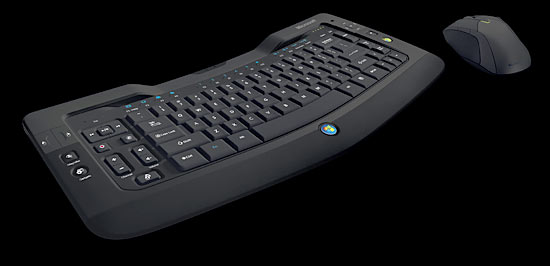
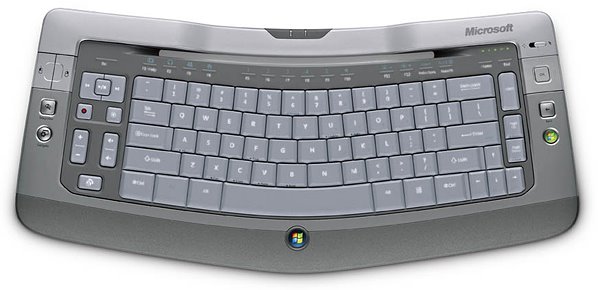
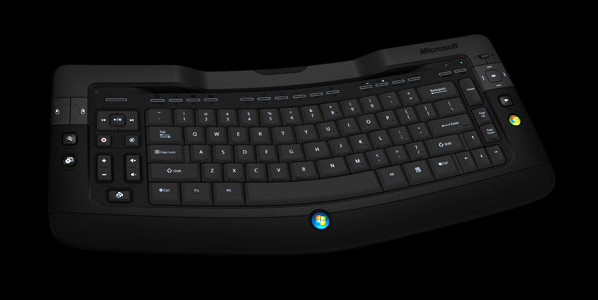
The ultimate rechargeable keyboard and mouse for Windows Vista™ and PC entertainment. Designed to make it easier than ever to control PC media from your desk, your lap–or even from the comfort of your couch.


http://www.microsoft.com/hardware/mouseandkeyboard/productdetails.aspx?pid=080
Read More
Posted in | No comments

Tuesday, 12 September 2006

Vista RC1 and latest Google Toolbar

Posted on 21:29 by Unknown
Well ;I can't live without google toolbar.I love it.After installing Vista RC1 I downloaded and installed the latest version of Google Toolbar but most unfortunately it was not working.Putting the search obeject in toolbar's window if I click 'Go' button it remained as it was.So I tweaked add on features but that didn't help.In the mean while I found that I couldn't copy -paste web contents or right click Open in New Window/or Open in New Tab.I uninstalled Google toolbar and everything was just fine.But this time I decided that I should install the eartlier version of Google Toolbar (3.0.131.0-big/en)I did.Waw!it's working like a charm.
Read More
Posted in | No comments

Per User Display Settings

Posted on 11:22 by Unknown
Though Windows XP doesn't support per user screen resolution.You can see this here:- http://support.microsoft.com/?kbid=832295

But there are some utlities which will allow users to do :-

XPKeepPerUserDisplaySettings

http://www.myitforum.com/inc/upload/1365Vidchng.zip

http://www.dougknox.com/xp/utils/xp_userdisplay.htm

http://www.snapfiles.com/get/uniquedisplay.html
Read More
Posted in | No comments

Sunday, 3 September 2006

Vista Pre RC 1 is better than Vista RC 1

Posted on 19:23 by Unknown
Yes.It may sound odd and funny but that's exactly is my personal opinion.

Pre RC1 takes less time to instal than the RC1 build.Almost a 5 minutes difference on same hardware machine.

Pre RC 1 boots faster.

Pre RC 1 build takes lesser time to access various applications than RC 1.

Pre RC 1 is more stable.

As far as nforce drivers are concerned still RC 1 is not friendly with them.

The latest released driver for RC1 by Nvidia makes the system crash prone.

Vista Media Center guide takes a considerable time to download the latest guide on same internet speed which I used for Pre RC1 guide downloading.

Apart from a few diffrences in RC1,still I shall say Pre-RC1 is better.

[this was first published in www.merawindows.com ]
Read More
Posted in | No comments

MVP Insider :September-2006

Posted on 08:44 by Unknown
I am really overwhelmed when I was featured in Microsoft's MVP Insider.It's a huge huge honour.It will surely inspire me to work more for the Microsoft communities.

MVP Insider :September
http://mvp.support.microsoft.com/mvpinsider
Read More
Posted in | No comments

Wednesday, 30 August 2006

What services are safe to Disable

Posted on 18:35 by Unknown
One can't forget Blackviper's contribution,unfortunately his site went down.I have no idea what exactly happened.
Anyway here is the list of services which you can safely disable in Windows XP Service Pack 2.

http://tinyurl.com/q3mrt
Read More
Posted in | No comments

When Workgroup is greyed out

Posted on 18:23 by Unknown
The Problem:-
If the workgroup is greyed out in the my computer/change name section, is there any other way of changing it?

Resolution:-

Start>Run>LUSRMGR.MSC>OK.
Read More
Posted in | No comments

Thursday, 24 August 2006

If You randomly get disconnected from wireless network

Posted on 19:09 by Unknown
The Problem:-
After connecting to a wireless network, it disconnects randomly.

Resolution:-

1.Start>Control Panel>Network Connections.
2.Right click on the wireless connection.
3.Select Properties.
4.Select Authentication tab.
5. Clear the Enable IEEE 802.1X authentication for this network check box.
6. Press Apply, OK, and OK.
7.Restart.

If the above method doesn't help then recreate a fresh wireless network connection and update the driver.
Read More
Posted in | No comments

Internet Explorer 7 (IE7) Release Candidate 1 (RC1)

Posted on 19:03 by Unknown
Internet Explorer 7 (IE7) Release Candidate 1 (RC1) has been designed to make everyday tasks easier, provide dynamic security protection and improve the development platform and manageability. End user improvements include a streamlined interface, tabbed browsing, printing advances, improved search functionality, instant feeds (RSS), dynamic security protection, and more.

Download:

Internet Explorer 7 Release Candidate 1 for Windows XP SP2 Release Notes

Download:

Internet Explorer 7 Release Candidate 1 for Windows Server 2003 SP1 IE7 RC 1 (Windows x64 Editions)
Read More
Posted in | No comments

Sunday, 20 August 2006

Hibernate Fix for XP SP2

Posted on 06:44 by Unknown
The Problem:-Machines with more than 1GB of RAM when trying to hibernate,the affected machines will display the message "Insufficient System Resources Exist to Complete the API"

Now here is a fix from Microsoft:-

Visit Microsoft's site (validation required).
Read More
Posted in | No comments

Monday, 14 August 2006

Desktop tab is missing under display properties

Posted on 11:06 by Unknown
The Problem:-When you right-click an empty area of your desktop and press Properties, or use Control Panel / Display, the Destop tab is missing from the Display Properties dialog.

Resolution:-
Start > Run >regedit > OK

Now locate to the following location:-
HKEY_CURRENT_USER\Software\Microsoft\Windows\CurrentVersion\Policies\System
Look in the right pane for a value called NoDispBackgroundPage. If it exists it should be set to 0 (zero).
Read More
Posted in | No comments

0X800B0109 Error during Windows Update

Posted on 10:38 by Unknown
The Problem:-

When you visit Windows Update , you may receive one of the following error messages:

Digital Signatures are missing.
Page Cannot be Displayed.
The Page Requested Cannot be Displayed
.Additionally, the %systemroot%\WindowsUpdate.log file may contain the following error message:
0x800B0109

Why does it happen?

It happens if Vx2 ZServ malware is there.

Resolution:-See the resolution as described in the following Microsoft KB Article:-
http://support.microsoft.com/default.aspx?scid=kb;en-us;916260&sd=rss&spid=3223

Vx2 ZServ malware removal tool:-
Windows Defender (Beta 2)
http://www.microsoft.com/athome/security/spyware/software/default.mspx
Read More
Posted in | No comments

Wednesday, 9 August 2006

Windows Live Messenger 8.0.0812

Posted on 10:40 by Unknown
Windows Live Messenger goes beyond the traditional instant messaging (IM) service, enabling people to connect and share, with free PC-to-PC calls and inexpensive calls from a PC to phones around the world, video calling, easy sharing with Sharing Folders, and more. Windows Live Messenger features the following improvements: - Video Call - Windows Live Call with Verizon Web Calling service - Integration with Windows Live Messenger phones - Integration with Microsoft LifeCams - Shared Folders - Offline Instant Messaging - Windows Live Contacts - Integration with other Windows Live Services.

http://www.majorgeeks.com/download4451.html
Read More
Posted in | No comments

NVIDIA Forceware 32 Bit (2K-XP) 91.45 Beta

Posted on 10:37 by Unknown
Unified Driver Architecture (UDA) Delivers rock-solid forward and backward compatibility with software drivers. Simplifies upgrading to a new NVIDIA product or driver because all NVIDIA products work with the same driver software. Includes full support for PCI Express and AGP.

http://www.majorgeeks.com/download3294.html
Read More
Posted in | No comments

Monday, 7 August 2006

Windows Genuine Advantage does not validate a copy of Windows XP

Posted on 09:12 by Unknown
SYMPTOMS

loadTOCNode(1, 'symptoms');
The Windows Genuine Advantage (WGA) validation process does not validate a copy of Microsoft Windows XP.


RESOLUTION
loadTOCNode(1, 'resolution');
To resolve this issue, follow these steps:

1.Start Microsoft Internet Explorer, and then visit the following Microsoft Web site:
http://www.microsoft.com/genuine/diag (http://www.microsoft.com/genuine/diag)

2.Click Start Diagnostics.Note If you receive a dialog box that asks whether you want to run this file or save this file, click Run.The WGA Diagnostic Tool analyzes the computer and lists the reasons why you cannot validate the copy of Windows XP. The WGA Diagnostic Tool may list some error messages.The most common problems are an invalid product key and a blocked volume license key. If the product key that is generated by the WGA Diagnostic Tool differs from the original product key, go to step 3. If this is not issue, see the "More Information" section to resolve the problem.

3.If the product key that is generated by WGA Diagnostic Tool differs from the original product key, you must change the product key back to the original product key. To change the product key, use the Windows Product Key Update Tool. To do this, visit the following Microsoft Web site:
http://www.microsoft.com/genuine/purchase/UpdateInstructions.aspx (http://www.microsoft.com/genuine/purchase/UpdateInstructions.aspx)

4.Follow the instructions on the Web site, and then try to validate Windows XP again.


MORE INFORMATION
loadTOCNode(1, 'moreinformation');
This section lists explanations and resolutions for WGA error messages.
•
Error messages

0x80080200
Unsupported Operating System for WGA


Cause

loadTOCNode(3, 'moreinformation');
WGA cannot currently determine whether the operating system is genuine or not. However, you still can access the Windows Update and Microsoft Update Web sites.
•
Error messages
0x80080201
0x80080202
Cannot detect product ID (PID)


Invalid product IDCause The system is in a state that prevents WGA from accessing the product ID (PID).

Resolution

1.Click Start, click Run, type cmd, and then press ENTER.

2.Type the following commands. Press ENTER after each command:
regsvr32 %windir%\system32\licdll.dllregsvr32 %windir%\system32\licwmi.dll

3.Check the value of the PID in the registry. To do this, follow these steps:

a. Start Registry Editor.

b. Locate and then right-click the following registry subkey:
HKEY_LOCAL_MACHINE\SOFTWARE\Microsoft\Windows NT\CurrentVersion\ProductId

c. Make sure that the product ID has a format that resembles the following:
12345-VER-1234567-12345

4.Restart the computer. If you still cannot validate Windows XP, you may have to reinstall the operating system.
•
Error messages
0x80080203
0x80080204
Internet Connection Problem
Service Unavailable


Cause

Computer settings may be preventing you from validating Windows XP.

Resolution

1.Start Internet Explorer, click Tools, and then click Internet Options.


2.Click the Security tab, and then click Customer Level.

3.Make sure that the related ActiveX control options are enabled.

4.If you have third-party firewall software installed, disable the firewall.


5.Make sure that the Date and Time settings for the computer are correct.

6.Validate Windows XP again.
•
Error messages

0x80080205
Insufficient PrivilegesCauseYou must use administrative credentials to continue with validation.

Resolution

1.Reactivate Windows XP by using administrative credentials.
2.Validate Windows XP by using administrative credentials.
•
Error messages
0x80080206
Internet settings do not allow the genuine ActiveX control to run properly, or user may not be the system administrator of the machineCause An ActiveX control is disabled
.

Resolution
1.Start Internet Explorer, click Tools, and then click Internet Options.
2.Click the Security tab, and then click Customer Level.
3.Make sure that options are enabled for the ActiveX control that triggered the error message.
4.Validate Windows XP again.
•
Error messages
0x80080207
Expired Validation CodeCause You have typed a wrong validation code on the Microsoft Download Center validation page
.

Resolution

1.Run the validation check again.
2.Enter the correct validation code.
3.Validate Windows XP again.
•
Error messages
0x80080209
Can’t Run Active XCause This problem may occur because antivirus software or firewall software is preventing ActiveX controls from running
.

Resolution
1.Configure third-party antivirus or firewall software so that ActiveX controls are enabled.
2.Validate Windows XP again.
•
Error messages
0x80080211
User has chosen to exit the validation processCause You have exited the validation process.ResolutionRestart the validation process later.
•
Error messages
0x80080219
Windows Not ActivatedCause This copy of Windows is a retail copy or an OEM copy. Activation is required to continue
.

Resolution
1.Activate Windows XP.
2.Validate Windows XP again.
•
Error messages
0x80080220
Invalid Product KeyCause This problem occurs because of a blocked volume license key. You may have installed Windows by using an invalid product key. The volume license key has been blocked by Microsoft because the key has been reported as stolen or leaked.


Resolution
1.Buy a new copy of Windows XP.
2.Reinstall and then validate the new copy of Windows XP.
•
Error messages
0x80080222
The product key associated with your copy of Windows was never issued by MicrosoftCause The product key that is installed on this system is not recorded. Therefore, this product key is probably generated by a program that produces unauthorized product keys
.

Resolution
1.Buy a new copy of Windows XP.
2.Reinstall and then validate the new copy of Windows XP.


REFERENCES
loadTOCNode(1, 'references');
For more information about Windows XP, visit the following Microsoft Web site:
http://support.microsoft.com/ph/1173?FR=1 (http://support.microsoft.com/ph/1173)For more information about WGA, visit the following Microsoft Web site:
http://www.microsoft.com/genuine/downloads/whyValidate.aspx (http://www.microsoft.com/genuine/downloads/whyValidate.aspx)For more information, click the following article number to view the article in the Microsoft Knowledge Base:
892130 (http://support.microsoft.com/kb/892130/) Description of Windows Genuine Advantage (WGA)

See KB Aricle:-
http://support.microsoft.com/default.aspx?scid=kb;en-us;916247
Read More
Posted in | No comments

Sunday, 23 July 2006

Image Toolbar is missing

Posted on 05:54 by Unknown

If you don't get the image toolbar over an image then try the following:-

1.In Internet Explorer, click Internet Options on the Tools menu.
2.On the Advanced tab, click to clear (disable) or click to select (enable) the Enable Image Toolbar (requires restart) check box.
3.Click OK.

Ref:-
How to Use the Image Toolbar and Automatic Image Resizing Feature in Internet Explorer 6
http://support.microsoft.com/?kbid=306917

Image Toolbar Does Not Appear Over Image in Internet Explorer
http://support.microsoft.com/kb/303473/
Read More
Posted in | No comments

MCEWORLD

Posted on 00:00 by Unknown

Yes,that's my latest blog on Windows Media Center.Visit:-
http://mymce.wordpress.com/
Read More
Posted in | No comments

Saturday, 22 July 2006

wmnetmgr.dll error

Posted on 11:17 by Unknown
The Problem:- Everytime I open IE it crash and the error siganture is AppName: iexplorer.exe AppVer: 6.0.2900.2180 ModName: wmnetmgr.dll ModVer: 11.0.5358.4827 Offset: 0047c82 .What can I do?

Resolution:-
Re-register wmnetmgr.dll

Start > Run > regsvr32 C:\WINDOWS\system32\wmnetmgr.dll > OK

Alternatively you can revert back to WMP10 from WMP 11..You may opt System Restore to return to WMP 10.
Read More
Posted in | No comments

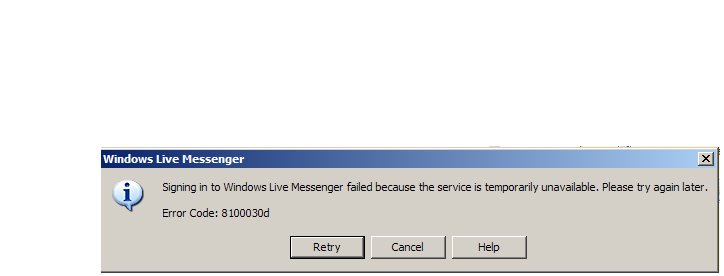
Windows Live Messenger Error Code 8100030d

Posted on 10:27 by Unknown

When you are trying to sign in Windows Live Messenger you are getting an Error Code 8100030d.


Resolution:-If you have Zone Alarm then disable Zone Alram and rery.
Read More
Posted in | No comments

Friday, 21 July 2006

Vista Build 5472 And Live Messenger

Posted on 05:17 by Unknown
I found a few references where it has been mentoned that Live Messenger doesn't work well on Vista 5472.I have installed it on Vista 5472 and it works just fine- like in Windows XP.Really no problem at all.
Read More
Posted in | No comments

Saturday, 15 July 2006

What File Types Are Supported In Windows Media Center

Posted on 22:59 by Unknown
Music files:-

Music file types (format)and their File name extensions :-

Audio CDs> .cda
Windows Media Audio file> .asx, .wm, .wma, and .wmx
Windows audio file> .wav
MP3 audio file >.mp3 and .m3u


Video files:-

Video file types (format)
and their File name extensions:-

Windows Media file >.wm and .asf
Windows Media Video file> .wmv
Windows video file> .avi
Movie file> .mpeg, .mpg, .mpe, .m1v, .mp2, and .mpv2


Picture files:-

Picture file types (format) and their File name extensions :-

Joint Photographic Experts Group >.jpg and .jpeg
Tagged Image File Format> .tif and .tiff
Graphics Interchange Format> .gif
Bitmap >.bmp
Windows MetaFile> .wmf
Portable Network Graphics >.png
Read More
Posted in | No comments

Critical Updates for Windows XP Media Center Edition

Posted on 08:00 by Unknown
This update provides stability and performance enhancements and replaces Q329979:Start download.

April 2006 Update Rollup for Windows XP Media Center Edition 2005 (KB914548)

Windows XP Media Center Edition Patch: Remote Sensor Driver & Firmware Update

Update Rollup 2 for Windows XP Media Center Edition 2005 (KB900325)

Windows XP Media Center Edition Product Activation Hotfix

Windows XP Patch: Windows XP Media Center Edition Fast User Switching Hotfix
Read More
Posted in | No comments

Client Services for Netware has disabled the welcome screen and fast user switching

Posted on 07:17 by Unknown
The Problem:-
I am unable to use the fast user switching screen and welcome screen at start up. the only thing I can use is classic logon prompt. I tried to go into the control panel and change it back but when I click on the "change the way users log on and off" it brings up a box and says that "Client Services for Netware has disabled the welcome screen and fast user switching. To restore these features you must uninstall client services for netware."

Resolution:-Open Network Connections. Right click on your network connection and select Properties. Click the General tab and locate the Netware entry and highlight it. Click Uninstall. Unless you know you need it, Client Services for Netware is generally not used outside of a corporate environment.
Read More
Posted in | No comments

Friday, 14 July 2006

Decoder Error - The video decoder has either malfunctioned or is not installed.

Posted on 10:05 by Unknown
A fresh install of Microsoft Media Center Edition 2005 may not have the necessary CODEC,as a result when you are trying to view Live TV then the Television won't display correctly and you will get the following error:-Decoder Error - The video decoder has either malfunctioned or is not installed.

Resolution:-

1]Download the Microsoft Windows XP Video Decoder Checkup Utility .This utility will help you to determine if an MPEG-2 video decoder or, a DVD decoder is installed on your system and whether or not the decoder is compatible with Windows Media Player 10 and Windows XP Media Center Edition 2005.

2] Next you download and install compatible video decoder which will allow you to view TV without any prroblem.Nvidia,Cyberlink Power DVD,Win DVD or,Sonic will help.Personally I find Nvidia Pure Video is excellent.Remember you just need the decoder not the full or entire package.

Here is a list of compatible decoders:-

NVidia PureVideo:-
http://www.nvidia.com/object/dvd_decoder.html

Sonic:-
http://www.sonic.com/products/Consumer/play.aspx

Cyberlink Corp:-

http://www.cyberlink.com/

Intervideo Corp.:-

http://www.intervideo.com/media_pack/jsp/Product_Profile.jsp?p=DVDXPack

*SourceForge :-

http://sourceforge.net/project/showfiles.php?group_id=98765&package_id=105790&release_id=208928

*[The last one is Free]
Read More
Posted in | No comments

Tweak MCE PowerToy

Posted on 10:03 by Unknown
Overview
Tweak MCE gives you access to systems settings and options not normally exposed in the Windows XP Media Center Edition user interface, including remote control settings, Skip and Replay time customizations, user interface options, and more. It also helps you to optimize Media Center Extender for plasma and non-CRT displays.

http://www.microsoft.com/downloads/details.aspx?FamilyId=3400190A-511A-4A3A-9B89-524511A76F58&displaylang=en
Read More
Posted in | No comments

Hauppague Tweak Tool

Posted on 10:01 by Unknown
If you have Hauppague Tuner card,installed on your system then here is a very cool tool for you.It will allow you to take more control as far as colour,contrast of the pictures are concerned as well as more finer audio and video settings.
Hauppauge Tweak Tool
Read More
Posted in | No comments

Keyboard Shortcuts for Windows XP Media Center Edition 2005

Posted on 09:47 by Unknown
To: Turn closed captioning on or offPress: CTRL+SHIFT+C

To: Turn up volumePress: F10

To: Go to the previous channelPress: PAGE DOWN

To: Turn down volumePress: F9

To: Mute volumePress: F8

To: Open Messenger in Media CenterPress: CTRL+N

To: Display the Help windowPress: F1

To: Display an additional menu of actions for a page or item that is selected Press: CTRL+D

To: Go in and go out of windowed modePress: ALT+ENTER

To: Move left, right, up, or downPress: ARROW KEYS

To: Go to the previous pagePress: PAGE UP

To: Go to the next pagePress: PAGE DOWN

To: Go to the last item in a listPress: END

To: Go to the first item in a listPress: HOME

To: Go back to the previous screenPress: BACKSPACE

To: Accept the selectionPress: ENTER

To: Close Media CenterPress: ALT+F4

To: Open Media Center or return to the Media Center Start menuPress: Windows Key+ALT+ENTER

To: Go to the next channelPress: PAGE UP

To: Skip forward 30 second while watching TVPress: CTRL+F

To: Skip back 7 seconds while watching TVPress: CTRL+B

To: Fast forward live TV or recorded TVPress: CTRL+SHIFT+F

To: Rewind live TV or recorded TVPress: CTRL+SHIFT+B

To: Play live TV or recorded TVPress: CTRL+SHIFT+P

To: Stop recording or stop playing a TV showPress: CTRL+SHIFT+S

To: Pause or resume live TV or recorded TVPress: CTRL+P

To: Record a TV showPress: CTRL+R

To: Go to live TVPress: CTRL+T

To: Go to the GuidePress: CTRL+G

To: Go to Recorded TVPress: CTRL+O

To: Go to My TVPress: CTRL+SHIFT+T

To: Copy a CDPress: CTRL+R

To: Fast forward a songPress: CTRL+SHIFT+F

To: Skip to the next songPress: CTRL+F

To: Replay an audio file or songPress: CTRL+B

To: Stop an audio file or songPress: CTRL+SHIFT+S

To: Pause an audio file or songPress: CTRL+P

To: Play an audio file or songPress: CTRL+SHIFT+P

To: Go to My MusicPress: CTRL+M

To: Skip forwardPress: CTRL+F

To: Skip backPress: CTRL+B

To: Resume playing radioPress: CTRL+SHIFT+P

To: Stop live radioPress: CTRL+SHIFT+S

To: Pause or resume playing live radioPress: CTRL+P

To: Go to RadioPress: CTRL+A

To: Zoom a picture in full-screen modePress: ENTER

To: Skip forward to the next picturePress: RIGHT ARROW

To: Skip back to the previous picturePress: LEFT ARROW

To: Pause a slide showPress: CTRL+P

To: Stop a slide showPress: CTRL+SHIFT+S

To: Play a slide showPress: CTRL+SHIFT+P

To: Go to My PicturesPress: CTRL+I

To: Skip forward 30 seconds in a videoPress: CTRL+F

To: Skip back 7 seconds in a videoPress: CTRL+B

To: Fast forward a videoPress: CTRL+SHIFT+F

To: Rewind a videoPress: CTRL+SHIFT+B

To: Stop playing a videoPress: CTRL+SHIFT+S

To: Pause or resume a videoPress: CTRL+P

To: Play a videoPress: CTRL+SHIFT+P

To: Go to My VideosPress: CTRL+E

To: Change the DVD subtitles selectionPress: CTRL+U

To: Change the DVD audio selectionPress: CTRL+SHIFT+A

To: Change the DVD anglePress: ARROW KEYS

To: Skip forward or go to the next chapterPress: CTRL+F

To: Skip back or go to the previous chapterPress: CTRL+B

To: Fast forwardPress: CTRL+SHIFT+F

To: RewindPress: CTRL+SHIFT+B

To: Stop a DVDPress: CTRL+SHIFT+S

To: Pause or resume playing a DVDPress: CTRL+P

To: Play a DVDPress: CTRL+SHIFT+P

To: Go to the DVD menuPress: CTRL+SHIFT+M
Read More
Posted in | No comments

Thursday, 13 July 2006

Windows AntiSpyware (Beta) and Media Center2005

Posted on 17:48 by Unknown
The Problem:-
After installing Windows AntiSpyware (Beta) in MCE 2005,Windows Media Center Extender cannot establish a remote connection.

You may receive the following error message from Windows Media Center Extender for Xbox:

The Media Center for Xbox has unexpectedly disconnected from the Media Center PC. The Extender requires a connection to the computer. The Extender might have been disconnected because of network congestion, a network disconnection, or because the PC has been turned off.


You may receive an error message that is similar to the following from third-party extenders:

An error occurred while the Media Center Extender tried to communicate with the Media Center PC. Verify your network and the PC are working and then select OK to try again.


Why Does it happen?

Windows AntiSpyware (Beta) is not compatible with Media Center 2005.

Resolution:-
Right-click the notification area icon and, then click Shutdown Microsoft AntiSpyware.
Read More
Posted in | No comments

Can Not Join A Domain In Media Center 2005

Posted on 17:31 by Unknown
You cannot join your computer to a domain in Windows XP Media Center Edition 2005.

Why?

Media Center Edition 2005 does not support your computer to join a domain. This edition of Windows is designed as an exclusive home entertainment system. By using Media Center Extender devices you can share the entertaiments with your family members to various locations of your house..Media Center Extender devices require concurrent connections, and these are available only through the Fast User Switching component. Therefore, the domain join functionality in Windows XP Media Center Edition 2005 is disabled.


But if you have ealier versions of Media Center?

Windows XP Media Center Edition 2005 does not allow for you to join a domain but a Windows XP Media Center Edition 2004 PC upgraded to Media Center Edition 2005 can join domains.
Read More
Posted in | No comments

Latest NVidia PureVideo Decoder for Media Center

Posted on 05:14 by Unknown
This is one of the most commonly used MPEG2 decoders for Media Center.The latest version is Version: 1.02-223 and it was released on 28th June, 2006,
What's new:-
Release Notes show:-
Support for High Definition (HD) inverse telecine on compatible GPUs. See http://www.nvidia.com/page/purevideo.html for a list of supported GPUs.
After installing the PureVideo Decoder and using the MCE "speaker setup" wizard to select 5.1 speakers, the audio will only be set in 2 channel stereo mode. This is a known issue with Microsoft Media Center Edition 2005 Update Rollup2. You may
download this patch to fix the problem. The patch sets the proper value for 5.1 analog and must be run after using the speaker setup wizard. Note: You must run this patch every time after you run the wizard in order for the settings to remain active.
Other compatibility fixes,
click here to view the User's Guide

http://www.nvidia.com/object/dvd_decoder_1.02-223-trial.html
Read More
Posted in | No comments

Redesigned menu system in Vista Media Center

Posted on 03:18 by Unknown


In case if Vista Media Center you will find a complete redesigned menu system.All menus are now on horiznal plane instead of vertical menus present in Windows Media Center 2005.All favourite digital entertainment—including live and recorded TV, movies, music, and pictures—in one place with the easy-to-use
Windows Media Center menu system and remote control.
Read More
Posted in | No comments

Wednesday, 12 July 2006

How to run Windows XP Media Center Edition 2005 smoothly

Posted on 22:12 by Unknown
If we follow a few basic things we can surely enhance the performance of Media Center.

Remove temporary files,temporary Internet files:-

Disk Cleanup helps free up space on your hard drive. Disk Cleanup searches your drive, and then shows you temporary files, Internet cache files, and unnecessary program files that you can safely delete. You can direct Disk Cleanup to delete some or all of those files.

Remove memory dump files:-

Search for *.dmp and delete the files.

Defragment the hard disk drive:-

Disk Defragmenter consolidates fragmented files and folders on your computer's hard disk, so that each occupies a single, contiguous space on the volume. As a result, your system can gain access to your files and folders and save new ones more efficiently

Increase the paging file size:-


1.Click Start, click Run, and then type sysdm.cpl in the Open box.

2.Click the Advanced tab, and then click Settings under Performance.


3.Click the Advanced tab, and then click Change under Virtual memory.


4.Under Drive [Volume Label], click the drive that contains the paging file that you want to change.


5.Under Paging file size for selected drive, click Custom size.

6.In the Initial size (MB) box, enter a new initial paging file size. The size should be at least 1.5 times the amount of system RAM.


7.In the Maximum size box, enter the maximum paging file size. The size should be at least two times the size of the initial paging file size.


8.Click Set, and then click OK three times.


9.Click Start, and then click Turn Off Computer.


10.Choose Restart.

Remove Malwares:-

Boot in to Safe Mode and scan your system with latest versions of malware removal tools (like-Spybot,Search and Destroy,CWShredder as well as Adaware etc.)


Read More
Posted in | No comments

"msvcr71.dll cannot be found" error in Media Center 2005

Posted on 22:04 by Unknown
The Problem:-

During repairing installation of Microsoft Windows XP Media Center Edition,you you may receive the following error message:-
msvcr71.dll cannot be found

Resolution:-


1.Close the error message box.

2.Open the Notepad, paste the following XML sample code:


3.Save the file as Copy2gac.exe.config in the following folder:
Windows Folder\Microsoft.NET\Framework\v1.0.3705.Note Windows Folder is a placeholder for the location of your Windows folder.

4.You can now successfully repair your operating system.

Further Ref:-
KB.Article#827073
Read More
Posted in | No comments

Electronic Programming Guide in India-Reality

Posted on 21:42 by Unknown

Microsoft Corporation India Pvt Ltd on May 05,2006 launched its latest offering, the Electronic Programming Guide for Windows XP Media Center PCs, to enable users to control their television entertainment experience in India.

EPG, an onscreen interactive guide to television programmes, which for the first time in India, will allow viewers to navigate, select, discover and record shows across more than 80 channels in the country.

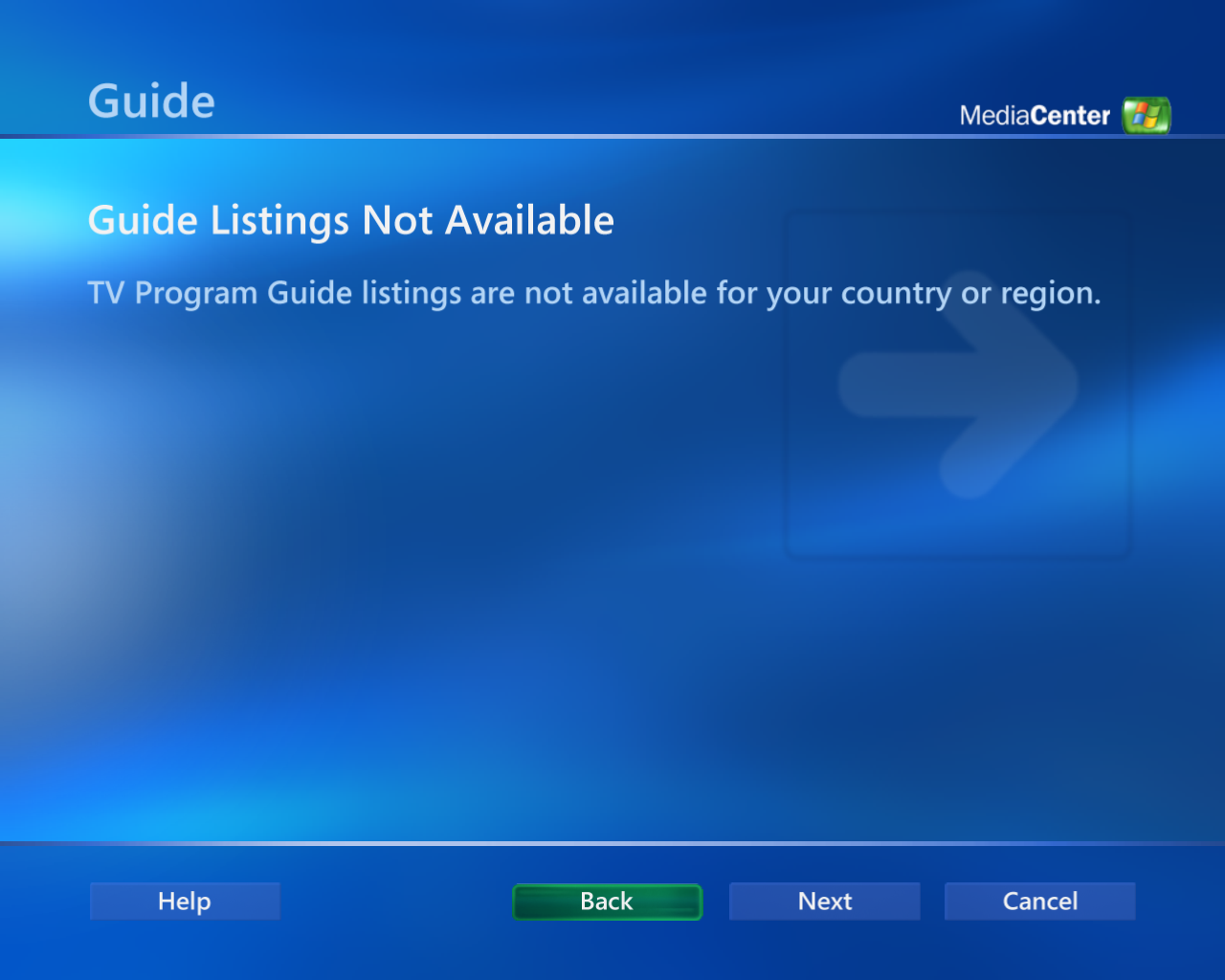
When I tried to download the guide for my Media Center,I got the message:-"Guide Listings Not Available.TV Program Guide listings are not available for your country or region. " [see the pic].I experienced the very same scenario in case of Vista Media Center.
Read More
Posted in | No comments

Software Requirements for installing MCE2005

Posted on 07:20 by Unknown
To install Windows Media Center 2005 we need the following softwares:-

1] Windows XP Media Center Edition 2005 CD1
2] Windows XP Media Center Edition 2005 CD2
3] Media Center compatible TV tuner / encoder drivers.
4] Media Center compatible display adapter drivers.
5] Media Center compatible MPEG2 decoder.
Read More
Posted in | No comments

Hardware Requirements for MCE 2005

Posted on 07:06 by Unknown
1] 2 Ghz processor or better 3+ Ghz

2] 512MB RAM

3] Primary Hard Disk Drive (Minimum 20 GB) for operating system and applications.
If you have Secondary Hard Disk Drive (Minimum 80 GB) for storage.

4] Media Center compatible TV tuner / encoder.

5] Media Center compatible display adapter.

6] Media Center Remote Control and IR Transceiver
Read More
Posted in | No comments

Microsoft Windows Media Encoder Studio Edition beta 1

Posted on 06:21 by Unknown
Windows Media Encoder Studio Edition Beta 1 is an exciting new addition to the Windows Media tools family. It is a powerful tool for video professionals, optimized for the creation of high-quality offline encoding using Microsoft’s implementation of the VC-1 video standard (WMV9). Windows Media Encoder Studio Edition Beta 1 provides the key features necessary to create next-generation video content and capitalize on the growing importance of scenarios around optical media and video-on-demand. With the final standardization of VC-1, “Studio Edition”, will prove to be an invaluable tool for the offline encoding community.

Download: Microsoft Windows Media Encoder Studio Edition beta 1

Homepage: Microsoft Windows Media Encoder Studio Edition
Read More
Posted in | No comments

Tuesday, 11 July 2006

How Can I move to Media Center Edition From Win XP Pro?

Posted on 21:50 by Unknown
The Problem:-
Just wondering... I have a PC running xp pro at the moment, is it possible ?or me to upgrade to media centre edition without reinstalling all my programs and losing all my files etc?

Resolution:-Well,you can't upgrade,you have to perform a Clean installation to get Media Center Edition.

You may be able to use the File and Settings Transfer Wizard to help move some of your files/settings...
Read More
Posted in | No comments

An Alternative To Windows Media Center PCs

Posted on 01:25 by Unknown
Linux's reply to Windows Media Center.As I go through the article I ind lots of hot features are there,but also keep the price factor in mind.

http://www.crn.com/sections/breakingnews/dailyarchives.jhtml?articleId=189500212
Read More
Posted in | No comments

Sunday, 9 July 2006

Microsoft Unveils Ultimate Keyboard and Mouse

Posted on 20:21 by Unknown


http://www.microsoft.com/hardware/ultimatekeyboard/default.mspx
Read More
Posted in | No comments

MCE remote control manual

Posted on 20:00 by Unknown

Here is a great manual on how to use the remote control in Windows XP Media Center 2005.

http://www.2partsfusion.com/manuals/MCE_Remote_Manual.pdf
Read More
Posted in | No comments

PowerToy Calc:A strange error in Velocity - Miles/Hour to Feet/Hour conversion

Posted on 01:38 by Unknown
I have downloaded and installed PowerToy calculator from Microsoft PowerToys for Windows XP.Whenever I try to convert from Velocity - Miles/Hour to Feet/Hour, there seems to be an error. Entering 1[mi/h->ft/h] results in 1760 instead of 5280 foot per hour.

*[ 1 mile per hour = 5280 foot per hour ]
Read More
Posted in | No comments

Saturday, 8 July 2006

Can not minimize,maximize or close Yahoo Messenger in Vista Beta#2

Posted on 07:37 by Unknown
The Problem:
After downloading the latest beta version or Yahoo Messenger 7.5 a strange thing occurs.You can't minimize,maximize or close Yahoo Messenger.

Resolution:-
Go to menu,click Messenger,scroll down to Change Skin...and click on it,from the drop down box of Skin select Classic and click the OK button.

Read More
Posted in | No comments

Friday, 7 July 2006

Non Glass Theme@Vista

Posted on 10:12 by Unknown


Microsoft has confirmed non glass themes for windows vista.It was first discussed in hive[http://www.hive.net],then Nick White of MSFT wrote in detail in his blog:-http://blogs.technet.com/windowsvista/archive/2006/07/06/440510.aspx

Thus if you don’t have a display driver capable of running WDDM you’ll get the Windows Vista Basic theme,which is standard for Vista Home Basic Edition.
Read More
Posted in | No comments

Thursday, 6 July 2006

Favorites-A Unique Feature In Vista Media Center

Posted on 05:30 by Unknown
In Windows XP Media Center 2005,there was no scope to add own 'Favorite' channels.But in Vista Media Center this great feature has been added.As a result most viewed channels will be under the Favorites.

How To:-
Launch Vista Media Center > Click Guide > Press [CTRL+D] keys together > Scroll down to Filter Guide and click on it > Click Favorites.

This will will narrow the guide down to your favorite channels.
Read More
Posted in | No comments

Saturday, 1 July 2006

Cabinet File

Posted on 10:08 by Unknown
What is a Cabinet File?

-A cabinet is a single file created to hold a number of compressed files.

What will you do if a .CAB file got corrupted?

- You have to extract individual files from the cabinet files to replace missing or corrupted files.

How can you extract ?

1] Press Win+R keys to launch Run menu.

2]Now type in:msconfig and click OK.

3]Click Expand Fille...

4]Name the file you want to extract in the File to restore box

5]Click Browse From tab to restore the file in the Restore from box.For example, the Windows XP .cab files are stored in the I386 folder present in XP CD.

6]Locate the folder where you want to Save file in.

7]Click Expand tab In the System Configuration Utility dialog box, click OK>Restart.

Ref:-

Description and Explanation of a Cabinet File
http://support.microsoft.com/kb/q310435/
Read More
Posted in | No comments

Friday, 30 June 2006

Error 0x8024400A

Posted on 03:46 by Unknown
The Problem:-
I am trying to use Microsoft Update to update my computer & get error message 0x8024400A.

Resolution:-

1]Disable antivirus.
2]Start>Run>Type in: regsvr32 MSXML3.DLL>OK
3]Reboot.
4]Retry Windows/Microsoft update.
Read More
Posted in | No comments

Desktop Sideways

Posted on 03:28 by Unknown
The problem:-
I don't know how I managed this one, but all the desktop is on it's side. What is supposed to be on top is on the side. As I write this, the message appears vertical. I have to physically turn my laptop so that I can read anything on it. Since I have no clue how I did this; I have no clue on how to correct it.

Resolution:-
Open Control Panel>Display>Settings tab>advanced, navigate through the tabs to find a rotate display option.This option has come due to the graphic card you have installed. The option should allow you to rotate the display back to its original orientation.

If you have Nvidia software installed,then look for NVRotate;with NVRotate, you can rotate any display 90, 180 or 270 degrees.
http://www.nvidia.com/object/feature_nvrotate.html

You may also try Ctrl + Alt + Up/Down arrow. [hot keys]
Read More
Posted in | No comments
Newer Posts Older Posts Home
Subscribe to: Comments (Atom)

Popular Posts

  • 16 Bit Windows Subsystem Error
    The problem:- 16-bit MS-DOS Subsystem path to the program that you are trying to start or install C:\Windows\System32\config.nt The system ...
  • Only Wallpaper Appears
    The Problem:- My computer starts up okay with the, then the windows XP logo, then the blue "welcome" logo, but then only wallpape...
  • Internet Explorer 7 (IE7) Release Candidate 1 (RC1)
    Internet Explorer 7 (IE7) Release Candidate 1 (RC1) has been designed to make everyday tasks easier, provide dynamic security protection and...
  • Group Policy Control-Information bar XPSP2
    One can control the information bar behaviour through the group policy also. For Active X controls:- Start>Run>Type in: gpedit.msc ...
  • DRM
    What is Windows Media DRM? 'Microsoft Windows Media digital rights management (DRM) is a flexible platform that makes it possible to pro...
  • The Fastest Browser;Google Chrome
    This is something every one wants to know. Well Google Chrome(beta) is the fastest browser I have ever used.It's too light and really bl...
  • Turning Off Automatic Updates
    In Microsoft Public Windows XP General News Group,I was going through a starge request-"Accidentally XP SP2 has been downloaded and...
  • The Secuirty Folder Under the Event Viewer is empty
    The Problem:- In the event viewer I can see all the Application folder full of events and System folder full of events but there is nothing...
  • 'Go' Button missing in Internet Explorer
    The Problem:- The Go button may be missing from the Address bar in Internet Explorer. Cause:- May be the 'Go' button has been disabl...
  • How to register dll files in XP
    Regsvr32 This command-line tool registers .dll files as command components in the registry. Start > Run > Regsvr32 then a space, and ...

Blog Archive

  • ►  2008 (12)
    • ►  October (1)
    • ►  September (4)
    • ►  August (1)
    • ►  April (1)
    • ►  March (4)
    • ►  January (1)
  • ►  2007 (47)
    • ►  December (4)
    • ►  July (1)
    • ►  June (3)
    • ►  April (1)
    • ►  March (15)
    • ►  February (11)
    • ►  January (12)
  • ▼  2006 (212)
    • ▼  December (12)
      • Microsoft Sent Free Ferrari Acer Laptops to bloggers
      • Vista Compatibility Check
      • Blank Settings under the Advanced tab in IE7
      • Chat With Santa on Windows Live Messenger
      • Life Cycle of various versions of Windows Vista
      • An error occurs while installing the Windows Insta...
      • First Windows Mobile 5.0 Pocket PC
      • Chitti aayi hai : Outlook 2007
      • Microsoft’s hack for running IE6 & 7 on the same m...
      • Sysinternals Tools Updated
      • Microsoft Hardware Vista Support
      • Vista's image-based install is great for hackers
    • ►  November (19)
      • Microsoft's Big Day is Here!
      • Indian Skype Users Get Wi-Fi Phone
      • VISTA vs. XP – a brief yet more detailed look
      • Windows Vista Product Guide
      • How to add Run Command in Vista
      • Windows Vista Countdown Gadget
      • Nero 7.5.7.0 And Windows Vista
      • Windows Vista Security Guide
      • A new version of the Windows Update offline scan f...
      • Photosynth is on Live
      • Nvidia GeForce 8800 GTX graphics card for Windows ...
      • Windows Vista releases to manufacturing
      • Can't change Wallpaper
      • Screensaver Issues
      • MSConfig Cleanup
      • Intel's quad-core Core 2 Extreme QX6700 processor
      • How to create a Clipboard shortcut
      • Fastest Monitor
      • Indimix06
    • ►  October (24)
      • Product Boxshots: Windows Vista and 2007 Office
      • Stay away from Office if you don't have a genuine ...
      • Latest Vista-ready ATI Radeon graphic processors.
      • Internet Explorer 7 Quick Reference Sheet
      • Windows Vista™ Tips & Tricks
      • Microsoft Webcast: Be One of the First to See Tips...
      • Vista Screensavers for Windows XP
      • Brand New Browser-Fresh tension
      • Windows Vista build 5808
      • Windows Automated Installation Kit (WAIK) User's G...
      • XP Service Pack 3 Delayed
      • Virtual PC 2007 Beta now available!
      • Notepad tips and tricks
      • How to play a DVD movie in Windows XP
      • After an unsuccessful attempt to install Nero 7.0 ...
      • Error 0x80072EE4
      • Desi Search Engine Launched
      • All Keyboards Are Not Born Equal
      • Office 2007 to Go 'Gold' This Month
      • Not a good news for Vista Gamers
      • IE7 Is Coming This Month...Are you Ready?
      • Vista Build 5744/RC2 is now ready for public download
      • Windows Vista RC2 Coming This Friday
      • Intel GPUs that would support WDDM
    • ►  September (13)
      • After 5728 it's now 5734
      • Just One More Release Before Windows Vista Goes Gold
      • Flight Simulator X Trial Version
      • Applications which won't run in Vista 5728
      • New Vista boot animation & sound?
      • Welcome to QnA
      • XP's starting problem after removing Vista from a ...
      • Zune's battery life
      • Microsoft's wireless Entertainment Desktop 8000
      • Vista RC1 and latest Google Toolbar
      • Per User Display Settings
      • Vista Pre RC 1 is better than Vista RC 1
      • MVP Insider :September-2006
    • ►  August (10)
      • What services are safe to Disable
      • When Workgroup is greyed out
      • If You randomly get disconnected from wireless net...
      • Internet Explorer 7 (IE7) Release Candidate 1 (RC1)
      • Hibernate Fix for XP SP2
      • Desktop tab is missing under display properties
      • 0X800B0109 Error during Windows Update
      • Windows Live Messenger 8.0.0812
      • NVIDIA Forceware 32 Bit (2K-XP) 91.45 Beta
      • Windows Genuine Advantage does not validate a copy...
    • ►  July (31)
      • Image Toolbar is missing
      • MCEWORLD
      • wmnetmgr.dll error
      • Windows Live Messenger Error Code 8100030d
      • Vista Build 5472 And Live Messenger
      • What File Types Are Supported In Windows Media Center
      • Critical Updates for Windows XP Media Center Edition
      • Client Services for Netware has disabled the welco...
      • Decoder Error - The video decoder has either malfu...
      • Tweak MCE PowerToy
      • Hauppague Tweak Tool
      • Keyboard Shortcuts for Windows XP Media Center Edi...
      • Windows AntiSpyware (Beta) and Media Center2005
      • Can Not Join A Domain In Media Center 2005
      • Latest NVidia PureVideo Decoder for Media Center
      • Redesigned menu system in Vista Media Center
      • How to run Windows XP Media Center Edition 2005 sm...
      • "msvcr71.dll cannot be found" error in Media Cente...
      • Electronic Programming Guide in India-Reality
      • Software Requirements for installing MCE2005
      • Hardware Requirements for MCE 2005
      • Microsoft Windows Media Encoder Studio Edition beta 1
      • How Can I move to Media Center Edition From Win XP...
      • An Alternative To Windows Media Center PCs
      • Microsoft Unveils Ultimate Keyboard and Mouse
      • MCE remote control manual
      • PowerToy Calc:A strange error in Velocity - Miles/...
      • Can not minimize,maximize or close Yahoo Messenger...
      • Non Glass Theme@Vista
      • Favorites-A Unique Feature In Vista Media Center
      • Cabinet File
    • ►  June (21)
      • Error 0x8024400A
      • Desktop Sideways
    • ►  May (10)
    • ►  April (19)
    • ►  March (12)
    • ►  February (16)
    • ►  January (25)
  • ►  2005 (101)
    • ►  December (15)
    • ►  November (10)
    • ►  October (20)
    • ►  September (11)
    • ►  August (6)
    • ►  July (2)
    • ►  June (11)
    • ►  May (1)
    • ►  April (5)
    • ►  March (5)
    • ►  February (8)
    • ►  January (7)
  • ►  2004 (21)
    • ►  December (3)
    • ►  November (11)
    • ►  October (7)
Powered by Blogger.

About Me

Unknown
View my complete profile