Windows Vista Support

  • Subscribe to our RSS feed.
  • Twitter
  • StumbleUpon
  • Reddit
  • Facebook
  • Digg

Friday, 15 July 2005

How to disable Security Alert icon reminders popping up

Posted on 23:01 by Unknown


Overview:-Security Center alerts users to protect their computers against a variety of security risks.The Security icon pops up in the system tray and reminds us regularly about security related vulnerabilities. e.g. the anti-virus software has not been updated or the firewall is not configured properly,or the automatic update is not on or not configured properly.But if one wants to get rid of this icon and constant reminders he/she can do the following:-
Resolution:-
Start>Run>Regedit>Ok
Now navigate to the following key:-
HKEY_LOCAL_MACHINE\SOFTWARE\Microsoft\Security Center
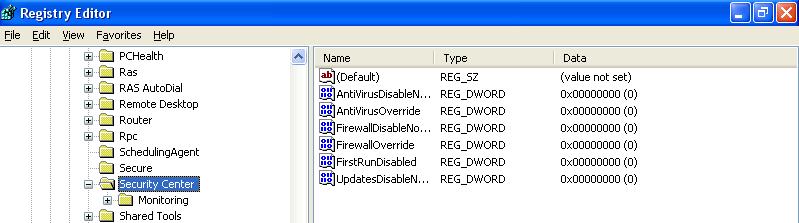
Highlight Security Center and you will find the following entries as default (the default value data is zero):- Click the following image to get an enlarge view:-
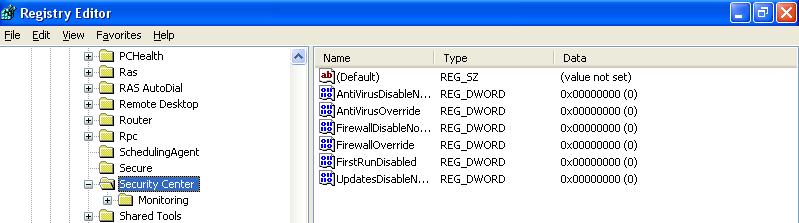
Now right click on each item and select 'Modify' Change the value Change the Value Data from zero to one.Close the registry editor and restart the computer.
Email ThisBlogThis!Share to XShare to FacebookShare to Pinterest
Posted in | No comments
Newer Post Older Post Home

0 comments:

Post a Comment

Subscribe to: Post Comments (Atom)

Popular Posts

  • 16 Bit Windows Subsystem Error
    The problem:- 16-bit MS-DOS Subsystem path to the program that you are trying to start or install C:\Windows\System32\config.nt The system ...
  • Only Wallpaper Appears
    The Problem:- My computer starts up okay with the, then the windows XP logo, then the blue "welcome" logo, but then only wallpape...
  • Internet Explorer 7 (IE7) Release Candidate 1 (RC1)
    Internet Explorer 7 (IE7) Release Candidate 1 (RC1) has been designed to make everyday tasks easier, provide dynamic security protection and...
  • Group Policy Control-Information bar XPSP2
    One can control the information bar behaviour through the group policy also. For Active X controls:- Start>Run>Type in: gpedit.msc ...
  • DRM
    What is Windows Media DRM? 'Microsoft Windows Media digital rights management (DRM) is a flexible platform that makes it possible to pro...
  • The Fastest Browser;Google Chrome
    This is something every one wants to know. Well Google Chrome(beta) is the fastest browser I have ever used.It's too light and really bl...
  • Turning Off Automatic Updates
    In Microsoft Public Windows XP General News Group,I was going through a starge request-"Accidentally XP SP2 has been downloaded and...
  • The Secuirty Folder Under the Event Viewer is empty
    The Problem:- In the event viewer I can see all the Application folder full of events and System folder full of events but there is nothing...
  • 'Go' Button missing in Internet Explorer
    The Problem:- The Go button may be missing from the Address bar in Internet Explorer. Cause:- May be the 'Go' button has been disabl...
  • How to register dll files in XP
    Regsvr32 This command-line tool registers .dll files as command components in the registry. Start > Run > Regsvr32 then a space, and ...

Blog Archive

  • ►  2008 (12)
    • ►  October (1)
    • ►  September (4)
    • ►  August (1)
    • ►  April (1)
    • ►  March (4)
    • ►  January (1)
  • ►  2007 (47)
    • ►  December (4)
    • ►  July (1)
    • ►  June (3)
    • ►  April (1)
    • ►  March (15)
    • ►  February (11)
    • ►  January (12)
  • ►  2006 (212)
    • ►  December (12)
    • ►  November (19)
    • ►  October (24)
    • ►  September (13)
    • ►  August (10)
    • ►  July (31)
    • ►  June (21)
    • ►  May (10)
    • ►  April (19)
    • ►  March (12)
    • ►  February (16)
    • ►  January (25)
  • ▼  2005 (101)
    • ►  December (15)
    • ►  November (10)
    • ►  October (20)
    • ►  September (11)
    • ►  August (6)
    • ▼  July (2)
      • How to disable Security Alert icon reminders popp...
      • Security Icon sometimes missing in taskbar
    • ►  June (11)
    • ►  May (1)
    • ►  April (5)
    • ►  March (5)
    • ►  February (8)
    • ►  January (7)
  • ►  2004 (21)
    • ►  December (3)
    • ►  November (11)
    • ►  October (7)
Powered by Blogger.

About Me

Unknown
View my complete profile